


Key takeaways
• WebRTC security has two halves: the media is encrypted by default, your app is not. DTLS-SRTP protects audio and video in transit, but signaling, IP addresses, access control and recording are yours to secure.
• A group call runs through an SFU that decrypts every frame. If a third party runs that server, or the data is regulated, you need end-to-end encryption with SFrame (RFC 9605, 2024) on top.
• Five fixes close most audit findings. WSS signaling, one-hour TURN credentials, timestamp-and-nonce on messages, ACLs on every media track, and disabled mDNS host candidates.
• HIPAA and GDPR are governance, not crypto. Browser encryption alone never passes an audit: you also need BAAs, audit logs, EU data residency and deletion on request.
• The 2026 facts moved. DTLS 1.3 is on by default, Encoded Transform E2EE now works in Safari too, and SDES is gone. We ship these across telemedicine, EdTech and fintech builds and test every permutation in a lab before go-live.
New here? Start with the plain-language primer — What is WebRTC and how does it work? — then come back for the security layer.
Why Fora Soft wrote this guide
We have built video and real-time communication products since 2005 — 250+ projects, an in-house team of 50 engineers, and a run of security reviews in telemedicine, EdTech and financial services. In those reviews the same gaps repeat. Teams assume the browser “does encryption,” then ship with plaintext signaling, static TURN passwords, and no access control on individual media tracks. The private IP that mDNS was supposed to hide leaks anyway because the signaling channel is unauthenticated. And the HIPAA paperwork is missing the one signature that matters: a Business Associate Agreement with whoever runs the media server.
This guide is the checklist we run before a penetration test. It answers the questions we field every week. Is WebRTC encrypted by default? (Media, yes; signaling, no; the SFU operator, yes — they see plaintext unless you add SFrame.) Can a pen test pass if the media server can see the video? (Under HIPAA, only if a BAA and DPIA name that server as a Business Associate, you log every access, and the client holds encryption keys the server never sees.) We wrote it from real reviews on healthcare platforms like CirrusMED and on-premise systems like Nucleus, where SOC 2 and HIPAA controls ship as part of the product, not as an afterthought.
Need a security review before you ship?
We audit WebRTC deployments end to end: signaling auth, E2EE posture, TURN hardening, and HIPAA, GDPR and SOC 2 gaps — then hand you a prioritized fix list.
Is WebRTC secure by default?
Yes for the media, no for everything around it. WebRTC mandates DTLS-SRTP, so audio and video are always encrypted in transit — there is no unencrypted mode, and the security architecture is specified in RFC 8827 and RFC 8826. But “the media is encrypted” is not the same as “the app is secure.” A group call decrypts at the media server, signaling has to be secured by you, private IPs can leak, and compliance is a governance layer WebRTC knows nothing about.
We find it clearer to think in three layers. The browser layer is on by default: DTLS-SRTP, ICE with mDNS candidates, and the Same-Origin Policy on the signaling endpoint. The signaling-server layer is what you build: TLS transport, token validation, ephemeral TURN credentials, room access control and rate limits. The application layer is what you add on top: end-to-end encryption when the media server is untrusted, consent capture before media starts, and audit logs. Miss any one layer and a real attack opens up.
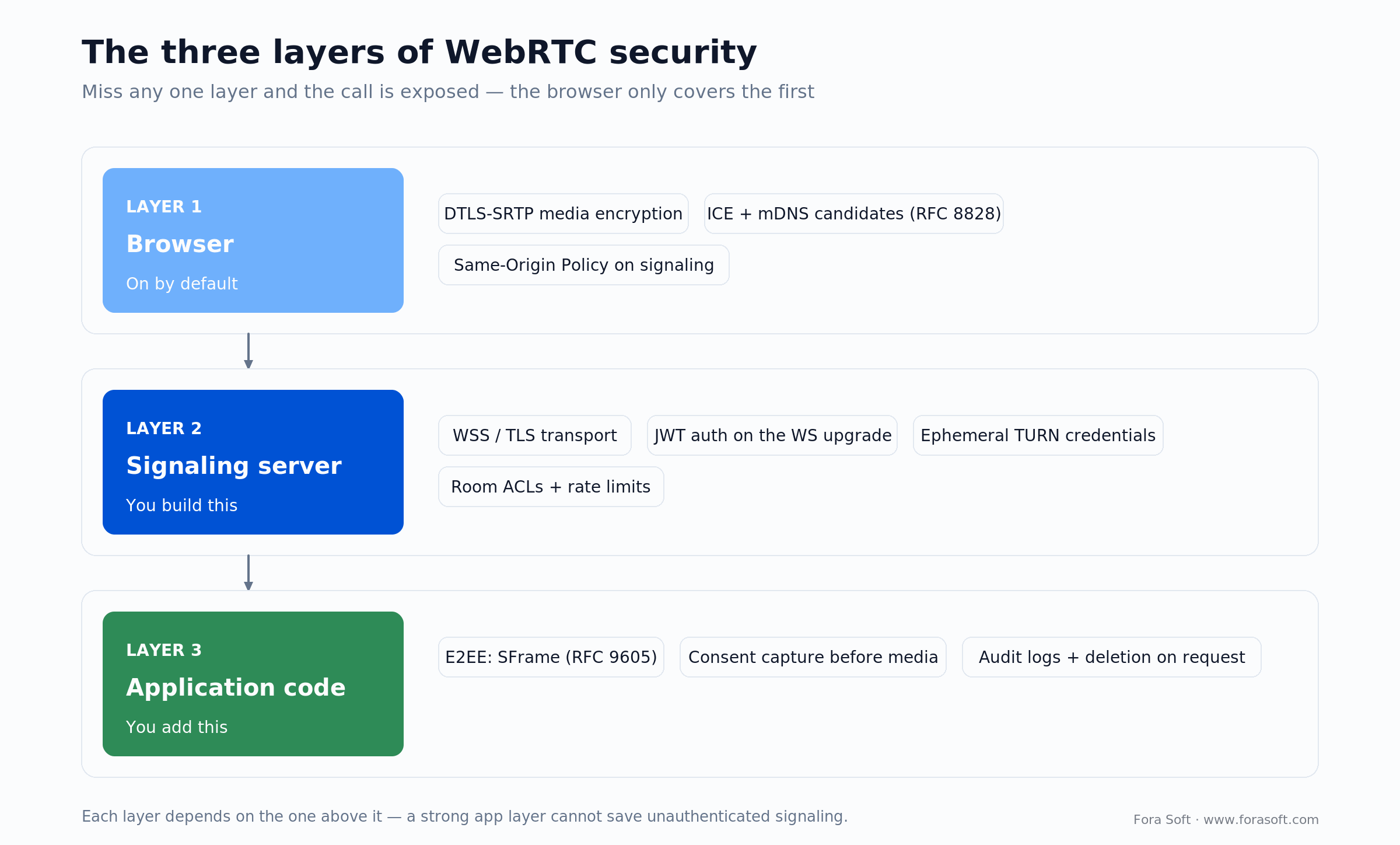
Figure 1. The three layers of WebRTC security. The browser only covers the first; the other two are yours to build.
What WebRTC encrypts by default
WebRTC encryption starts with DTLS-SRTP. Every peer connection runs a Datagram TLS handshake to agree on a key, then SRTP encrypts every audio and video frame in flight (the DTLS-SRTP key exchange is RFC 5764, with SRTP itself defined in RFC 3711). In a direct one-to-one call, Alice’s encrypted video frames cannot be read by anyone on the network path — not the ISP, not a café router. You do not configure it; it is on.
Here is the catch: DTLS-SRTP does not hide media from a Selective Forwarding Unit. An SFU is the media server that sits in the middle of a group call. Alice sends her encrypted video to the SFU; the SFU has the DTLS keys because it did its own handshake with Alice, so it decrypts each frame, reads it, and re-encrypts it onward to Bob and Charlie. From every client’s point of view the media is encrypted in transit. The SFU operator still sees the raw pixels in process memory. If you want the architecture background, our P2P vs MCU vs SFU guide walks through the trade-offs.
What WebRTC does not encrypt. Signaling messages — the “please call Bob,” offer and answer that ride a WebSocket — are not encrypted by WebRTC. You put signaling behind TLS (HTTPS and WSS) yourself. The ICE candidate list of IP addresses and ports travels inside the SDP, inside that signaling message, so an unencrypted channel hands an attacker your addresses. Metadata — call times, the participant roster, chat — is plaintext unless you encrypt it at the application layer.
Reach for DTLS-SRTP alone when: the call is one-to-one peer-to-peer with no media server, or the SFU is yours and the data is not regulated. It is table stakes, not a substitute for end-to-end encryption.
End-to-end encryption: when DTLS-SRTP is not enough
SFrame is the standard for E2EE in WebRTC. The IETF published Secure Frame as RFC 9605 in August 2024. SFrame wraps each media frame in its own authenticated encryption using a key the media server never holds. Alice encrypts her frames; the SFU receives them, reads only the routing headers it needs, and forwards the ciphertext unchanged; Bob and Charlie decrypt with the shared key. The server moves the bytes without ever seeing the picture.
How you apply it. You intercept each frame before SRTP with the WebRTC Encoded Transform API and run your own AES-GCM encryption on it. The performance cost is small because AES-GCM is hardware-accelerated; the real work is key distribution and verification. LiveKit’s open-source client is a good reference implementation, and it names the honest limits: under E2EE the SFU can no longer drop simulcast layers or transcode, because it cannot read the payload. Managed platforms bundle their own module — see our WebRTC vs Agora comparison for how that changes the trust model.
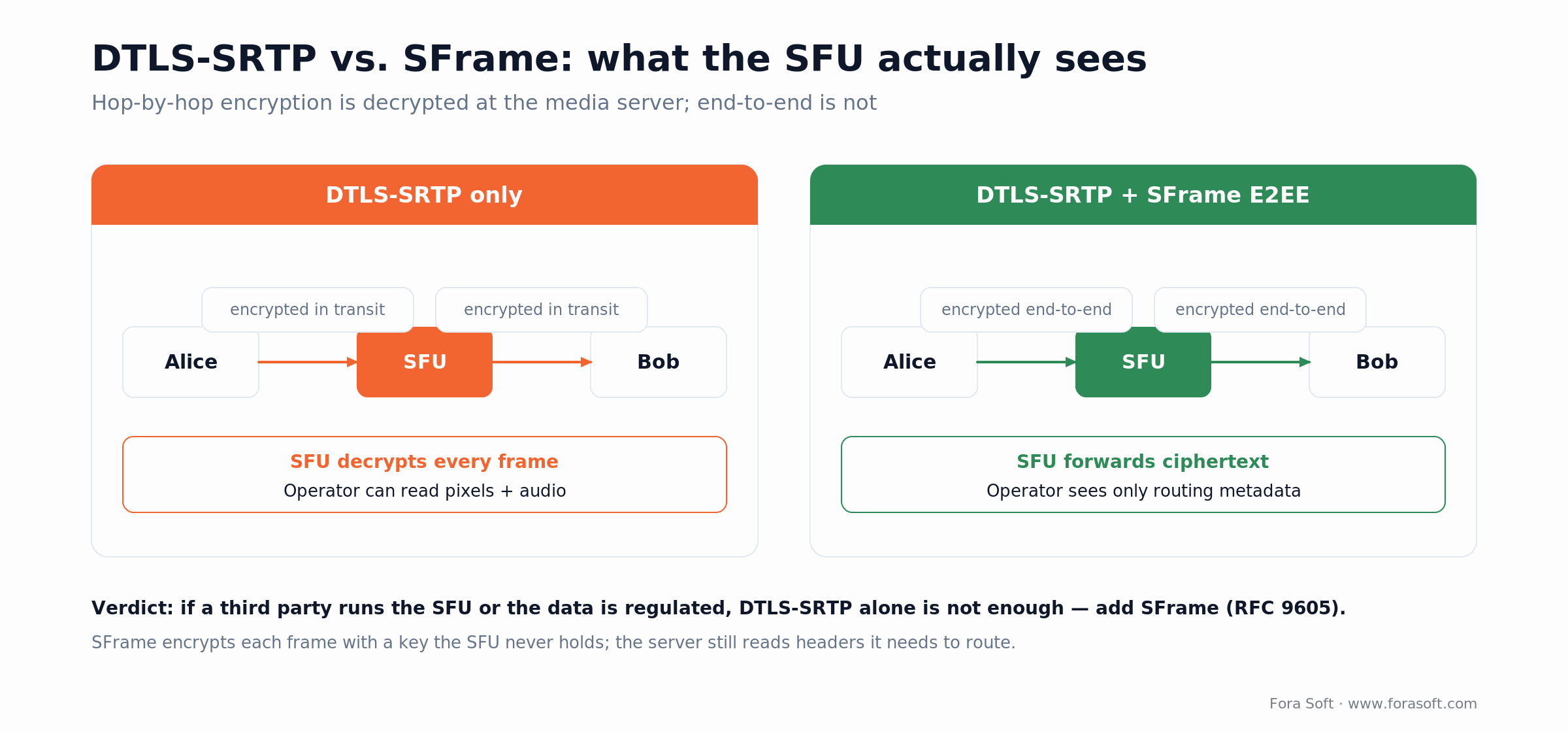
Figure 2. Hop-by-hop DTLS-SRTP is decrypted at the media server; SFrame keeps the payload encrypted end to end.
Reach for SFrame E2EE when: a third party runs your SFU (AWS, Agora, Twilio, Daily), the call content is regulated, or your BAA does not grant the media server permission to see patient video.
What changed in WebRTC security in 2024–2026
Most WebRTC security articles still repeat facts that stopped being true. Four things moved, and getting them right is the difference between a current threat model and a stale one.
1. SFrame became a real RFC. It shipped as RFC 9605 in August 2024. If a guide still calls it “an IETF draft” or cites the wrong number, its E2EE advice predates the standard.
2. DTLS 1.3 is now the default. Chrome, Firefox and Safari all default to DTLS 1.3 (RFC 9147) as of February 2025. It removes a round trip from the handshake, roughly 50 ms on high-latency links, and drops aging cipher suites. DTLS 1.2 still works for backward compatibility, so plan a minimum-version policy rather than a hard cutover.
3. E2EE now works in Safari. The standardized Encoded Transform API (RTCRtpScriptTransform) reached cross-browser Baseline status in 2025 — Safari, which shipped it first back in 2022, plus Firefox and Chrome. The older Chrome-only createEncodedStreams is legacy. Any article claiming “Safari has no insertable-streams E2EE” is out of date.
4. SDES is gone. The old habit of exchanging SRTP keys in the SDP was removed from Chrome in Chrome 97 (January 2022); the spec says implementations must not offer it, because it exposes keys to JavaScript and signaling. If your stack still negotiates SDES, that is a finding on its own.
The IP-leak problem and how to fix it
mDNS host candidates hide your private IP, until signaling leaks. To gather connection paths, a browser lists its local IP, its public IP, and a multicast-DNS name like a1b2c3d4.local that stands in for the private address. That mDNS scheme (RFC 8828) is on by default in Chrome, Edge and Firefox on desktop, and it stops a web page from harvesting your LAN IP. But the name still travels in the SDP inside the signaling message. If signaling runs over plain HTTP or WS, an eavesdropper reads it and resolves the address anyway. Mobile builds are weaker still: a 2025 measurement study found Android clients that leak LAN and carrier-NAT addresses regardless.
Two fixes. First, always run signaling over WSS. Second, for regulated data, force all media through your TURN servers by setting iceTransportPolicy: 'relay'. You give up peer-to-peer and pay a little latency, and you gain a single, controlled egress IP. In a telemedicine call, trading 10–15 ms for patient privacy is an easy call.
Budget for TURN-only. Relay costs bandwidth. A one-to-one call is roughly 500 Kbps; a ten-person 2 Mbps call is about 20 Mbps of egress; a large room with recording can push 1 Gbps. Self-hosted TURN on dedicated hardware is cheaper at scale than per-gigabyte cloud relay and gives you physical control of the egress address — which matters when a HIPAA-compliant platform has to name where data flows.
Reach for TURN-only mode when: the platform handles regulated data or PII, you need a fixed egress IP for allow-listing, or you must guarantee that private addresses never appear in an SDP an attacker could read.
Signaling, CORS and WebSocket security
WSS is not optional. When Alice’s browser tells your server “I want to call Bob,” that message rides a WebSocket. Over plain WS, anyone on the path reads it, pulls Bob’s user ID, and can hijack the call. Use WSS everywhere. We still find plain WS signaling in production in 2026.
The CORS reflection trap. The Same-Origin Policy stops a script on attacker.com from reading responses from your signaling API — until a careless CORS setup hands that ability back. Teams often start here:
Access-Control-Allow-Origin: *
Access-Control-Allow-Credentials: true
Browsers reject that exact pair: a wildcard origin is not allowed together with credentials, so the call fails closed. The real danger is the “fix” teams reach for next — reflecting whatever Origin the caller sent straight back:
Access-Control-Allow-Origin: https://attacker.com
Access-Control-Allow-Credentials: true
Now any origin can make credentialed cross-origin calls to your signaling API and read the authenticated response — room tokens, rosters, TURN credentials. CORS governs who may read a response, not who may act, so pair it with CSRF defenses too. The fix is to allow-list exact origins, never reflect an arbitrary Origin alongside credentials, and carry identity in an Authorization-header token rather than a cookie.
Validate the upgrade, then the message. Check the Origin header on the WebSocket upgrade and reject anything you did not expect. Then authenticate the payload itself: stamp every offer, answer and ICE candidate with a timestamp and a random nonce, and reject anything older than 60 seconds. That one habit kills the replay attacks below.
The attacks we see in real audits
Across security reviews of WebRTC deployments, six issues turn up again and again. The first four are configuration; the last two are reminders that the infrastructure and the browser engine are part of your attack surface too.
1. Signaling MITM and TURN credential hijack. An attacker eavesdrops on unencrypted signaling, captures the TURN username and password the server hands out, and relays their own traffic as your user. Fix: WSS, plus ephemeral TURN credentials that expire in an hour, plus a log of every credential issued.
2. Replay of signed offers. A captured offer or answer is re-sent later to re-establish a stale session or forge a re-join. Fix: timestamp and nonce on every message, reject anything past 60 seconds, and tie each offer to the user who created it.
3. Missing room ACLs (the “zoombomb”). A guest who knows a room ID starts pushing audio or video because the server checks room membership but not per-track permission. Fix: enforce an access control list on every media-add, not just on joining the room, and log every stream start with the sender’s user ID.
4. mDNS and IP leaks. Private addresses escape through unauthenticated signaling. The vivid 2025 example was Meta’s “Local Mess” technique: the Meta Pixel script stuffed a tracking cookie into an SDP field and fired WebRTC STUN requests at 127.0.0.1, where the native Facebook and Instagram apps were listening, de-anonymizing “private” browsing until it was pulled in June 2025. Fix: TURN-only and WSS.
5. TURN relay abuse (SSRF). An open TURN server will happily relay to internal addresses. Enable Security famously abused Slack’s TURN servers to reach cloud metadata and RFC 1918 hosts. Fix: deny loopback, link-local and private ranges as relay peers, and rate-limit allocations.
6. Browser-stack CVEs. The engine itself gets hit. CVE-2023-7024 was a heap overflow in Chrome’s WebRTC component, exploited in the wild as a zero-day and patched in December 2023; a similar use-after-free (CVE-2025-7657) landed in 2025. Fix: pin known-good engine versions in your native wrappers and keep an update path you can ship fast.
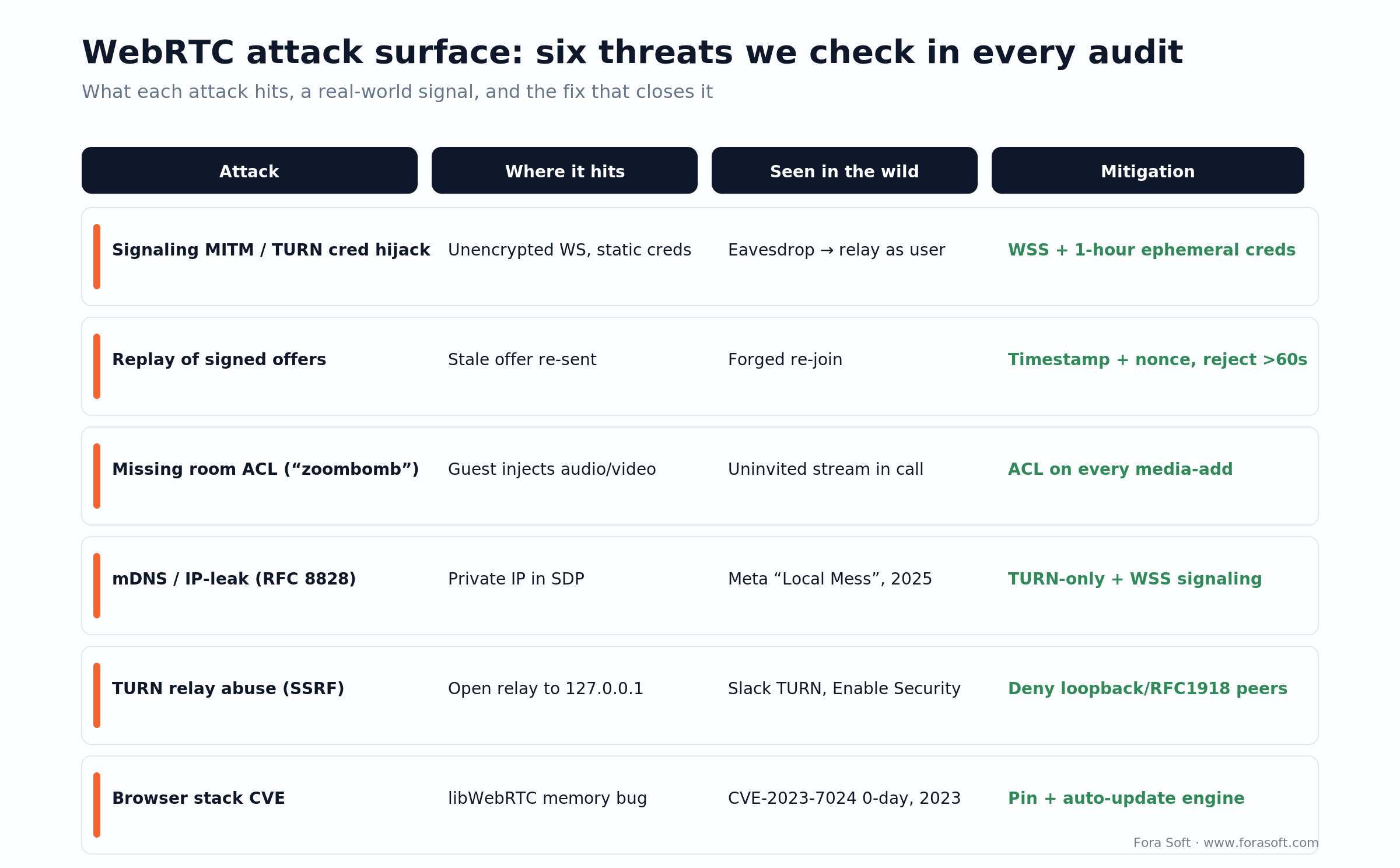
Figure 3. Six threats we check in every audit, each with a real-world signal and the control that closes it.
Worried your SFU operator can see patient video?
We audit your E2EE posture and design an SFrame or Encoded Transform implementation that fits your stack and your compliance scope.
Authentication and authorization
A signed token for identity. Require a JWT in the Authorization header of the WebSocket upgrade, signed with a secret only your server holds, carrying the user ID and a short expiry. When Alice asks to join room B, verify her token and her permission for that room before anything else. Do not put identity in a plain WebSocket message; put it in the token.
Ephemeral TURN credentials. Do not ship a static TURN username and password. Generate a fresh pair per session: the username is a short-lived timestamp:userid string, and the password is a base64-encoded HMAC-SHA1 of that username keyed with a shared secret, expiring in an hour. This is the coturn REST scheme, and it means a captured credential is useless within the hour instead of forever.
Access control on every track. Keep a per-room list of who may be present, which media types they may send, and until when. Check it on every media-add, not just on join. If the list says a guest may send audio only and a video track appears, reject it. Most “zoombomb” findings are a missing check at exactly this point.
Recording, retention and consent
Consent is explicit and logged. HIPAA, GDPR, CCPA and two-party-consent states all want a clear yes before you record — a checkbox on screen, timestamped and tied to the person who agreed, not a line buried in the terms. No consent, no recording of that participant.
Retention has an end date. A recording is not kept forever. Under GDPR you keep it only as long as the stated purpose lasts, then delete; a deletion request must be honored within one month. HIPAA sets a six-year floor on compliance documentation, and medical-record retention is set by state law on top. In practice this means a stored TTL on every recording, a daily purge job, and a log entry for each deletion. Our guide to telemedicine features covers the product side of this.
Record out of band. Run the recorder as a separate bot that subscribes to the SFU, not as part of the call logic. If recording fails, the call survives; if a patient opts out, you stop the bot without dropping anyone; and the recording’s access log stays cleanly separate from the live session.
Encryption controls compared
When you choose the encryption and transport layer for a deployment, these are the four options and where each one fits. For most regulated production systems we pair DTLS-SRTP with SFrame.
| Control | DTLS-SRTP | SFrame E2EE | SDES | Encoded Transform |
|---|---|---|---|---|
| Encrypts media | Yes (P2P and to SFU) | Yes (end to end) | Yes (removed) | Yes (carries SFrame) |
| Hides media from the SFU | No | Yes | No | Yes |
| Key exchange | DTLS handshake | App or out-of-band | In the SDP (unsafe) | App-defined |
| Performance cost | Negligible | Low (2–5%) | Negligible | Low |
| Browser support (2026) | All (default, DTLS 1.3) | Via Encoded Transform | Removed — do not use | Chrome, Edge, Firefox, Safari |
HIPAA: BAAs, audit logs and retention
Compliance is not a crypto setting. Each framework maps to concrete WebRTC design choices — who you sign an agreement with, what you log, where data lives, and how long you keep it.
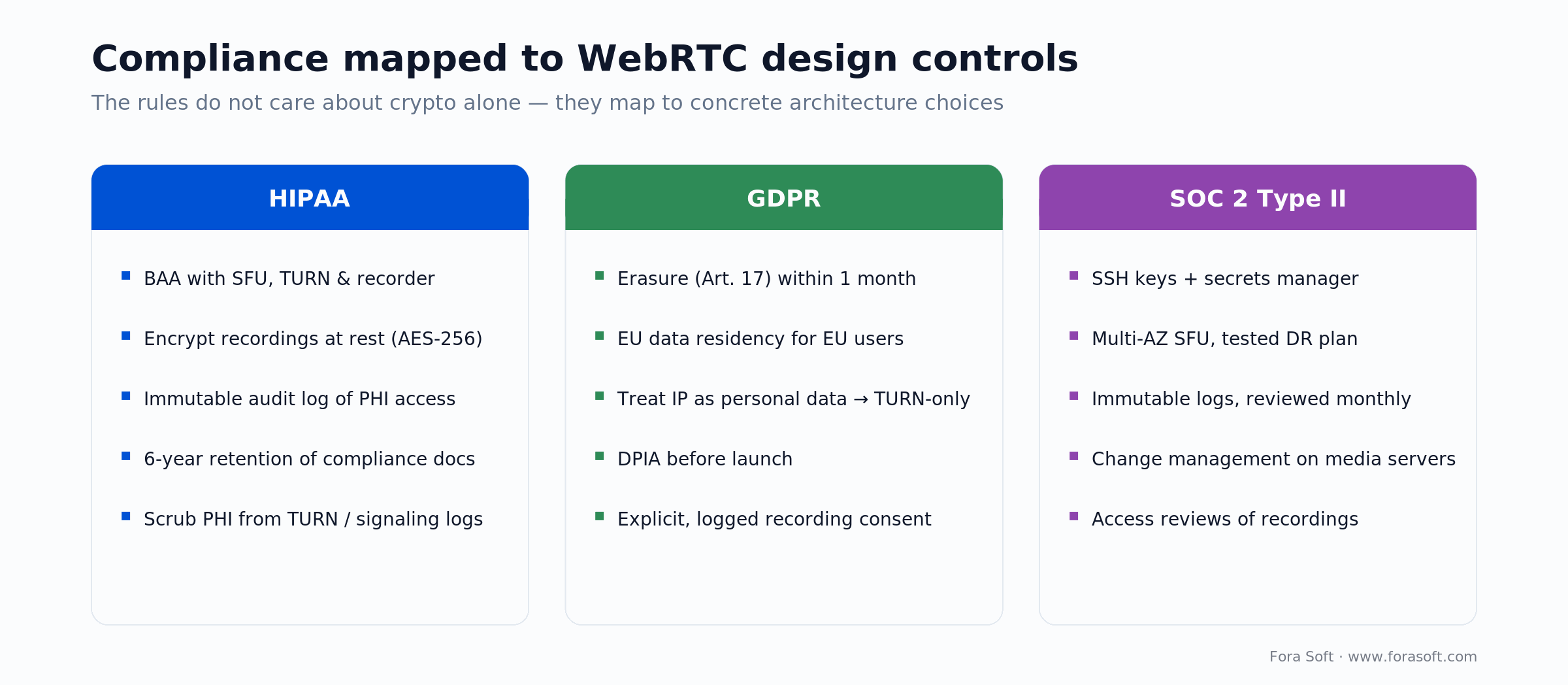
Figure 4. HIPAA, GDPR and SOC 2 mapped to the WebRTC controls that satisfy them.
BAAs are not optional. If any third party touches protected health information, you need a written Business Associate Agreement with them. Use AWS or Agora to relay patient video and you need a BAA with AWS or Agora; use a cloud recorder and you need one with the recorder. We regularly meet teams that built a careful app and forgot the BAA with their media vendor — which puts them out of compliance on day one.
Log every access to PHI. Each call start, each recording view, each backend read of call metadata gets a log line with user, timestamp and scope. Those logs are write-once, retained for six years, and actually reviewed. And scrub PHI from TURN and signaling logs, which is where it quietly ends up.
Encrypt recordings at rest. HIPAA does not strictly mandate it, but store recordings and user data under AES-256 anyway. A stolen disk or exposed backup then reveals nothing, and you have removed an entire class of breach from the table.
GDPR: data residency, DPIA and deletion
Residency. Personal data on EU users should stay in the EU unless a valid transfer mechanism covers the destination. An IP address counts as personal data, so a media server in the wrong region is a transfer, not just an ops detail. In practice, most teams run EU infrastructure for EU users.
Run a DPIA before launch. A Data Protection Impact Assessment writes down what personal data you collect, how it is protected, who can reach it, and what happens in a breach. If the SFU sits outside the EU, the DPIA is where you record why that transfer is lawful and what safeguards apply. It is a real document that shapes design decisions, not a form.
Deletion on request. The right to erasure (Article 17) gives you one month to act, extendable by two months for complex cases — the UK ICO’s right-to-erasure guidance is the reference. Delete recordings, logs and chat, remove the user, and keep only what another law forces you to keep. When HIPAA’s six-year retention conflicts with an erasure request, the legal-obligation exemption wins — but you document why.
SOC 2 Type II for video infrastructure
SOC 2 Type II is an independent audit, run over a period of months, that certifies your controls across security and, optionally, availability, processing integrity, confidentiality and privacy. For a WebRTC platform it comes down to three habits.
Security. Restrict access to the signaling server, SFU and recorder to named people using SSH keys, not passwords. Build every server from an approved image with Terraform or Ansible, and keep TURN secrets, database passwords and API keys in a secrets manager, never in source.
Availability. No single point of failure: run the SFU and signaling across zones behind a load balancer, keep a disaster-recovery plan that stands up a fresh environment in under an hour, and test it every quarter for real rather than on paper.
Processing integrity. Log every signaling message, TURN allocation and recording access with enough detail to reconstruct events, keep the logs immutable, and review them on a schedule. On-premise deployments like Nucleus ship these controls as product features precisely because enterprise buyers ask for the audit report.
Mini case: a telemedicine platform passes its pen test
A healthcare platform in the mold of CirrusMED came to us before a scheduled penetration test. It handled doctor-patient calls, recorded with consent, and stored recordings on AES-256 encrypted storage. The initial review found four holes: mDNS host candidates leaking private IPs through the SDP, TURN credentials valid for 24 hours and replayable, signaling messages with no timestamp, and room ACLs that were not enforced when a video track started.
We shipped four fixes in a short engagement. We forced TURN-only relay with iceTransportPolicy: 'relay', which moved latency from 25 ms peer-to-peer to 35 ms — still comfortable for a consult. We cut TURN credentials to one-hour HMAC tokens and logged every issue. We added a timestamp and nonce to every signaling message and rejected anything past 60 seconds. And we enforced the room ACL on every media-add, so an audio-only guest could not push video.
The test passed. The tester could not replay signaling, could not hijack a TURN credential, could not inject into a room, and could not leak a patient IP. It is the same playbook we hand any HIPAA-compliant video platform. Want a similar review before your audit? Book a 30-minute call and we will scope it.
HIPAA or SOC 2 audit on the calendar?
We review your signaling auth, TURN configuration, recording-consent flow and audit logs, then walk the remediation through with your audit team.
Choose your security posture in five questions
Q1: Is the call content regulated? Health, financial or personal data means end-to-end encryption and TURN-only relay. If not, DTLS-SRTP is a fair baseline.
Q2: Who runs the SFU? If you run it, you can log every access and argue it is not a Business Associate. If a third party runs it, you need a BAA and E2EE, because that party can see the media.
Q3: Where are your users? EU users bring data residency and a DPIA. US healthcare brings HIPAA; California brings CCPA. Global users? Hold everyone to the strictest standard that applies.
Q4: SaaS or on-premise? Hosted means you own security end to end. On-premise splits it — the customer owns their network, you own signaling auth and the media stack. Write the split into a responsibility matrix so nothing falls between you.
Q5: What is your risk tolerance? Zero-risk (gov, health, finance): TURN-only, SFrame, ephemeral credentials and SOC 2. Medium (EdTech like BrainCert): DTLS-SRTP, ephemeral credentials, ACLs and audit logs. Consumer gaming: DTLS-SRTP and move on.
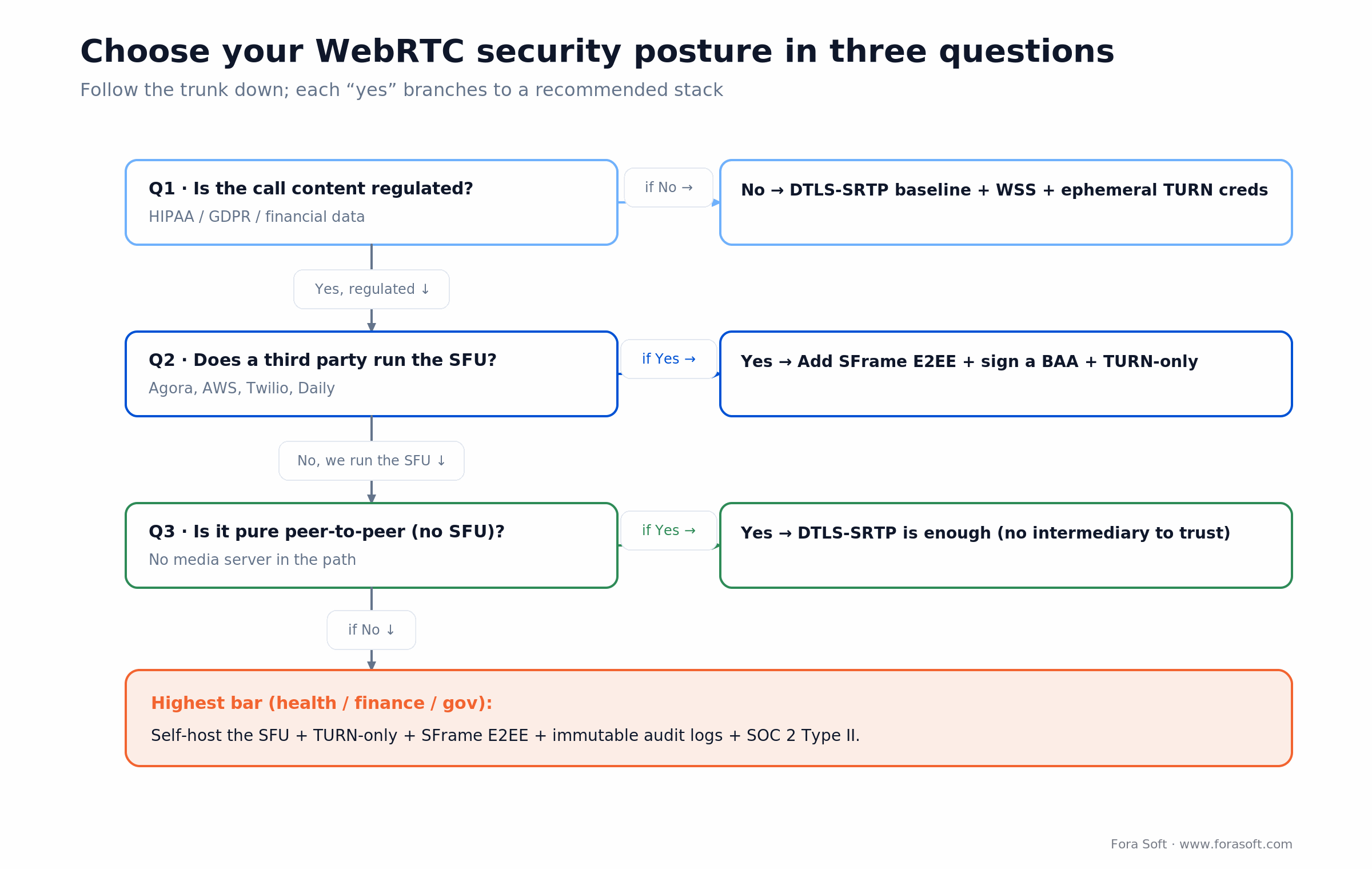
Figure 5. A fast three-question cut of the five-question framework above, with the highest bar for regulated sectors.
How to vet a WebRTC vendor’s security
If you are hiring a team to build or run real-time video, these are the questions that separate people who have shipped secure WebRTC from people who have read about it. Ask them before you sign, not after the pen test.
1. Where is media decrypted, and who can read it? A good answer names the SFU as the decryption point and explains when they add SFrame. A vague “it’s all encrypted” is a red flag.
2. How are TURN credentials issued and how long do they live? You want “ephemeral, one hour, HMAC.” If it is a static password, keep looking.
3. Show me an access-control check on a media track. Membership is not permission. They should be able to point at where a video track gets rejected for an audio-only participant.
4. What is in your TURN and signaling logs, and is PHI scrubbed? This is where regulated data leaks unnoticed. A team that has passed an audit will know the answer instantly.
5. Which BAAs and data-residency commitments can you sign? If they run third-party infrastructure, they need to name it and stand behind it. We keep a live view of ours as part of our WebRTC development practice.
Reach for an outside review when: you are about to enter a regulated market, a customer’s security team is about to audit you, or you inherited a WebRTC stack and cannot answer the five questions above with confidence.
Five WebRTC security pitfalls
1. “DTLS-SRTP encrypts the media, so we are done.” It encrypts to the SFU, which decrypts to route. If the server is third-party or the data is regulated, you need SFrame on top.
2. “We use WSS, so signaling is secure.” WSS encrypts the channel but does not authorize the message. Without ACL checks on every message, a valid WSS connection can still carry a forged request.
3. “TURN credentials rotate daily.” A 24-hour window is a 24-hour window for a captured credential. Cut it to an hour with per-session HMAC tokens.
4. “mDNS hides our IPs, so we are private.” Only until an unauthenticated signaling channel leaks the name. For regulated data, go TURN-only and never rely on mDNS alone.
5. “We keep audit logs.” Logs no one reads are storage, not security. Alert on the anomalies — repeated auth failures, TURN traffic from an unfamiliar network, access to a recording someone does not own — and review formally each quarter.
KPIs: security telemetry to monitor
Quality: failed auth and signaling errors. Track failed token validations per day; a spike above about 1% of attempts suggests someone probing credentials. Track rejected signaling messages (bad timestamp, nonce or ACL); a spike is either a broken client or a forged-message attempt.
Business: TURN abuse and exfiltration. Watch bytes relayed per user. If a single account moves far more than a normal session — say an EdTech class is 10–20 MB and someone is pushing a gigabyte — alert. Watch unique source IPs per TURN username: one credential appearing from 50 addresses in an hour is a compromised credential.
Reliability: recording access and consent. Log every recording view, download and delete with user, time and IP. Alert when someone reaches a recording they do not own, and make sure every recording has a matching consent entry — if consent is revoked, the recording goes within 24 hours.
When SFrame is overkill
End-to-end encryption is not free — it complicates key distribution and blocks server-side features like layer selection and transcoding. For a few cases, DTLS-SRTP alone is the right call and SFrame just adds cost.
Consumer streaming and gaming. If you broadcast a match to a public audience, the content is already public. DTLS-SRTP stops network eavesdropping, which is all you need; SFrame adds CPU and key-management pain for no gain.
Internal calls where you run the SFU. If your own team operates the media server on a system like Nucleus inside your own network, you already trust the operator by definition. DTLS-SRTP plus tight access control is enough.
Pure peer-to-peer. With no SFU in the path, there is no intermediary that can read the media, so DTLS-SRTP already gives you end-to-end protection. This is the most private topology precisely because nothing sits in the middle.
FAQ
Is WebRTC secure by default?
Media is encrypted by default with DTLS-SRTP, and there is no unencrypted mode. Signaling is not encrypted by WebRTC, so you run it over TLS (HTTPS and WSS) yourself, and a group call’s media server can read the media unless you add end-to-end encryption. So the transport is secure by default; the application is not.
Is DTLS-SRTP enough for HIPAA?
No. DTLS-SRTP encrypts media in transit, but an SFU decrypts it to route, so the operator can see it. HIPAA needs a BAA with the media vendor, audit logs, encryption at rest and, when the SFU is untrusted, end-to-end encryption such as SFrame.
What is SFrame and what RFC defines it?
SFrame (Secure Frame) is a lightweight end-to-end encryption layer for real-time media, standardized as RFC 9605 in August 2024. Each frame is encrypted with a key only the sender and receivers hold, so the SFU forwards ciphertext it cannot read.
Can the SFU see my video?
Yes, if you only use DTLS-SRTP: the SFU decrypts each frame to route it. With SFrame end-to-end encryption the SFU relays encrypted frames unchanged and never sees the picture.
Does WebRTC use DTLS 1.3 in 2026?
Yes. Chrome, Firefox and Safari default to DTLS 1.3 (RFC 9147) as of February 2025. It shortens the handshake and drops old ciphers. DTLS 1.2 still works, so keep a minimum-version policy for older peers.
Is WebRTC GDPR-compliant out of the box?
No. GDPR needs data residency, a DPIA, consent logs and deletion within one month of a request. WebRTC handles the encryption; you build the governance layer on top, and you treat IP addresses as personal data.
How do I prevent a “zoombomb”?
Enforce a room access-control list on every media-add, not just on joining. Authenticate each participant with a token that carries their user and room, and reject any track a participant is not permitted to send.
What are WebRTC security best practices?
Run signaling over WSS, issue one-hour ephemeral TURN credentials, timestamp and nonce every message, enforce ACLs on every media track, disable mDNS host candidates for regulated data, harden TURN against relaying to internal addresses, and add SFrame when a third party runs the SFU.
Should I still use SDES?
No. SDES exchanged SRTP keys in plaintext in the SDP and was removed from Chrome in Chrome 97 (January 2022); the spec forbids offering it. Use DTLS-SRTP, which encrypts the key exchange.
What to read next
Compliance
Building a HIPAA-Compliant Video Platform
BAAs, audit logs, encryption, retention and control frameworks.
Architecture
P2P vs MCU vs SFU for Video Apps
Where the media server sits and why it changes your threat model.
Testing
How to Test WebRTC Streams
Tools, metrics and continuous monitoring for production calls.
Comparison
WebRTC vs Agora: Architecture Trade-Offs
Open-source WebRTC vs managed platforms and their security posture.
WebRTC security is not a binary choice
Secure WebRTC in 2026 is three layers working together: the browser gives you DTLS-SRTP and ICE, your server adds ephemeral credentials, ACLs and rate limits, and your application adds end-to-end encryption, consent and access logging. The browser encrypts the media path by default, but the SFU sees the pixels unless you add SFrame. Signaling is plaintext unless you run WSS. Private IPs leak unless you go TURN-only. And HIPAA, GDPR and SOC 2 are governance the crypto cannot cover.
The good news is that every one of these has a known fix. Ephemeral TURN credentials, room ACLs, message timestamps, disabled mDNS and SFrame are all well understood. The hard part is deploying them correctly at scale, proving it in a penetration test, and keeping up as browsers, RFCs and regulators move — which they did again this year. That is the work we do across telemedicine, EdTech and financial platforms, and it is why we test every permutation in a lab before go-live.
Security is a practice you build into every release, not a feature you ship once. Our video and audio streaming development service includes security reviews, penetration-test prep and HIPAA, GDPR and SOC 2 guidance. Let us look at your deployment.

The book · Volume 3 of 7
Video Streaming: A Complete Guide to Video Delivery: From ABR and CDNs to Players, WebRTC, DRM, and the Economics of Streaming
DTLS-SRTP protects the media by default, and this guide covered the app around it. Volume 3 goes deep on WebRTC and real-time delivery alongside DRM, CDN caching, player recovery and QoE monitoring, which helps when your security posture has to live with call quality and the delivery bill rather than in a separate audit document. Written by Nikolay Sapunov, CEO at Fora Soft.
Read it on Amazon →Kindle & paperback · Fora Soft Video Engineering Handbook
Have a pen-test report you want a second opinion on?
We read the findings, prioritize what actually matters, and help you remediate before your next audit.

