


Key takeaways
• On-device AI is the default on Android in 2026. Privacy, sub-100ms latency, and offline behaviour beat cloud inference for most mobile features.
• LiteRT 2.x is the runtime, not TensorFlow Lite. Version 2.3 (October 2026) is current; the CompiledModel API drives NPU/GPU acceleration; your old .tflite files still load unchanged.
• MediaPipe Tasks is where most teams should start. Hand, pose, face, object, and audio detection ship production-ready with almost no boilerplate.
• Gemini Nano now runs through ML Kit GenAI APIs. Summarization, proofreading, rewriting, image description, and a Prompt API (all beta in October 2026) — nano-v4 ships on the Pixel 11 series, nano-v3 on Pixel 9/10 and Galaxy S26.
• Plan for the floor, not the flagship. Gemma 4 E2B decodes at ~52 tokens/sec on a Galaxy S26 Ultra GPU (Google, 2026); a budget CPU-only phone gets a fraction of that. Your app has to handle both.
Updated October 2026: LiteRT 2.3 and LiteRT-LM 0.18 with Gemma 4 benchmarks, Gemini Nano nano-v4 on Pixel 11, Snapdragon 8 Elite Gen 6 and Dimensity 9600 Pro, and a model picker by latency and RAM budget.
Why Fora Soft wrote this 2026 guide
Four years ago, shipping on-device AI on Android meant hand-rolling TensorFlow Lite builds, custom quantization scripts, and one vendor SDK per chip. In 2026 the stack is boring in the best way: LiteRT for the runtime, MediaPipe Tasks for vision and audio, and Gemini Nano through ML Kit for language. The catch is that most guides still online were written for the 2022 toolchain, and they will send you down build paths Google has since deprecated. Pick the wrong runtime and you burn a sprint migrating; miss the device-tier reality and your app freezes on the phones half your users actually own. That device-tier work is the daily job of our AI mobile app development team.
We’re Fora Soft — 250+ shipped projects since 2005, and an AI integration team that has put on-device inference into production. We built real-time video anomaly detection into NetCam, live proctoring with face landmarks into BrainCert, on-device OCR and speech into Memory Master, and edge inference into DSI Drones. This guide is the playbook we hand new engineers: which tools win, what breaks on low-end hardware, and when to let the cloud do the work.
Scoping an on-device AI feature for Android?
Talk to an engineer who has shipped it. In 30 minutes we’ll pick the runtime, size the model, and sketch the quantization plan.
Three promises on-device AI keeps that cloud cannot
1. Privacy holds by construction. Medical images, face biometrics, voice recordings, and behavioural telemetry never leave the phone. There’s no cloud sync to secure and no retention window to defend. For HIPAA, GDPR, and PCI-DSS work, on-device inference is compliance shorthand: the model runs inside the user’s sandbox, so there’s nothing to exfiltrate from your servers.
2. Latency is low and predictable. A cloud round-trip adds 50–300ms before the model even runs. On-device, a current flagship NPU runs SSD MobileNet object detection in 30–40ms, pose estimation in ~25ms, and Whisper-tiny speech recognition at 1.5–2× realtime. No congestion, no timeouts, no cold starts.
3. Offline is a feature, not a bug report. Airplane mode, tunnels, and rural dead zones don’t brick the app. Download the model once (typically 50–200MB for vision), and inference keeps working with no network. Users read that as fast and reliable, which is exactly what competitors leaning on cloud APIs can’t promise.
The cost angle: zero marginal inference
Cloud inference bills per call. On-device, the millionth inference costs the same as the first: nothing. You pay once to train and quantize the model, once in bandwidth to ship it, and after that the compute is the user’s device. We work the full numbers below, but the short version is that past a certain volume, cloud stops being an accounting rounding error and starts being a line item you have to defend.

Figure 1. The four-layer Android on-device AI stack: what your app calls at the top, what stores the model at the bottom.
The Android 2026 on-device AI stack
The stack splits into four layers: model formats, runtimes, hardware accelerators, and app-level APIs. Match the layer to the job and the tool choice mostly picks itself.
| Layer | What lives here | 2026 status |
|---|---|---|
| App-level APIs | ML Kit GenAI APIs, MediaPipe Tasks, Prompt API, Google AI Edge SDK | Mature; start here before touching a raw interpreter |
| Runtimes | LiteRT 2.3 (CompiledModel), LiteRT-LM 0.18, ONNX Runtime Mobile, ExecuTorch 1.5 | LiteRT is the Android default; ExecuTorch now stable |
| Accelerators | Hexagon NPU, Tensor TPU, MediaTek and Samsung Exynos NPUs, Adreno/Mali GPU, ARM CPU | NPU on flagships; GPU on mid-range; CPU as the floor |
| Model formats + quant | .tflite, .onnx; FP16 / INT8 / INT4 (INT2 / FP8 on newest NPUs) |
Stable; INT8 default for vision, INT4 for LLMs |
LiteRT: the runtime formerly known as TensorFlow Lite
Google renamed TensorFlow Lite to LiteRT in September 2024, and the project has moved well past a simple rebrand since. Your existing .tflite models still load unchanged, so migration is not a rewrite. What’s new is how you get top performance out of them. The current release is LiteRT 2.3.0 (October 7, 2026): it raises the Android minSdk to 24, ships the GPU accelerator and vendor NPU libraries as separate Maven packages, adds Samsung Exynos NPU support, and extends MediaTek NPU support to Android 12 and later (LiteRT release notes).
The CompiledModel API is the part that matters
Two APIs, one recommendation. LiteRT 2.x keeps the classic Interpreter API (the old TFLite call surface) for backward compatibility, and adds the CompiledModel API as the modern path. CompiledModel is built to squeeze the hardware — it negotiates NPU, GPU, and CPU backends for you instead of leaving delegate wiring to hand-written boilerplate. For any new project, that’s the one to reach for.
On-device LLMs get their own runtime. LiteRT-LM is Google’s inference framework for language models on the edge. As of October 2026 its Kotlin and C++ APIs are stable, the NPU backend is stable on Android, and the supported list covers Gemma 4 (E2B, E4B), Gemma 3n, Gemma3-1B, FunctionGemma, Phi-4-mini, Qwen2.5 and Qwen3-0.6B, plus EmbeddingGemma 2 for embeddings. Version 0.17 (September 2026) added multimodal Gemma 4 12B with multi-token prediction. If you’re shipping a chat or summarization feature and Gemini Nano isn’t available on the target device, this is your fallback.
Google’s own Gemma 4 numbers, measured on a Samsung Galaxy S26 Ultra, show why the GPU backend is the default for chat-style features:
| Model (LiteRT-LM) | File size | Backend | Prefill, tokens/s | Decode, tokens/s | Time to first token |
|---|---|---|---|---|---|
| Gemma 4 E2B | 2.58 GB | CPU | 557 | 47 | 1.8 s |
| Gemma 4 E2B | 2.58 GB | GPU | 3,808 | 52 | 0.3 s |
| Gemma 4 E4B | 3.65 GB | CPU | 195 | 18 | 5.3 s |
| Gemma 4 E4B | 3.65 GB | GPU | 1,293 | 22 | 0.8 s |
Source: Google AI Edge, Gemma 4 on LiteRT-LM, checked October 2026. Decode speed is what users feel in a chat; prefill speed decides how fast a long document gets summarized.
Accelerators are first-class now. Hexagon (Snapdragon), MediaTek and Samsung Exynos NPUs and GPU (Adreno, Mali) acceleration ship in the official release rather than as vendor side-builds. On a current flagship NPU, INT4 models run several times faster than on the ARM CPU alone.
Reach for LiteRT when: you have a trained TensorFlow or PyTorch model, want sub-100ms inference on Android 10+, and want automatic NPU offload on flagships. It’s the default for most new Android ML projects, and the CompiledModel API is how you get the acceleration.
MediaPipe Tasks: the library most teams should reach for first
MediaPipe Tasks is Google’s high-level layer over LiteRT and vendor NPUs. Instead of writing interpreter loops, you call ready-made tasks: HandLandmarker.detectAsync(frame), PoseLandmarker.detectAsync(frame), ObjectDetector.detect(frame). It handles quantization, delegate selection, frame resizing, and threading for you.
The vision tasks people actually ship
Hand landmarks. 21 keypoints per hand, model 4–8MB, ~10ms on a flagship NPU. We use it in BrainCert for hand-in-frame proctoring checks; it also underpins sign-language and gesture apps. Works offline with no extra setup.
Pose estimation. 33 body keypoints, 4–6MB (lite) or ~15MB (full), ~25ms on flagship. Fitness form-checks, physical therapy, motion capture, fall detection. Handles multiple people in frame.
Object detection (SSD MobileNet). ~90 COCO classes, 4–7MB, 30–50ms on a flagship NPU. This is the model behind the NetCam anomaly-detection case below.
Face detection and landmarks. Bounding box plus 468 facial landmarks, 5–10MB, ~15ms. Gaze and attention for proctoring, filters, landmark-based emotion cues.
Audio classification. Environmental sound classes (speech, music, applause, silence), 5–30MB, streaming on Android 10+. Accessibility context and voice-activity detection.
The LLM inference task
MediaPipe’s LLM Inference task still runs quantized Gemma-class models behind the familiar task interface, but Google has put it in maintenance-only mode: new features and optimizations go to LiteRT-LM, and Google asks teams to migrate (MediaPipe LLM Inference guide, 2026). Keep MediaPipe for vision and audio; start new LLM features on LiteRT-LM.
Reach for MediaPipe Tasks when: you need hand, pose, face, object, or audio detection with minimal code. Start here for vision; drop to raw LiteRT only when you need custom model I/O or postprocessing the task doesn’t expose.
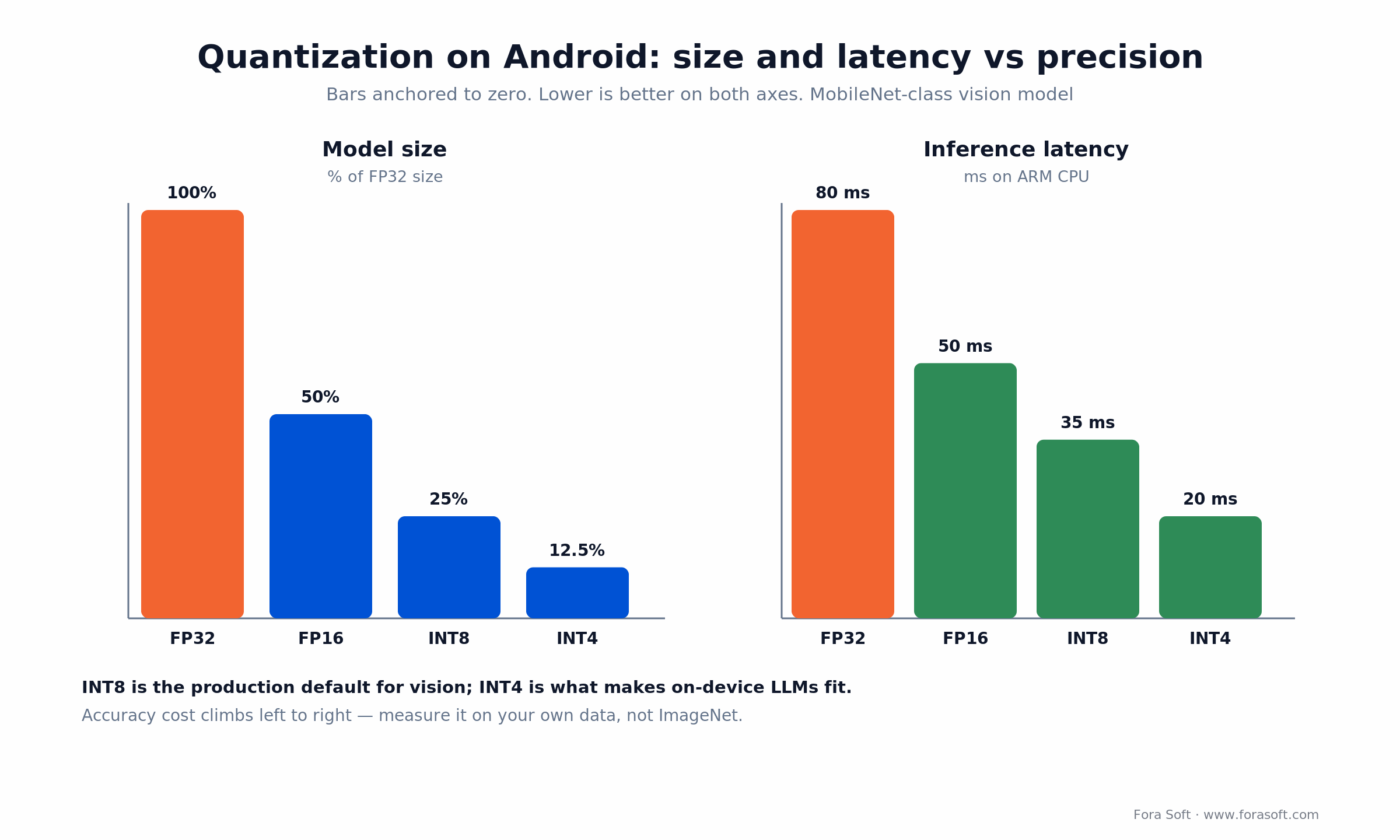
Figure 2. Model size and latency drop sharply as precision falls. Accuracy cost climbs the same direction — measure it on your own data.
Gemini Nano and ML Kit GenAI: the platform LLM on Android
Short answer: on supported devices, you don’t ship an LLM at all — you call the one baked into the OS. Gemini Nano runs fully on-device through the AICore system service, and the recommended way to reach it in 2026 is the ML Kit GenAI APIs. As of October 2026 three model generations are in the field: nano-v4 on the Pixel 11 series and Galaxy Z Fold8 / Z Flip8, nano-v3 on Pixel 9 and 10, the Galaxy S26 series, OnePlus 15 and OPPO Find X9, and nano-v2 on devices such as the OnePlus 13 and Xiaomi 15 (ML Kit GenAI overview).
What you get out of the box
Ready-made GenAI tasks. ML Kit exposes Summarization, Proofreading, Rewriting, and Image Description as high-level calls tuned for quality on Nano; all four are in beta as of October 2026, and a GenAI Speech Recognition API is in alpha (its Advanced Mode runs on Pixel 10 and 11). No prompt engineering, no model download, no MLOps. This covers the majority of “make this text shorter / cleaner / different tone” product features.
The Prompt API for custom work. When the canned tasks don’t fit, the Prompt API (beta) lets you send your own instructions to Nano on-device, with system instructions and thinking mode in beta and structured output in alpha. Call getBaseModelName() first: different Nano versions can return different output for the same prompt. Use it for classification, extraction, or grounded Q&A over local content — all without a network call.
On-device RAG. Pair Nano with on-device embeddings (EmbeddingGemma 2 via LiteRT-LM runs a text embedding in about 8.3ms on a Pixel 11 Pro TPU, per Google, 2026), retrieve chunks from a local knowledge base, and feed them in for grounded answers. The whole loop stays on the phone.
Device coverage and the fallback plan
There’s a catch worth planning around: Gemini Nano lives only on supported flagships and foldables, and the newest nano-v4 is limited to the Pixel 11 series and Samsung’s 2026 foldables. Mid-range and budget devices run an earlier Nano or none at all. Two runtime rules also bite in production: inference is allowed only while your app is the top foreground app (background calls return BACKGROUND_USE_BLOCKED), and per-app quotas return BUSY or a daily battery quota error, so build in backoff. Always check availability at runtime, and degrade cleanly: fall back to a bundled LiteRT-LM model (Gemma INT4) or to cloud Gemini when Nano isn’t present.
Reach for Gemini Nano when: your feature is summarization, proofreading, rewriting, or on-device chat, and you can gate it to supported devices with a fallback. Start with the ML Kit GenAI tasks; move to the Prompt API only when you need custom prompts.
ONNX Runtime Mobile: when to pick it over LiteRT
Answer first: pick ONNX Runtime Mobile when your team is PyTorch-first or you need the exact same model binary on iOS and Android. ONNX is a framework-neutral model format; ONNX Runtime Mobile is a lean interpreter for Android, iOS, and embedded targets, with a QNN execution provider for Qualcomm NPUs.
LiteRT vs ONNX Runtime Mobile
LiteRT wins if: you’re already in the TensorFlow world, you want official Google support and MediaPipe integration, or you need the Gemini Nano path. Hexagon and GPU delegates are mature and first-party.
ONNX Runtime Mobile wins if: your model is PyTorch or ONNX-native, you want one binary across iOS and Android, or you’re pulling models from Hugging Face that export ONNX directly. Snapdragon NPU support via the QNN provider is solid.
Raw speed is a wash: both land around 30–50ms on MobileNet on flagship hardware, and both support INT8, INT4, and dynamic quantization. The real difference is ecosystem gravity — LiteRT has more Android-first docs, pretrained models, and the MediaPipe on-ramp.
Reach for ONNX Runtime Mobile when: your team is Python/PyTorch-first, you need iOS/Android feature parity from one model, or you’re shipping Hugging Face exports. Otherwise start with LiteRT plus MediaPipe.
NNAPI is deprecated: what to do instead
Answer first: don’t start anything new on NNAPI, and migrate legacy code to LiteRT. The Android Neural Networks API was the old bridge between frameworks and hardware accelerators. Google introduced it in Android 8.1 (2018) and deprecated it in Android 15.
Why it’s going away
NNAPI was a lowest-common-denominator interface, and vendors implemented it unevenly, which fragmented the story. Transformer and diffusion models also move faster than a framework API baked into each OS release can keep up with. Google’s answer is an updatable runtime that ships outside the OS: LiteRT (delivered as TensorFlow Lite in Google Play Services) for custom models, and AICore for Gemini Nano.
The migration paths
For TensorFlow models: move to LiteRT with the GPU delegate (and Hexagon where available). Swapping an NNAPI delegate for the LiteRT GPU delegate is close to a one-line change.
For ONNX models: use ONNX Runtime Mobile with the QNN execution provider on Snapdragon.
For GenAI: use AICore and the ML Kit GenAI APIs rather than trying to run a foundation model through the old accelerator API.
Keep NNAPI only when: you’re maintaining shipped code on Android 10–14 that already depends on it and a rewrite isn’t justified yet. For anything new, skip it and use LiteRT or ONNX Runtime Mobile delegates.
Model quantization: FP32 to INT4 tradeoffs
Quantization stores weights and activations in lower precision to shrink the model and speed up inference. The ladder runs FP32 → FP16 → INT8 → INT4, and the newest NPUs add INT2 and FP8 at the bottom. Each step trades a little accuracy for size and speed.
The practical tradeoff, level by level
FP32 (baseline). Full 32-bit precision. Best accuracy, biggest and slowest. This is a training format, not a shipping one.
FP16 (half precision). Roughly half the size, accuracy loss usually under 0.1% on vision. A safe compatibility step that runs on older GPUs.
INT8 (post-training quantization). About a 75% size cut versus FP32, ~35ms on CPU and ~15ms on an NPU for a MobileNet-class model, with 0.5–2% accuracy loss on ImageNet-scale tasks. This is the production default for vision, and it’s almost always acceptable.
INT4 (aggressive). Roughly an 87.5% size cut, accuracy loss 1–5% depending on the model and calibration data. Marginal for dense tasks like segmentation, but it’s what makes on-device LLMs fit at all — a Gemma-class model in INT4 lands in the low gigabytes instead of tens.
Which quantization method to use
Post-training quantization (PTQ): quantize a trained model without retraining. Fast, needs representative calibration data, great for INT8. This is what the LiteRT converter and MediaPipe use by default.
Quantization-aware training (QAT): train with simulated low precision so the model learns to tolerate it. Costs 10–50% more training time and buys back 1–2% INT4 accuracy. Worth it for accuracy-critical domains like medical or accessibility.
Dynamic quantization: quantize weights, keep activations in float. Smaller model with no calibration step; handy for RNNs and Transformers where per-layer precision matters.
Reach for INT8 when: you want the best speed/accuracy/size balance for vision. Reach for INT4 when shipping LLMs or when download size is the hard limit. Use QAT where accuracy can’t slip — and always measure on your own data, not the benchmark set.
Hardware acceleration tiers: what runs where in 2026
Not every Android phone is a flagship. The install base splits into four tiers, and your app has to behave on all of them. Plan for the floor and let the ceiling be a bonus.
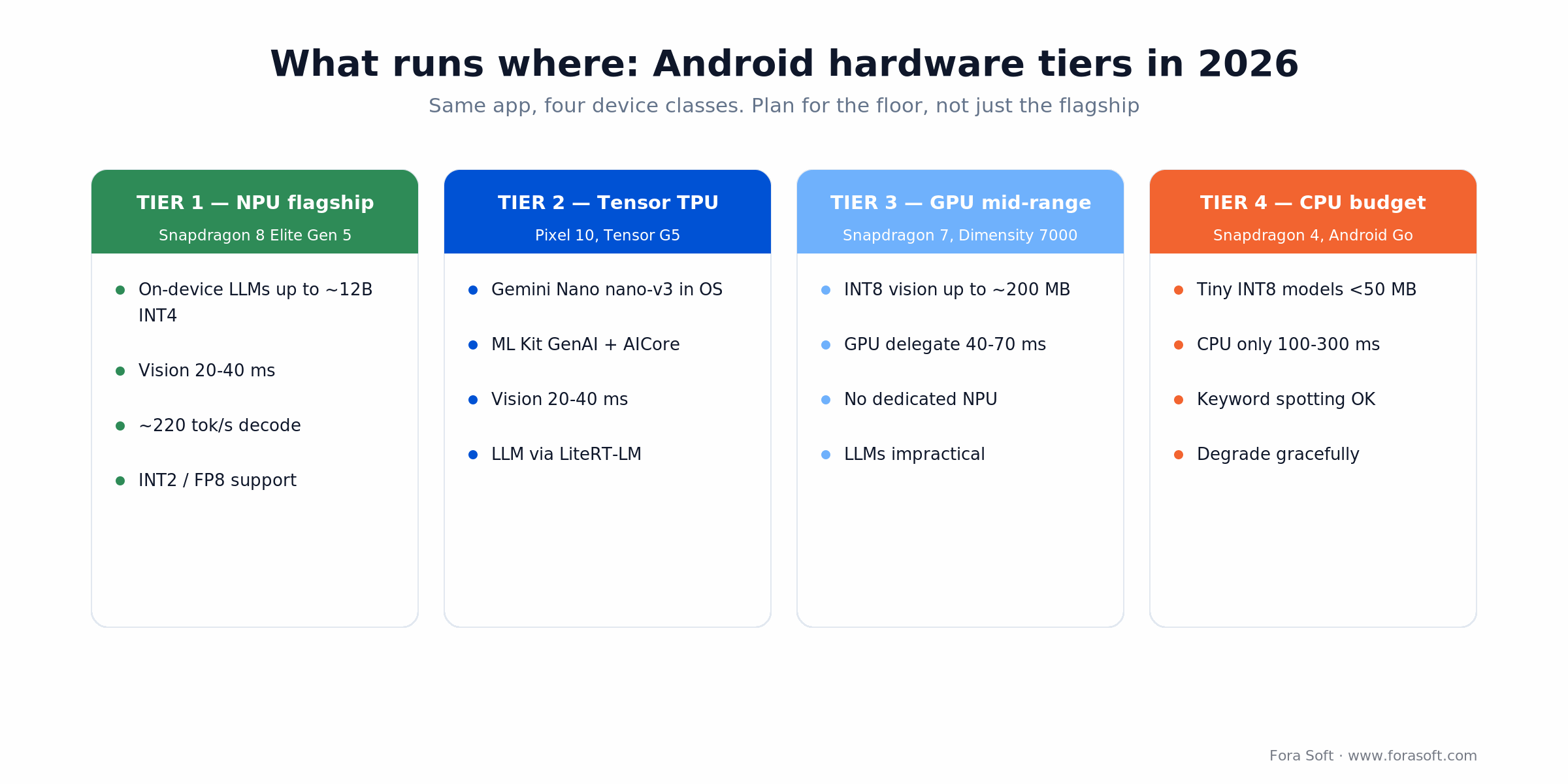
Figure 3. Four device classes, four capability envelopes. The gap between Tier 1 and Tier 4 is the size of your fallback logic.
Tier 1: flagship NPU (Snapdragon, MediaTek)
Chips: Snapdragon 8 Elite Gen 5 (Galaxy S26 Ultra, OnePlus 15 and other early-2026 flagships), MediaTek Dimensity 9500, and the new 2nm generation announced in September 2026: Snapdragon 8 Elite Gen 6 and 8 Elite Extreme Gen 6 (Qualcomm claims +14% and +35% NPU performance over Gen 5, 50% faster INT4 prefill, and local Mixture-of-Experts models up to 30B parameters) and MediaTek’s Dimensity 9600 Pro (NPU 1090, also rated for models up to 30B). Envelope: INT4 LLMs in the 2–4B range at interactive speed, larger models with compromises, dense vision in 20–40ms. This is where on-device chat is genuinely usable.
Tier 2: Tensor TPU (Google Pixel)
Chips: Tensor G6 (Pixel 11, launched August 2026; Google claims 50% more TPU compute than G5), Tensor G5 (Pixel 10, Google’s first TSMC-built chip) and Tensor G3/G4 (Pixel 8/9). Envelope: similar vision latency to Tier 1, plus native AICore and Gemini Nano (nano-v4 on Pixel 11, nano-v3 on Pixel 9 and 10). If your feature is GenAI-first, this tier gives you the platform LLM for free.
Tier 3: mid-range GPU (Adreno, Mali)
Chips: Snapdragon 7 series, MediaTek Dimensity 6000/7000. No dedicated NPU; the GPU delegate is your best bet. Envelope: INT8 vision up to ~200MB at 40–70ms. On-device LLMs are impractical here — route them to the cloud.
Tier 4: budget / older (CPU-only)
Chips: Snapdragon 4 series, Android Go devices, older Cortex-A cores. CPU inference only. Envelope: tiny INT8 models under 50MB (keyword spotting, small detectors) at 100–300ms. The right move is graceful degradation, not pretending the NPU exists.
Comparison matrix: runtimes head-to-head
| Runtime | Model ceiling | NPU support | LLM ready | When to pick |
|---|---|---|---|---|
| LiteRT 2.3 | Gemma 4 E4B (3.65GB) and up via LiteRT-LM, 200MB INT8 vision | Hexagon, Tensor, MediaTek, Exynos, GPU — first-party | Yes (LiteRT-LM + Gemini Nano) | Default for TensorFlow models and vision |
| MediaPipe Tasks | 4–50MB prebuilt, ~200MB custom | Inherits LiteRT delegates | Legacy (LLM Inference is maintenance-only) | Hand, pose, face, object, audio — least code |
| Gemini Nano / AICore | nano-v4 / v3 / v2 (supported flagships only) | Tensor / flagship NPU only | Yes, native LLM in OS | Summarize, proofread, rewrite, chat via ML Kit |
| ONNX Runtime Mobile | 2GB INT4, 200MB INT8 | QNN provider (Snapdragon), broad coverage | Via external LLM stacks | PyTorch / Hugging Face, iOS+Android parity |
| ExecuTorch 1.5 | ~500MB (sparse models recommended) | QNN + Vulkan backends (Android AAR) | Yes (multimodal LLM APIs) | PyTorch-only workflows, edge multimodal |
One correction worth flagging if you’re reading older guides: ExecuTorch is no longer experimental. It shipped a stable 1.0 in October 2025 and reached 1.5.1 on October 1, 2026 (Maven Central), with an Android AAR and QNN/Vulkan backends. It’s a real option for PyTorch-native teams, not a research toy.
What can actually run on-device in 2026
Grounded in model sizes and latencies you can ship today on a flagship NPU.
Vision
Object detection (SSD MobileNet v2). 4MB INT8, 30–40ms, 90 COCO classes. Surveillance anomalies, barcode scanning, AR perception.
Face detection and landmarks. 5–10MB, 15–20ms, 468 keypoints. Proctoring, filters, landmark-based emotion cues.
Hand landmarks. 4–8MB, 10–15ms, 21 keypoints. Sign language, gesture control, hand-exercise tracking.
Pose estimation. 4–15MB, 25–40ms, 17–33 keypoints. Fitness, physical therapy, fall detection.
Segmentation. 10–30MB INT8, 50–100ms. Background blur, scene understanding, medical image work.
OCR. 20–50MB (detect + recognize), 100–300ms. Document scanning, receipts, accessibility.
Audio and speech
Speech recognition (Whisper-tiny). ~75MB, 1.5–2× realtime on a flagship, 99 languages. Captions, voice commands, transcription. Needs the model pre-downloaded.
Audio classification. 5–20MB, 10–50ms. Sound context for accessibility, smart-home triggers, monitoring.
Text-to-speech (small local voices). 40–100MB, ~0.5–2s per utterance. Lower naturalness than cloud TTS, but offline. Accessibility, audiobooks, read-aloud.
Text and LLM
Text embeddings (EmbeddingGemma 2, MobileBERT). EmbeddingGemma 2 comes in 270M, 440M and 740M variants for text, image, video and audio; older MobileBERT-class models are 20–50MB at 100–200ms per chunk. On-device semantic search, RAG, dedup.
Small LLMs (Gemma 4, Qwen3, Phi-4-mini). Gemma 4 E2B is a 2.58GB file and decodes at 47–52 tokens/sec on a Galaxy S26 Ultra (Google, 2026); E4B is 3.65GB at 18–22 tokens/sec. Chat, summarization, writing help. Prefix caching cuts repeat-query latency.
Gemini Nano (platform LLM). nano-v4 on Pixel 11, nano-v3 on Pixel 9/10 and Galaxy S26, baked into the OS via AICore, called through ML Kit GenAI. Summarize, proofread, rewrite, and custom prompts — all offline on supported devices.
Which on-device model fits your latency and RAM budget?
Short answer: pick the task first, then the smallest model that meets your latency target on the lowest device tier you support. For most budgets in 2026 that means a MediaPipe task for vision, EmbeddingGemma 2 or a MobileBERT-class encoder for embeddings, Gemini Nano where it exists, and a Gemma 4 E2B-class model on LiteRT-LM as the LLM fallback. The table below is the shortlist we start from; the latency figures come from the sections above and should be re-measured on your own device matrix.
| Job | Budget you set | Start with | Runtime | Watch out for |
|---|---|---|---|---|
| Real-time vision (detection, pose, hands, face) | <50ms, <50MB | MediaPipe task models in INT8 (4–15MB) | MediaPipe Tasks on LiteRT GPU/NPU | Silent CPU fallback on older chips |
| Offline AR perception | <100ms end to end on flagships | INT8 detector + landmarks, no LLM in the loop | LiteRT CompiledModel on NPU | Thermal throttling after minutes of use |
| Personalization embeddings | <100ms, 2GB-RAM phones | EmbeddingGemma 2 (270M) or a MobileBERT-class encoder | LiteRT-LM or LiteRT | RAM: keep the model under ~30% of device memory |
| Offline summarization, rewrite, proofread | Seconds are fine | Gemini Nano via ML Kit GenAI, fallback Gemma 4 E2B | AICore / LiteRT-LM GPU | Nano is foreground-only and quota-limited |
| On-device chat assistant | First token <1s | Gemma 4 E2B INT4 (0.3s time to first token on GPU, S26 Ultra) | LiteRT-LM GPU or NPU | 2.58GB download; gate by device tier |
| Multimodal VQA (image + question) | <1–2s | Gemini Nano image description or Gemma 4 E4B | ML Kit GenAI / LiteRT-LM | 3.65GB file: flagship-only in practice |
| Offline transcription on mid-range phones | Near real time | Whisper-tiny INT8 (~75MB) or ML Kit GenAI Speech Recognition | LiteRT / ML Kit | Advanced Mode is Pixel 10/11 only |
| One model binary for iOS and Android | Parity over peak speed | ONNX export of your PyTorch model | ONNX Runtime Mobile (QNN on Snapdragon, Core ML on iOS) | Different NPUs round differently: run parity tests |
Two rules keep this table honest. First, budget for the floor: a model that meets 50ms on a Snapdragon 8 Elite Gen 5 can take several times longer on a CPU-only phone. Second, test the exact quantized file you ship on CPU, GPU and NPU backends, because accuracy can drift by backend even when the model is identical.
Privacy and compliance: why on-device is HIPAA/GDPR shorthand
Healthcare and fintech leads keep asking the same question: can we send this data to a cloud API? For biometric and health data the honest answer is “not without a lot of paperwork.” On-device inference sidesteps most of it because the sensitive bytes never leave the phone.
HIPAA
A teledermatology app that ships patient photos to a server for AI triage holds Protected Health Information the moment those photos arrive. That pulls in a Business Associate Agreement with your cloud provider, encryption in transit and at rest, breach notification, and audit logging. Run the same triage model on-device and only the result (“refer to a dermatologist”) leaves the phone. HIPAA still touches that metadata, but the PHI never hit your infrastructure, and your compliance surface shrinks accordingly.
GDPR and biometrics
GDPR Article 9 treats facial data as special-category, which demands explicit consent and a defensible lawful basis. Sending faces to a cloud emotion-detection API means a Data Processing Agreement and a legitimate-interest assessment across jurisdictions. Process face landmarks on-device and no biometric data flows off the phone at all — consent is still required, but enforcement is obvious because the app can’t phone home without network permission.
PCI-DSS
An app that verifies card details on-device keeps unencrypted card data out of your servers, which pulls large chunks of your systems out of PCI-DSS scope. Less data in transit means a smaller audit and a shorter compliance bill. If your team is weighing this, an independent architecture review from engineers who have shipped compliant on-device pipelines will sanity-check the data flows before you commit.
Handling health, biometric, or payment data?
We’ll help you keep the sensitive bytes on-device and out of scope. Bring your feature; we’ll bring the compliance-aware architecture.
Cost math: on-device vs cloud, worked through
Take a fitness app with 100K monthly active users, each running 30 inferences a day (movement detection, form checks, rep counting). That’s 3M inferences a day.
Cloud inference
Assume a conservative $0.002 per prediction for a lightweight hosted vision model (managed inference runs roughly $0.001–$0.02 depending on model and provider). The arithmetic:
- 3M inferences/day × $0.002 = $6,000/day
- $6,000/day × 30 = $180,000/month
- Annual inference: ~$2.16M
- Plus monitoring, egress, and compliance tooling on top
On-device inference
- Training and quantization: a one-time engineering cost.
- Model delivery: an 8MB model × 100K users = 800GB/month; at ~$0.12/GB that’s about $96/month.
- Telemetry server: ~$500/month for logging and feedback.
- Inference: $0 marginal — it runs on the user’s device.
- Recurring total: under ~$600/month, roughly $7K/year plus the one-time build.
Break-even
Cloud runs into the millions per year at this volume; on-device recurring cost is a few thousand. The real price of on-device isn’t compute — it’s the engineering: quantization, testing across 30–50 device types, and fallback logic for the low tiers. Above roughly 100K users at 10+ inferences each per day, on-device is the economically obvious choice. Because we build with Agent Engineering, that one-time engineering cost lands lower and faster than a typical hand-built pipeline, which pulls the break-even point in further.
Mini case: on-device anomaly detection in NetCam
NetCam is a video surveillance platform we built for SMB security — parking lots, warehouses, retail. The brief: flag unusual activity (abandoned bags, loitering, tailgating) in real time without streaming every frame to the cloud.
Before: cloud-only
Every frame went to a cloud model at 10 fps. At roughly 2MB per frame that’s ~1.7TB per camera per day, which at $0.12/GB works out to about $74K/year per camera in bandwidth alone — before compute or storage. Alerts landed 200–300ms after the event (network plus inference), too slow to trigger a gate or reach a guard in time.
After: on-device + cloud hybrid
We quantized SSD MobileNet to INT8 (4MB) and ran it on the Android device driving the camera. Detection happens locally at 30–40ms per frame; only confirmed anomalies push a low-res thumbnail plus metadata to the cloud.
- Bandwidth: ~$262/year per camera, down from ~$74K — a roughly 280× cut.
- Latency: ~140ms end to end (40ms local + ~100ms upload), so alerts arrive inside ~200ms.
- Reliability: the camera keeps detecting when the network drops, storing anomalies to sync later.
- Privacy: raw video never leaves the camera; only detections sync, which satisfies on-premise data-residency rules.
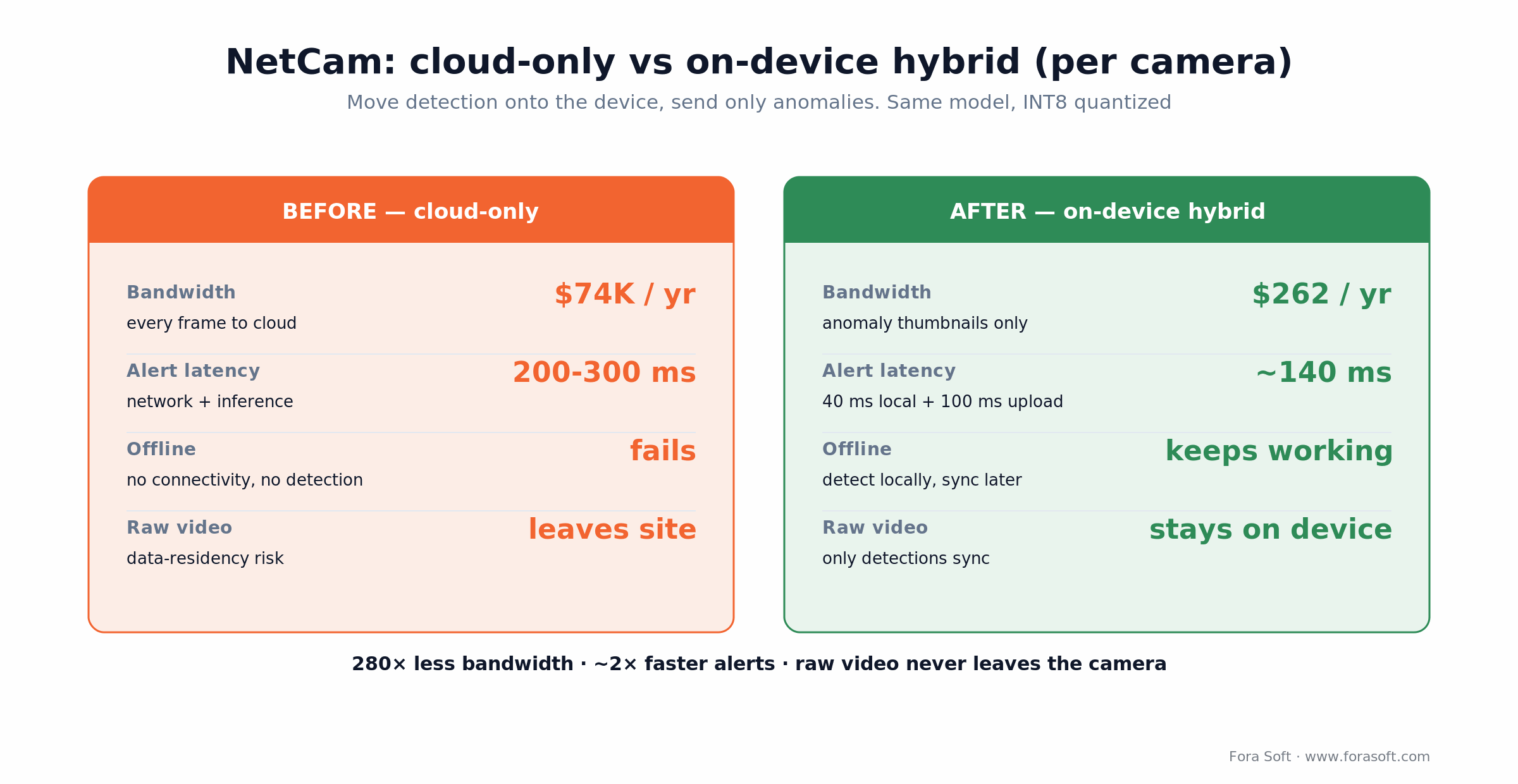
Figure 4. NetCam per-camera economics, cloud-only vs on-device hybrid. Same detector, moved to the edge.
The business outcome: NetCam scales to 50+ cameras per site without bandwidth blowing up, and enterprise buyers (logistics, airports) adopted it because sub-200ms alerts are fast enough for automated response. A cloud-only design couldn’t hit that latency or that price. Want a similar assessment of your own video stack? Book a 30-minute call and we’ll walk the numbers. There’s more on the detection side in our AI video surveillance guide and the deeper AI security camera engineering playbook.
Decision framework: five questions to pick on-device vs cloud
Run any new feature through these five. The more you answer “yes,” the more on-device wins.
1. Is it latency-critical (under 200ms)? If yes, on-device wins — the network alone eats 50–500ms. Detection, landmarks, and pose all qualify.
2. Is the data sensitive (biometric, health, financial)? If yes, on-device is close to non-negotiable, and it makes HIPAA and GDPR cheaper to satisfy.
3. Must it work offline? If yes, on-device is the only option that survives airplane mode and dead zones.
4. Does the model fit (under ~500MB vision, ~2GB LLM)? If yes, on-device is feasible. If not, split it: edge for the latency-critical part, cloud for the rest.
5. Do you control the release cadence? If it’s your app, on-device model swaps are easy (download a new file at startup). If a platform owns the model, lean on Gemini Nano instead.
Three or more “yes” answers point to on-device. Five out of five and it’s mandatory. All “no” and plain cloud inference is the simpler call — take it.
Five pitfalls in production Android ML
1. Accuracy craters on real-world data. Your INT8 model scores 95% on the validation set and 72% on customer photos shot in bad light. The fix: collect 500–1,000 real samples from the actual deployment, measure against them during development, and retrain with augmentation (blur, noise, brightness) if it’s not good enough.
2. Out-of-memory crashes on cheap devices. A 150MB model is fine on a flagship and dies with an OutOfMemoryError on a 3GB phone. Profile on the low tier (a Galaxy A-series, a Redmi Note), and shrink via INT4, pruning, or distillation. Rule of thumb: keep the model under ~30% of target RAM.
3. Silent CPU fallback. You target the NPU, but on an older chip the delegate quietly fails and drops to CPU. Latency jumps from 30ms to 200ms and the UI stutters. Log every delegate decision, test on real target hardware (not just the emulator), and add explicit fallback with timeouts and warnings.
4. No model update strategy. You bundle the model in the APK, then improve it — and shipping the new one now means a full store release and a 1–2 week rollout while old versions run stale. Store models in cache or cloud storage, update silently in the background, version them, and track the active version in prefs. Run every new version through a CI parity check: the same golden inputs on CPU, GPU and NPU backends, with an output-difference threshold, so a delegate bug never reaches users.
5. Battery drain from always-on inference. Pose detection every 100ms in a background service can pull 15–20% battery in an hour, and users notice. Batch inferences, gate them behind an accelerometer motion check, and throttle in low-power mode.
KPIs: what to measure once you ship
Quality KPIs. Track field accuracy against ground truth on a 500-sample set every two weeks, and watch false-positive and false-negative rates separately — the trade between them is a product decision. Set a floor (say, 90% top-1) that triggers a retrain or rollback.
Business KPIs. Watch inference volume, cache hit rate, and latency at p50/p95/p99. A p99 creeping past 200ms usually means delegate failures or device overload, not a modelling problem.
Reliability KPIs. Track OOM crash rate, ANR rate (inference blocking the main thread), and the share of inferences that actually reached the NPU versus falling back to CPU. Wire these to Crashlytics or Sentry and set targets: OOM under 0.1%, ANR under 0.5%, CPU fallback under 20%.
When NOT to ship on-device AI
The model is bigger than the phone. A 13B+ model in higher precision won’t fit in storage or RAM on most devices. Unless you’re targeting a narrow band of 12GB+ flagships, that’s a cloud job.
You retrain constantly. If accuracy drifts daily and you need fresh weights every 24 hours, pushing model updates to every device is a losing race. Cloud inference with a daily refresh is cleaner.
The feature isn’t time-sensitive. A weekly “your top focus areas” digest has no user-visible latency, so there’s no reason to fight device fragmentation for it. Compute it server-side.
You can’t afford device testing. On-device ML means validating across 30–50 device and OS combinations. With a two-person team and a tight deadline, cloud carries less risk. If you want that testing handled, that’s the kind of thing a dedicated development team with its own device lab does as a matter of routine.
FAQ
What is on-device AI on Android?
On-device AI runs a neural network directly on the phone’s CPU, GPU, or NPU instead of a remote server. On Android in 2026 the main stack is LiteRT 2.x for the runtime, MediaPipe Tasks for vision and audio, and Gemini Nano via ML Kit for language. The payoff is privacy (data stays on the device), sub-100ms latency, and offline operation.
What is LiteRT, and is it different from TensorFlow Lite?
LiteRT is Google’s renamed and extended TensorFlow Lite (renamed September 2024). Your .tflite models still load unchanged. The main addition in LiteRT 2.x is the CompiledModel API for hardware acceleration, plus LiteRT-LM for running on-device language models.
Is NNAPI dead? Should I migrate?
NNAPI is deprecated as of Android 15 but still works for backward compatibility. Existing Android 10–14 code keeps running. For anything new, use LiteRT delegates (GPU, Hexagon); moving from an NNAPI delegate to the LiteRT GPU delegate is close to a one-line change.
Which devices support Gemini Nano?
As of October 2026, nano-v4 runs on the Pixel 11 series and Galaxy Z Fold8 / Z Flip8; nano-v3 on Pixel 9 and 10, the Galaxy S26 series, OnePlus 15 and OPPO Find X9; and nano-v2 on phones such as the OnePlus 13 and Xiaomi 15. The ready-made ML Kit tasks also run on Pixel 9–11 and Galaxy S25–S26. Always check availability at runtime and provide a fallback.
How large a model can run on Android?
Vision models run 4–200MB in INT8. Small LLMs land in the low single-digit gigabytes: Gemma 4 E2B is 2.58GB and E4B is 3.65GB in LiteRT-LM, which added Gemma 4 12B in September 2026 for the biggest flagships. Flagships have 8–16GB RAM, budget phones 3–4GB. Keep the model under roughly 30% of target RAM and test on the device tier you actually support.
Is on-device AI free after the download?
Nearly. There are no per-call cloud charges — only device energy (a few milliwatts per inference) and memory. The one-time costs are the model download (roughly $0.01–$0.10 of bandwidth per user) and modest telemetry servers. The main investment is engineering, not runtime cost.
How do I run Whisper speech recognition on Android?
Convert a Whisper model (the C++ port is a common starting point) to LiteRT or ONNX, quantize to INT8 (~75MB for the tiny model), and run it through the LiteRT interpreter or a MediaPipe audio pipeline. Expect 1.5–2× realtime on a flagship. The model must be pre-downloaded, so live transcription on budget phones is a stretch.
Is on-device AI different on iOS?
iOS has Core ML as its runtime and Apple Intelligence for platform GenAI, but the APIs differ from Android’s. For one codebase across both, ONNX Runtime Mobile or LiteRT (which added a Swift package in version 2.3) give you the closest parity. Raw performance is comparable; the tooling and platform-LLM stories are not.
Is the MediaPipe LLM Inference API deprecated?
It is in maintenance-only mode as of 2026: it still works, but Google ships new features and optimizations only in LiteRT-LM and recommends migrating. Start new on-device LLM features on LiteRT-LM and keep MediaPipe Tasks for vision and audio.
Which small LLMs can I run on Android in 2026?
LiteRT-LM officially supports Gemma 4 (E2B, E4B, and 12B since September 2026), Gemma 3n, Gemma3-1B, FunctionGemma, Phi-4-mini, Qwen2.5 and Qwen3-0.6B. Other open models, such as Liquid AI’s LFM family, usually run through llama.cpp with GGUF files; Liquid’s own LEAP SDK is archived and no longer updated.
Which runtime gives the lowest latency on mid-range Android phones?
In our projects, on phones without a usable NPU the LiteRT GPU accelerator usually wins for vision, with ONNX Runtime Mobile close behind for PyTorch exports; keep models INT8 and under about 30% of device RAM. For LLMs on mid-range phones, a 1B-class INT4 model on GPU is the practical ceiling, and anything larger belongs in the cloud.
What to read next
AI Mobile
How to build an AI mobile app: the architecture playbook
End-to-end blueprint for shipping mobile apps with on-device and cloud inference.
Playbook
How to build apps with AI: strategy, tools, hiring, go-to-market
A guide for founders and product teams shipping AI features.
Hiring
Hire a computer vision team: skills, interview rubric, project types
What to look for in a computer vision engineer and how to evaluate them.
Vision
AI video surveillance with YOLO and DeepSORT: tracking and anomalies
How object detection and multi-object tracking power real-time surveillance.
Case Study
AI software development case study: from idea to production
A real example of building and shipping an AI feature for a mobile app.
On-device AI is the new default on Android
In 2022, on-device inference was a flagship luxury. In 2026 it’s the default for anything touching sensitive data, needing sub-100ms latency, or running offline. LiteRT 2.x and MediaPipe Tasks have matured to the point where not using them is the exception, and NPUs from Snapdragon, Tensor, and MediaTek have made INT8 inference several times faster than CPU-only.
The real cost is engineering: quantization, testing across the device tiers, fallback logic, and KPI monitoring after launch. The payoff is a big cost cut at scale, predictable low latency, and compliance that’s far easier to defend.
We’ve shipped on-device AI into production Android apps across surveillance, proctoring, and edge robotics. We know which tools scale, which don’t, and where the gotchas hide. If you’re scoping an on-device feature, we’ve already solved the hard parts.

The book · Volume 6 of 7
AI for Video: A Complete Guide to Intelligence in Video Products: From Models and Inference to Computer Vision, Speech, Search, and Generative Video
Choosing between LiteRT, MediaPipe and Gemini Nano is the first decision; making the model hold up inside a camera app is the longer one. Our AI for Video volume covers that ground: deployment topologies and model artifacts, the ML minimum for product decisions, and computer vision from detection and tracking to segmentation, pose and OCR. It suits Android teams putting live vision features on real devices. Written by Nikolay Sapunov, CEO at Fora Soft.
Read it on Amazon →Kindle & paperback · Fora Soft Video Engineering Handbook
Ready to ship on-device AI the right way?
We’ll pick the runtime, quantize the model, and architect the on-device plus cloud split — with no latency regret.

