

Key takeaways
- Digital video technology is six layers, not one. Frames, colour, bitrate, codec, container, transport. Every quality complaint, latency ceiling and cloud invoice traces back to a decision on one of those six.
- The 2026 codec answer is still a ladder, not a winner. H.264 for reach, AV1 for the modern web (30–50% less bitrate), HEVC for the Apple and TV tier. Apple decodes AV1 only where the silicon does, so Safari coverage sits at roughly 33% of iOS sessions and 24% on macOS.
- AV2 landed on 9 June 2026 and changes nothing yet. AOMedia's own read: about 30% better compression than AV1 on objective metrics (PSNR and VMAF) across a wide range of content types and resolutions, with visual-quality gains expected closer to 40% (AOMedia Video Codec Working Group, 27 July 2026) — and no shipping browser decodes it. It belongs in your 2027 roadmap, not your current scope.
- Codec royalties moved from footnote to line item. Access Advance's 25% HEVC rise applies to anyone licensing after the 30 June 2026 lock-in window, which has now closed; Via LA replaced its $100k AVC streaming cap with tiers reaching $4.5M a year for the largest platforms (Streaming Media, 2026), leaving the old cap only for small ones, and both major pools now list AV1 for content distribution.
- Transport sets your latency floor before you write code. WebRTC and WHIP for sub-second, LL-HLS for 2–5 s at CDN scale, HLS or DASH for 5–15 s, MoQ when you are ready to run infrastructure that is still an IETF draft.
- Where these numbers come from. Fora Soft is a software development company that has shipped video and real-time products since 2005 — 250+ projects, 50 in-house engineers, from BrainCert's 500M+ real-time classroom minutes to TradeCaster's 46,000+ traders and HIPAA telehealth at CirrusMED. Every figure below is one we've had to defend on somebody's invoice.
Digital video is a moving image stored and moved as numbers rather than as a continuous signal. A sensor samples the scene into pixels and frames, a colour model assigns values to each pixel, a codec compresses them, a container wraps them with audio and timing, and a transport protocol carries the result to a player that decodes it. Six layers, six invoices.
Most explainers tell you a video is a series of frames and stop there. That sentence has never once helped anyone decide between AV1 and HEVC, or spot the reason a $40,000 monthly CDN bill is twice what it should be, or catch a vendor who quotes sub-second latency over plain HLS. The gap between “I know what a frame is” and “I can hold my own in a scoping call” is where video projects lose money.
We're Fora Soft. We've built video and real-time communication products since 2005 — 250+ projects with 50 in-house engineers, from BrainCert's virtual classrooms (500M+ real-time classroom minutes as of July 2026) to TradeCaster's trading-desk broadcasts to HIPAA telehealth at CirrusMED. This article is the walk-through we give founders before we quote them: six layers, what each one decides, what it costs in 2026, and where the honest limits are.
Want the textbook version first? Our knowledge base has the definitional deep-dive on sampling, sensors and the analogue-to-digital chain in what is digital video. This page is the buyer's cut: same stack, every layer tied to a decision, a price or a risk.
What is digital video technology?
Digital video technology is the chain that turns light into numbers and numbers back into moving pictures. A sensor samples the scene in space (pixels) and time (frames). A colour model assigns numeric values to each pixel. A codec compresses those values by throwing away what your eye won't miss. A container wraps the compressed video with audio, subtitles and timing. A transport protocol moves it across a network. A decoder on the other end reverses the compression. Six layers, each with its own engineering choices and its own invoice.
Why six and not one blob? Because that's how the decisions actually separate. Frame rate is a product decision. Codec is a cost-and-reach decision. Transport is a latency decision. Mixing them up is how teams end up paying 4K prices for a 720p experience, or promising real-time interaction on a protocol with a five-second floor.
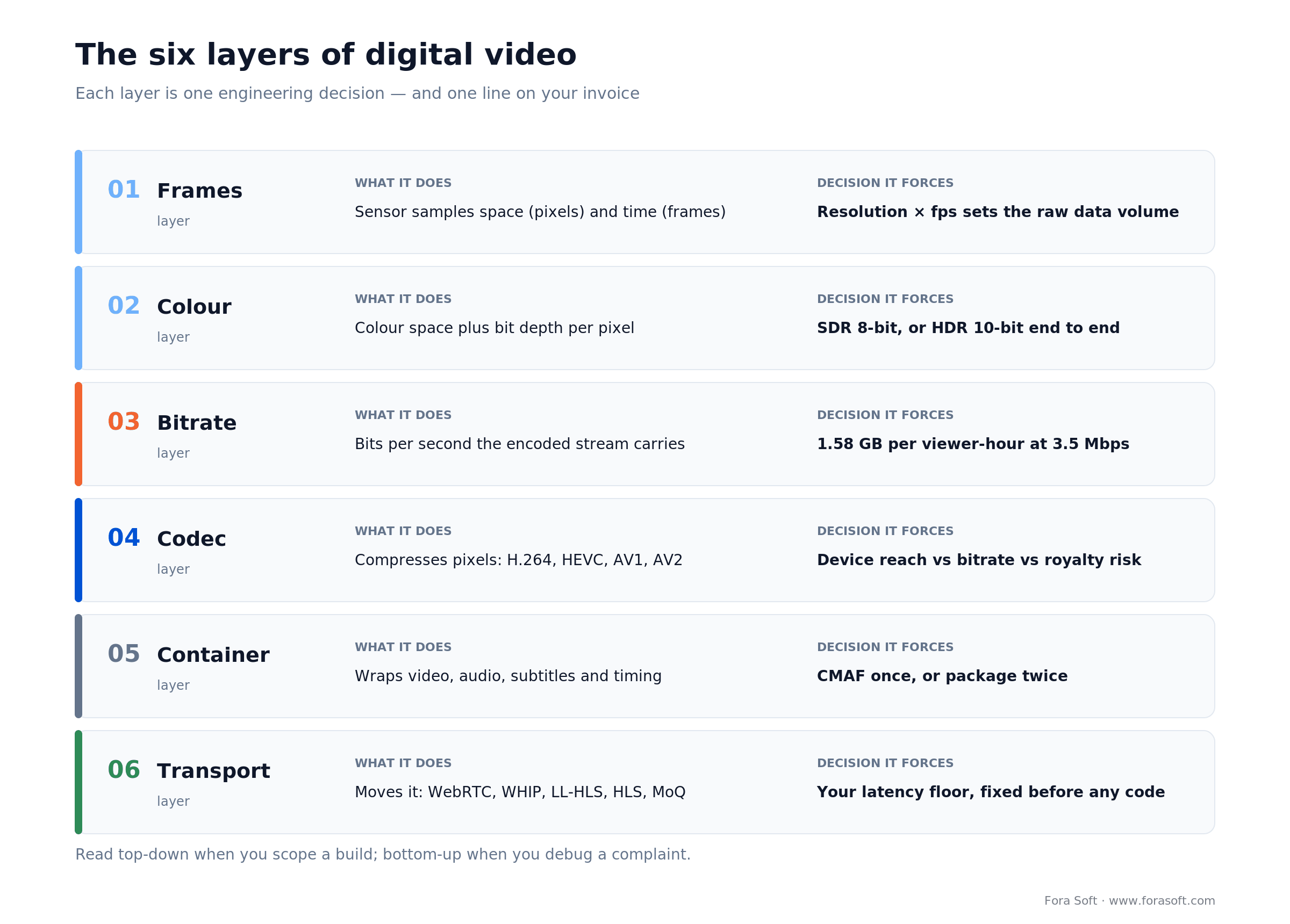
Figure 1. The six layers of digital video, and the one decision each layer forces on you. Read it top-down when you scope; read it bottom-up when you debug.
One number for scale before we start: video was about 75% of all mobile data traffic at the end of 2025, per Ericsson's Mobility Report. Every percentage point you shave off a bitrate ladder compounds across every viewer, every hour, forever.
How analogue becomes digital
Digital video begins as an analogue signal, and three operations turn it into numbers: sampling, quantising and subsampling. A lens focuses light onto a sensor. The sensor samples the scene in space (pixels) and in time (frames). An analogue-to-digital converter quantises each sample into an integer — 8-bit gives 256 levels per channel, 10-bit gives 1,024. Then, before anything is compressed, most pipelines throw away three quarters of the colour detail on purpose, because human vision barely notices. Everything in the six layers above sits on top of those three steps.
What the sensor actually does
Two sensor families do the sampling. CCD shifts charge across the chip to one converter; CMOS converts at each pixel and now wins on cost, power and readout speed in nearly everything you can buy. Both usually sit under a colour filter array — a Bayer mosaic with twice as many green photosites as red or blue — so each photosite records one colour and the other two are interpolated. That's the first reason a cheap 4K sensor doesn't deliver 4K of real detail, and no codec choice downstream recovers it.
The property to test for is shutter. Most CMOS sensors read a frame line by line (rolling shutter), which skews fast horizontal motion and wobbles under vibration; global-shutter sensors expose the whole frame at once and cost more. On surveillance and drone work we've had to specify global shutter outright, because a bent forklift or a wobbling licence plate is a detection failure, not an aesthetic one.
Chroma subsampling: the compression before the codec
Chroma subsampling stores colour at a lower resolution than brightness. 4:4:4 keeps full colour for every pixel. 4:2:2 halves horizontal colour resolution. 4:2:0 halves it in both directions, which drops raw frame size by about half against 4:4:4 before a codec touches it. Practically every delivery ladder on the internet ships 4:2:0, and almost nobody scoping a video product knows it.
It matters in one specific place: fine detail that is defined by colour rather than brightness. Thin coloured text on a coloured background, a red trend line on a dark chart, a surgical field, a green-screen edge for keying. Subsample those and the edges smear. That is why TradeCaster's desktop capture, where the information lives in one-pixel chart lines, is a different encoding problem from a talking head.
Reach for 4:2:2 or 4:4:4 when you capture screens with small text, key against a green screen, or grade footage downstream. Ship 4:2:0 for delivery in every other case — the bandwidth you save buys stability, and viewers cannot see the difference on camera footage.
Interlaced sources and where they still bite
Interlaced video sends half the horizontal lines per field, alternating odd and even, so 1080i carries 50 or 60 fields a second rather than full frames. It was a bandwidth trick for cathode-ray televisions and it should be dead. It isn't: broadcast contribution feeds, older cameras and legacy playout still hand over 1080i, and every modern display is progressive. Something has to deinterlace, and a bad deinterlacer produces combing on motion that no bitrate increase will fix. If any part of your ingest is broadcast, put a real deinterlacer in the pipeline and test it on fast pans, not on a static bar chart.
How the signal reaches your software
Between the camera and the encoder sits an interface, and the choice constrains everything downstream. HDMI is cheap, consumer, and gives up at a few metres. SDI over coax runs hundreds of metres, locks reliably and is what broadcast trucks use. USB/UVC is what webcams and capture dongles speak, so it is what a browser sees. NDI moves video over ordinary Ethernet inside a building at low latency. Beyond the building, ingest becomes a protocol question rather than a cable question: RTMP for legacy encoders, SRT for lossy public networks, WHIP for anything new. Get this wrong and you discover it on site, an hour before a live event.
The display side follows the same logic. HDMI and DisplayPort carry digital video to monitors and video walls; DVI is the legacy digital link you still meet on lab and kiosk hardware; component and composite analogue outputs survive only on old playout gear, and anything you feed from them needs a capture card and a deinterlacer. New broadcast builds increasingly replace cabled SDI with SMPTE ST 2110, which carries video, audio and metadata as separate IP streams over commodity networking — useful to know before you promise a broadcaster a file-based integration.
How we got here, in ten rows
The reason the stack looks the way it does is that each layer was standardised at a different time, by a different group, for a different constraint.
| Year | What landed | Why it still matters |
|---|---|---|
| 1977 | Ampex demonstrates digital video recording | Where the “video is just data” assumption starts — every cost model in this article inherits it |
| 1986 | D-1, the first standardised digital videotape (uncompressed 4:2:2) | 4:2:2 is still the mastering and screen-capture format of choice |
| 1995 | DV and MiniDV: consumer digital video at 25 Mbps | First time compression, not tape, set the quality ceiling |
| 1996 | DVD-Video ships on MPEG-2 at roughly 5 Mbps | Made MPEG-2 universal, which is why MPEG-2 transport streams are still in broadcast and IPTV plumbing |
| 2003 | H.264 / AVC standardised | Still your universal fallback rung 23 years later |
| 2006 | Blu-ray arrives carrying H.264, VC-1 and MPEG-2 | First mass format built on AVC, and the origin of the multi-codec ladder habit you still pay for |
| 2013 | HEVC / H.265 standardised | Bought 4K delivery, brought the patent-pool problem with it |
| 2018 | AV1 1.0 released by AOMedia | The royalty-free branch of the family tree; today's primary rung |
| 2020 | VVC / H.266 finalised | Efficient on paper, almost undeployable in browsers |
| 2026 | AV2 specification 1.0.0 (28 May, announced 9 June) | The next rung, waiting on browsers and silicon |
Frames: resolution and frame rate
Resolution is how many pixels are in a frame; frame rate is how many frames arrive per second. Together they set the raw data volume the rest of the stack has to carry, and they multiply: doubling either roughly doubles the bits before compression.
| Format | Pixels | Where it belongs in 2026 | Rough delivery bitrate (H.264 unless noted) |
|---|---|---|---|
| 720p | 1,280 × 720 | Bandwidth floor, mobile-first apps, surveillance sub-streams | 1–2 Mbps |
| 1080p | 1,920 × 1,080 | The default for conferencing, e-learning, telehealth, most SaaS video | 3–6 Mbps |
| 4K / UHD | 3,840 × 2,160 | Premium OTT tiers, sports, new TV apps, some medical imaging | 12–20 Mbps |
| 8K | 7,680 × 4,320 | Large-format displays and niche capture; rarely worth the bits | 40–80 Mbps with HEVC or AV1; H.264 is impractical at 8K |
Frame rate splits by purpose, not by taste. 24 fps is the cinema convention. 29.97 fps is North American broadcast, a legacy of NTSC colour timing. 25 and 50 fps are the European equivalents. 60 fps is the web, gaming and sports default. 90–120 fps exists so you can slow it down later, or so a headset doesn't make people ill.
Reach for 60 fps when motion carries the information: sports, gameplay, screen sharing with fast scrolling, or a trader's chart updating tick by tick. For talking heads, 30 fps looks the same and typically costs 20–30% fewer bits — measure it on your own content rather than trusting the rule of thumb. We ship 30 fps by default on conferencing and only raise it where the content earns it.
Colour, bit depth and HDR
Colour space defines which colours can be represented; bit depth defines how finely you can step between them. Rec. 709 (ITU-R BT.709) is the standard-dynamic-range HD gamut that almost every app assumes. DCI-P3 is wider and is what most current phones and laptops actually display. Rec. 2020 is the wide-gamut container used for HDR.
Bit depth is the quiet one. 8-bit gives 256 levels per channel. 10-bit gives 1,024. That difference doesn't show up on a test chart — it shows up as banding in a slow gradient, a sunset or a dark studio wall. HDR10 requires 10-bit as a floor under ITU-R BT.2100, which is why HDR and 10-bit travel together in every spec sheet.
Reach for 10-bit HDR when you're delivering premium entertainment, live sport, or archiving master files for editorial. For conferencing, e-learning, telehealth and surveillance, 8-bit SDR is the right answer and the saved bandwidth buys stability. Half-committing is the expensive option: HDR captured and delivered as SDR without tone mapping produces the washed-out, grey-looking playback we get called in to diagnose more than any other quality bug.
Bitrate: the layer that bills you
Bitrate is how many bits per second the compressed stream consumes, and it is the layer where engineering turns into accounting. CDNs bill per gigabyte. Managed platforms bill per delivered minute. Viewers on bad networks bill you in churn.
The conversion is worth memorising, because it turns any bitrate into money in one line: bitrate in Mbps × 3,600 ÷ 8 ÷ 1,000 = GB per viewer-hour. At 3.5 Mbps that's 3.5 × 3,600 ÷ 8 ÷ 1,000 = 1.58 GB per viewer-hour. Multiply by your viewer-hours, look up your CDN tier, and you have a bill.
CBR, VBR and capped CRF
Bitrate is a target, and how you tell the encoder to hit it changes both quality and your peak bandwidth. Constant bitrate (CBR) holds the rate flat, wasting bits on easy shots and starving hard ones, which is exactly what a fixed-capacity contribution link or a satellite path wants. Variable bitrate (VBR) spends where the picture is complex. Capped CRF sets a quality target with a bitrate ceiling — the encoder spends what a scene needs and no more — and it's what per-title ladders actually run in production (see the FFmpeg H.264 and H.265 encoding guides for the exact flags).
The buyer consequence is CDN planning. Pure VBR makes your 95th-percentile egress unpredictable, which is awkward when your commit is negotiated on peaks; capped CRF gives you most of VBR's efficiency with a ceiling you can budget against. If a vendor quotes you an average bitrate without saying which rate-control mode produced it, the number means very little.
One sanity check before you accept any bitrate quote: bits per pixel = bitrate ÷ (width × height × frame rate). At 3.5 Mbps, 1920×1080 and 30 fps that's 3,500,000 ÷ (1920 × 1080 × 30) = 0.056 bpp. Live-action H.264 delivery generally lands around 0.05–0.10 bpp; screen recordings and animation come in cheaper, sport and film grain dearer. Run the same check on a 4K quote: 8 Mbps at 3840×2160 and 30 fps is 8,000,000 ÷ 248,832,000 = 0.032 bpp, which is why that stream looks soft no matter whose encoder produced it. Bits per pixel is the one number that lets you compare quotes across resolutions and frame rates without trusting anybody's adjectives.
Reach for a lower average bitrate first when you're trying to cut video cost. Codec swaps, per-title ladders and smarter caps all attack the same number, and they compound. Renegotiating CDN rates is the slower lever, and it only pays once you're big enough to be worth a call.
Codecs in 2026: H.264 to AV2
A codec is the compression algorithm; in 2026 you ship three of them, not one. Device reach and bitrate efficiency still pull in opposite directions, so the practical answer is a ladder: H.264 for universal fallback, AV1 for the modern web and Android, HEVC for Apple and smart TVs. The player negotiates the best rung it can decode. H.264 is still in production at 79% of teams surveyed for Bitmovin's Video Developer Report (surveyed late 2024), which tells you how long the tail of old decoders really is.
| Codec | Bitrate vs H.264 | Where it wins | Where it breaks |
|---|---|---|---|
| H.264 / AVC | baseline | Decodes on effectively everything; cheapest and fastest to encode; still in production at 79% of surveyed teams (Bitmovin Video Developer Report, 8th edition, surveyed September–December 2024; the 9th edition, published September 2025, leads on cost control rather than restating the figure) | Costs the most in egress; Via LA's new tiered AVC streaming licence hits large platforms hard |
| HEVC / H.265 | 25–50% smaller (JCT-VC verification tests, 2014) | Apple ecosystem, smart TVs, 4K HDR delivery; mature hardware everywhere | Royalty exposure across two pools; Access Advance's 25% rise now applies to all new licensees (lock-in closed 30 Jun 2026) |
| AV1 | 30–50% smaller (MDN web video codec guide, 2026) | Chrome, Firefox, Edge, Android; royalty-free from AOMedia; the 2026 default for the open web | Safari decodes it only on hardware-capable devices; encoding runs ~3.5× single-pass AVC per minute inside MediaConvert's Professional tier, more if your H.264 sits on Basic today |
| VP9 | ~32–35% smaller measured, 30–50% claimed (Nguyen & Marpe, APSIPA 2021) | Legacy YouTube-style stacks; broad browser support | Superseded by AV1; no reason to start here in 2026 |
| VVC / H.266 | ~36% smaller than HEVC in BD-rate terms under JVET common test conditions (Nguyen & Marpe, APSIPA Transactions 2021), ~40% on subjective tests; the standard itself publishes no gain figure and is ITU-T H.266 (2020) | 8K, broadcast-adjacent workflows, some Asian deployments | Almost no browser or device decode; the industry read on 2026 is that VVC shrank while AV1 advanced |
| AV2 | ~30% smaller than AV1 on objective metrics across content types and resolutions; closer to 40% on visual quality (AOMedia, July 2026) | Released 9 June 2026; the successor line for AOMedia stacks | No shipping browser decodes it; encoders, containers and silicon are still in flight |
The Apple asterisk on AV1 matters more than the headline. Apple ships no software AV1 decoder, so Safari plays AV1 only on hardware that has the decode block — iPhone 15 Pro (A17 Pro) and later, M3-and-newer Macs, the M4 iPad Pro. AV1 hardware decode reaches roughly 33% of iOS Safari sessions and 24% of macOS Safari sessions in 2026, measured across the decoder-probe subset of a 1,142,586-session dataset (decoder data starts 14 January 2026), by the WebCodecs Fundamentals codec dataset — one application's traffic, so weight it against your own analytics. Ship AV1 as your primary and you still need the HEVC rung for Apple, not as a nicety but as coverage for most of that audience. Our knowledge base tracks the detail in AV1: where it stands in 2026 and the full matrix in the codec comparison table.
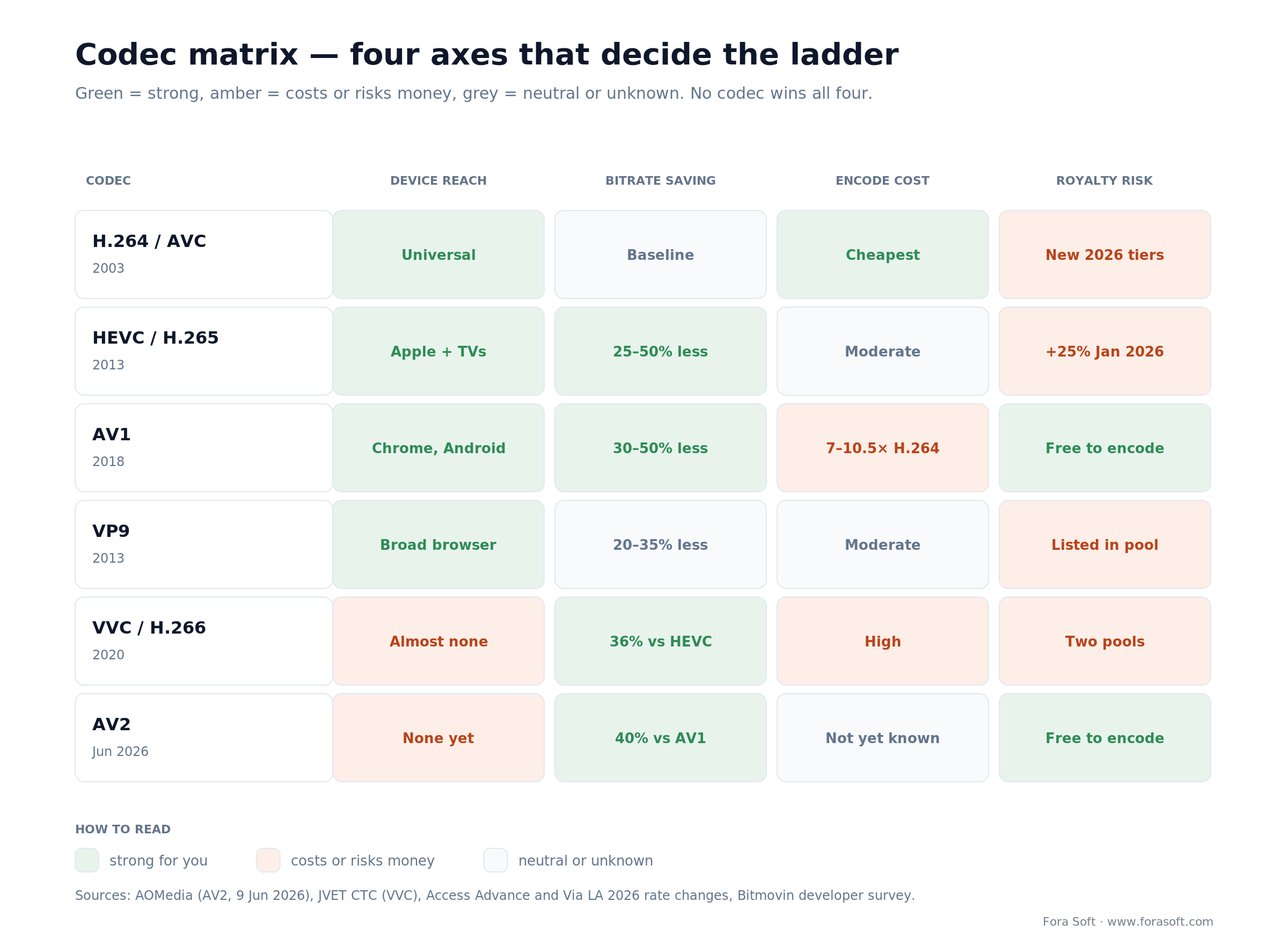
Figure 2. Four axes that actually decide a codec ladder. No codec wins all four — which is why production stacks carry three.
Reach for AV1 as your primary when your audience skews Chrome, Edge, Firefox and Android, and your monthly egress is large enough that 30% of it exceeds the extra encode cost. Below roughly a few terabytes a month, the encode premium and the extra ladder complexity aren't worth it — ship H.264 plus HEVC and revisit.
Codec royalties nobody scopes
Codec licensing stopped being a legal footnote in 2026 and became a budget line. Three things moved at once, and none of them appear in a single general explainer of digital video we could find.
What moved in 2026
First, HEVC got more expensive. Access Advance, the pool administering 29,000+ HEVC-essential patents as of July 2026, raised royalty rates and caps by 25% for licensees signing after 31 December 2025, aligning HEVC pricing with its VVC program. In January 2026 it extended the lock-in deadline to 30 June 2026; that window has closed, so anyone licensing now pays the higher rates while earlier signatories keep theirs through 2030. Second, H.264 followed: Via LA replaced its single-cap AVC streaming licence with a tiered structure for new licences from 2026: as Streaming Media reported, Tier 1 services pay $4.5M a year, Tier 2 $3.375M and Tier 3 $2.25M, with only small or nascent platforms keeping the old $100,000 cap. Anyone holding an active AVC licence at the end of 2025 keeps their original terms. Third, and least expected, AV1 entered the conversation.
That last point needs care, because it's easy to get wrong in both directions. AOMedia still licenses AV1 royalty-free to members and implementers — the encoder and decoder are free, and that hasn't changed. What changed is content distribution: Access Advance's Video Distribution Patent pool covers AV1, VP9, HEVC and VVC, and the Avanci Video program covers the same four plus MPEG-DASH, with rates published in 2026 of 1.6–2.0% of revenue or $0.12–$0.15 per user per month. Neither pool's claims have been settled in court. The practical read for a product team: AV1 is still the cheapest codec to deploy, and “royalty-free” is no longer a sentence you can end a due-diligence conversation with.
When royalties become your problem
Scale sets whether you care. A 100,000-user product at Avanci's published two-technology rate of $0.135 per user per month — the middle of its $0.12–$0.15 band, and a real tier rather than an average — grosses $13,500 a month, or $162,000 a year, against a delivery bill in the same order of magnitude. List is not what you pay — early-adopter discounts and an adjustment that bills only the traffic share on covered codecs cut it — but the exposure is a budget line, not a footnote. An independent 2026 model by Jan Ozer (published methodology, sponsored by Access Advance, so read it with that in mind) put Avanci's royalties at 1.9× Access Advance's for a Paramount-scale service and 30.3× at Meta scale, with Access Advance capped near $72M a year and Avanci publishing no cap as of March 2026.
Reach for a licensing review when you cross roughly 100,000 monthly users, sell subscriptions or run ads on video, and ship HEVC or VVC. Below that, pools rarely come knocking and the engineering decision dominates. Above it, get the codec question in front of legal and finance before you sign a CDN contract — the pools price on users and revenue, not on bytes.
Containers: MP4, CMAF, WebM
A container is the wrapper that keeps compressed video, audio, subtitles and timing in sync. It's not the compression. AV1 lives happily inside both MP4 and WebM; H.264 lives in MP4, MKV, MPEG-TS and more. When someone says “we need MP4”, they've named the box and told you nothing about what's in it.
| Container | What it's for | Notes for 2026 |
|---|---|---|
| MP4 (ISOBMFF) | Downloads, progressive playback, the universal safe default | Plays everywhere; the file format most non-engineers mean when they say “video file” |
| fMP4 / CMAF | HTTP streaming for HLS and DASH from one set of segments | The modern OTT default: encode once, package once, serve both player families |
| WebM | AV1 and VP9 with Opus audio on the open web | Native fit for AV1 on Chrome, Firefox and Edge; not an Apple-first choice |
| MKV | Archival and desktop playback | Great for masters and mezzanine files, not a delivery format |
| MPEG-TS | Legacy broadcast and some ingest paths | The carrier for DVB and ATSC broadcast and most IPTV set-top plant, usually with MPEG-2 or H.264 inside; still standard in contribution workflows, displaced by SRT and WHIP on ingest and by CMAF on delivery |
The one container decision that saves real money: package to CMAF. One segment set feeding both HLS and DASH players halves your packaging storage and removes an entire class of “works on Android, breaks on iPad” bug.
Packaging and codec ladder already in place, results disappointing?
Send us your current ladder, player mix and monthly egress. We'll tell you in 30 minutes where the waste is and what the fix costs — even if the answer is “leave it alone”.
Transport: WebRTC to MoQ
Transport sets your latency floor, and no amount of encoding cleverness moves it. This is the layer where buyers get burned most often, because the protocol names sound interchangeable and their latency profiles differ by two orders of magnitude.
| Protocol | Typical glass-to-glass | Scales to | Use it for |
|---|---|---|---|
| WebRTC (SFU) | 200–500 ms | Thousands per SFU tier, more with cascading | Conferencing, classrooms, telehealth, trading desks, anything interactive |
| WHIP ingest | Adds ~50–150 ms | Ingest side only | Standardised WebRTC ingest — RFC 9725, published March 2025; the replacement for RTMP in new builds |
| WHEP egress | Same as WebRTC | Vendor-dependent | HTTP-style WebRTC playback; still an IETF draft (draft-04, expires Dec 2026) but shipping in Cloudflare Stream (beta) and MediaMTX; OvenMediaEngine ships WHIP on ingest and has WHEP on the roadmap |
| LL-HLS | 2–5 s | Millions via CDN | Sports, betting, auctions, live events that need scale and near-real-time |
| HLS / DASH | 5–15 s | Millions via CDN | VOD and linear OTT where a few seconds don't matter |
| MoQ | Sub-second, in principle | CDN-style relays | The interesting frontier: draft-ietf-moq-transport reached draft-19 on 6 July 2026; Cloudflare runs MoQ relays across its edge as a free tech preview whose implementation still tracks a subset of draft-07, and multiple vendors interopped at NAB 2026 |
| RTMP | 2–5 s | Ingest only | Legacy ingest that every encoder still speaks; keep it as a fallback path, don't design around it |
How LL-HLS reaches 2–5 seconds
LL-HLS earns its numbers with a specific trick worth understanding before you buy it: instead of publishing a whole six-second segment, the packager publishes partial segments as they're produced. Apple's own guidance works through a 200 ms example part against a six-second segment. Two different numbers get confused here, so separate them. The spec rule is about the hold-back: HLS second edition says PART-HOLD-BACK MUST be at least twice the part target duration and SHOULD be at least three times it — that is what sets how far behind live a compliant player sits. The other number is a network fact, not a spec clause: a part shorter than the client's round-trip time just multiplies requests that arrive too late to help. Production deployments run 0.2–0.5 s parts by convention, and on the projects we've shipped it's P95 client RTT, not the packager, that decides whether 200 ms parts survive. Players fetch them incrementally with blocking playlist reloads. Because the spec leans on SHOULD rather than MUST, player behaviour varies — which is why LL-HLS projects need real device testing, not a vendor's latency slide.
MoQ: prototype it, don't launch on it
MoQ is the one to watch and not the one to bet a launch on. It unifies the WebRTC subscription model with CDN-style caching, so in principle you get sub-second latency at HLS scale. In practice it's a moving Internet-Draft with a handful of production deployments. Our engineering read is in the MoQ deep-dive; the short version is that we'd prototype on it today and ship WebRTC or LL-HLS to customers.
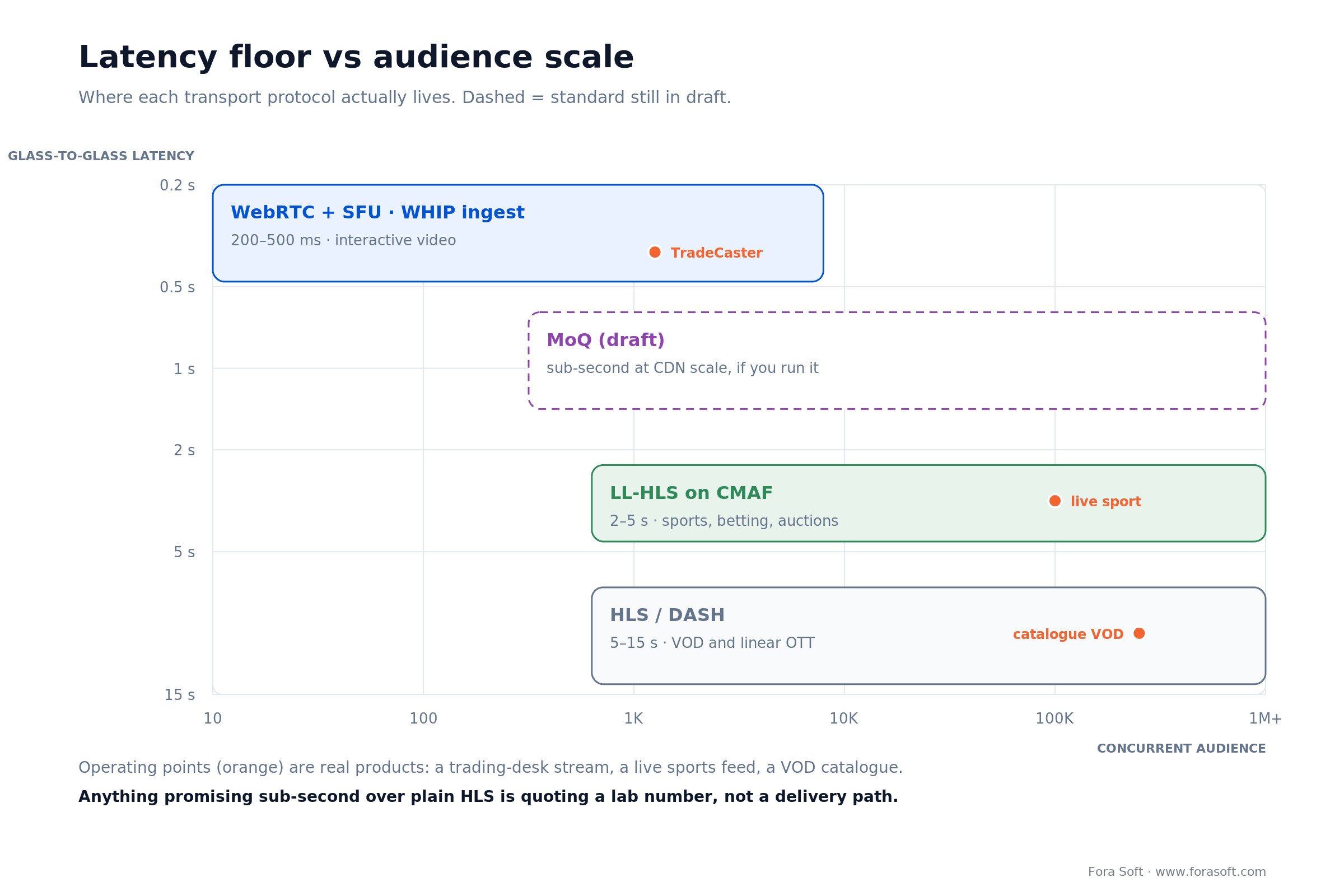
Figure 3. Latency floor against audience scale. Pick the quadrant your product lives in before you argue about codecs.
Reach for WebRTC or WHIP when users interact with what they're watching inside a second: a tutor correcting a student, a doctor reading a scan with the patient on the line, a trader following a live position. Reach for LL-HLS when you need 2–5 s at CDN scale. Reach for plain HLS when nobody will notice ten seconds and you want the cheapest, most boring delivery on earth. Our WebRTC architecture guide covers the SFU sizing maths, and the WHIP and WHEP playbook covers migrating off RTMP.
Adaptive bitrate and per-title encoding
Adaptive bitrate streaming encodes the same content at several qualities and lets the player switch between them as the network moves. A typical OTT ladder is five to seven rungs, from a 240p lifeboat to a 1080p or 4K top rung. Without ABR, every viewer on a weak connection buffers; with it, they get a softer picture and keep watching.
Per-title encoding is the refinement that pays for itself. One fixed ladder wastes bits on a static interview and starves a fast-cut action scene, because the optimal bitrate depends on the content. Netflix published the receipts for its per-shot approach: at equal VMAF quality, the Dynamic Optimizer cut bitrate by 28.04% for x264, 33.51% for x265 and 37.61% for VP9 (Netflix Technology Blog, 2018). Netflix's own framing is roughly 20% from per-title and 30% from per-scene (per-title encode optimization).
You don't need Netflix's infrastructure to get some of this. Mux, Bitmovin and AWS Elemental all ship content-aware encoding as a checkbox. The catch is compute: per-title analysis means encoding candidate ladders before you pick one, so your transcode bill rises while your egress bill falls. The trade only works when egress dominates — which it does for catalogues, and doesn't for a low-traffic archive.
Reach for per-title encoding when your catalogue is a few hundred hours or more with varied motion, and egress is a bigger line than transcode. Below that, a fixed five-rung ladder is honest engineering, and the money is better spent on the codec ladder.
Worked example: AV1 egress over a year
Numbers beat adjectives, so here's the whole calculation with the arithmetic showing. Take a mid-size streaming product: 100,000 monthly active viewers, 6 hours each per month, average delivered bitrate 3.5 Mbps across the ABR ladder (most sessions don't sit on the top rung — assuming they do is how cost models end up double reality).
- Viewer-hours. 100,000 × 6 = 600,000 viewer-hours per month.
- GB per hour. 3.5 × 3,600 ÷ 8 ÷ 1,000 = 1.575 GB.
- Monthly egress. 600,000 × 1.575 = 945,000 GB, i.e. 945 TB.
- Apply the CDN ladder. CloudFront's 2026 US/EU rates are $0.085/GB for the first 10 TB, $0.08 for the next 40 TB, $0.06 for the next 100 TB, $0.04 for the next 350 TB and $0.03 for the next 524 TB. Two details people miss: the first 1 TB a month is free (the table below ignores it — it moves the total by $85), and the tiers count per edge region, so a globally split audience reaches the cheap tiers slower than a single-region model suggests.
| Tier | H.264 — 945,000 GB | H.264 cost | AV1 at −30% — 661,500 GB | AV1 cost |
|---|---|---|---|---|
| First 10 TB @ $0.085 | 10,000 GB | $850 | 10,000 GB | $850 |
| Next 40 TB @ $0.08 | 40,000 GB | $3,200 | 40,000 GB | $3,200 |
| Next 100 TB @ $0.06 | 100,000 GB | $6,000 | 100,000 GB | $6,000 |
| 150–500 TB @ $0.04 | 350,000 GB | $14,000 | 350,000 GB | $14,000 |
| 500 TB–1 PB @ $0.03 | 445,000 GB | $13,350 | 161,500 GB | $4,845 |
| Monthly total | 945,000 GB | $37,400 | 661,500 GB | $28,895 |
| Annual | — | $448,800 | — | $346,740 |
AV1 at a conservative 30% saving takes $8,505 a month off the bill — $102,060 a year, about 23%. At the 40–50% end of AV1's range the saving is larger, but we quote 30% because that's what mixed real-world catalogues deliver.
The transcode cost, honestly
Now the cost side, with the same arithmetic showing. A 5,000-hour catalogue is 300,000 minutes of content, and MediaConvert bills per output rendition — so what follows prices one AV1 rendition per source minute. Multiply by your rung count for a full ladder. MediaConvert bills normalised minutes, and AV1 is Professional-tier only and carries a 7× multiplier at HD against 2× for single-pass AVC in the same tier — about 3.5× per minute like for like. If your H.264 runs on the cheaper Basic tier today, the jump is bigger than that, because Professional's per-minute rates are higher as well. AV1 is also excluded from reserved pricing entirely. 300,000 × 7 = 2,100,000 normalised minutes, billed at $0.0120 for the first 50,000, $0.0096 for the next 950,000 and $0.0072 after that: $600 + $9,120 + $7,920 = $17,640 one-time at 1080p. Treat that as a floor and price your exact job in AWS's calculator — multipliers move with quality mode and frame rate. At 4K the multiplier doubles to 14× and the pass runs about $32,760. Against $8,505 a month saved, payback lands between two and four months, and the saving keeps running after that.
Reach for the AV1 migration when your annual egress spend is comfortably into six figures and your player mix is Chrome- and Android-heavy. If more than half your audience is Safari on older Apple hardware, the coverage gap eats the saving and HEVC is the better second rung. We run this exact model against real player analytics before recommending either — the streaming platform cost breakdown has the full build-side numbers.
When not to build your own pipeline
Most products should not build a video pipeline. We say that as the company you'd pay to build one. Managed platforms have got good enough that custom infrastructure only wins in specific conditions, and scoping a build when a $150-a-month API would do is a waste of your runway.
| Option | List price, July 2026 | Where it wins | Where it breaks |
|---|---|---|---|
| Cloudflare Stream | $5 / 1,000 min stored + $1 / 1,000 min delivered (published pricing, July 2026) | Flat pricing, no resolution tiers, encoding included; simplest VOD maths in the market | Limited control over ladders and packaging; not a fit for bespoke real-time topologies |
| Mux | encoding free on basic, ~$0.031 / encoded min at 1080p on plus + ~$0.001 / delivered min at 1080p, first 100k delivered min free | Best-in-class analytics and per-title encoding, strong live features | Per-minute and per-resolution, so 4K delivery costs 3.2× 1080p; and you're renting someone else's opinions about video |
| AWS (MediaConvert + CloudFront) | From ~$0.015 / min encode + tiered egress | Cheapest at volume, full control, negotiable egress | You own the operational burden: packaging, DRM, monitoring, failover |
| Custom (WebRTC / SFU / WHIP) | Engineering time + infrastructure | Sub-second latency, unusual topologies, on-prem or sovereign hosting, no per-minute meter | Real ops cost; wrong choice if video is a feature rather than the product |
Don't build when video is a feature and your differentiator is elsewhere; when you're under roughly a few hundred thousand delivered minutes a month; when you have no one on the team who will own an SFU at 3am; or when your latency target is above two seconds and a CDN plus LL-HLS already clears it. Build when the video behaviour is the product, when per-minute pricing has crossed your engineering cost, when compliance forces your media into your own infrastructure, or when you need a codec ladder no managed vendor will run for you.
Not sure whether to build or buy?
We'll model both against your real numbers — viewer-hours, latency target, compliance constraints — and tell you which one we'd choose and why. If the answer is “buy Cloudflare Stream and call us in a year”, we'll say that.
What changed in digital video in 2026
Five things changed in digital video between 2024 and 2026: WHIP became a published standard (RFC 9725, March 2025), AV2 shipped on 9 June 2026 with no browser decode yet, HEVC royalties rose 25% for new licensees once the June 2026 lock-in closed, MoQ reached credible pilots on draft-19, and Twilio Programmable Video's shutdown was reversed. If your architecture notes date from 2024, those five have moved underneath them.
| What changed | When | What to do about it |
|---|---|---|
| WHIP became a published standard | RFC 9725, March 2025 | Default new ingest to WHIP; keep RTMP as a fallback for third-party encoders |
| AV2 released | Spec 1.0.0 on 28 May 2026, launch 9 June 2026 | Track it, don't scope it — no browser decodes AV2 yet; revisit in 2027 |
| Codec royalties repriced | HEVC +25% for new licensees, lock-in closed 30 Jun 2026; new tiered AVC streaming licence for 2026 | Put licensing in the codec decision, not after it; review before a CDN contract |
| MoQ reached credible pilots | draft-ietf-moq-transport revised 6 July 2026 (draft-19) | Prototype if sub-second at CDN scale is your moat; ship WebRTC or LL-HLS to customers |
| Twilio Programmable Video was not shut down | EOL reversed 21 Oct 2024 | If you migrated in a panic, fine; if you're still on it, there's no forced deadline |
That last row deserves a flag, because the internet is still full of “Twilio Video dies in December 2026” posts — including, until this rewrite, an earlier version of this article. Twilio announced the end-of-life on 5 December 2023 with a 5 December 2024 shutdown, extended that date by two years to 5 December 2026 in March 2024 — which is where the “December 2026” posts come from — then reversed it on 21 October 2024. Programmable Video remains a standalone, supported product accepting new accounts. There are still good reasons to move off it, and we wrote a migration guide for teams that want to; a hard deadline isn't one of them.
Case study: sub-second trader streaming
The situation. TradeCaster is a live streaming platform for stock traders: viewers watch a trader's actual desktop (charts, orders, positions) and copy the strategy while it happens. As of July 2026 it carries 46,000+ users on $99–$119 monthly subscriptions. The product only works if the stream is genuinely live. A five-second delay on a chart is not a slightly worse experience; it's a different, useless product, because the trade has already moved.
What the layers decided. Latency ruled out HLS in the first conversation, which meant WebRTC with an SFU, which meant designing for screen content rather than faces: text-heavy desktop capture punishes low bitrates far more than a talking head does, so the ladder is built around legibility rather than smoothness. Load is the second constraint — a trading audience arrives within a minute of the opening bell, so the media tier auto-scales on schedule as well as on load, and streamers with 100+ concurrent viewers get monetisation features that assume that spike is normal.
The result. Sub-second desktop streaming that holds up through market-open spikes, with TradingView charts overlaid and public and private rooms on the same media infrastructure. The founder has earned over $500K live on stream, which is a stricter quality bar than any synthetic test we could have written. On our own KPI table below we hold builds to sub-0.5% rebuffer ratio and under 1.5 s join time; we don't publish per-client QoE dashboards, but we will walk you through the measured numbers for a comparable build on a call. If your product has a similar “must be live or it's pointless” property, that's the conversation to book with us — it changes the architecture, not just the settings.
The counterexample from the same portfolio: Mangomolo, an OTT platform doing over a billion streams a month and 30M+ daily viewers for 50+ publishers — Discovery Networks MENA, Dubai Media Incorporated's Awaan, SABC+ in South Africa — where nobody needs sub-second anything. There we built a Wowza module for SCTE-35 ad-marker detection and server-side ad insertion, because at that scale the money is in monetisation and CDN efficiency, not latency. Same six layers, opposite answers on almost every one. Our OTT platform playbook and live streaming guide cover those two shapes in detail.
Five questions that expose a video vendor
Use these in a scoping call. A partner who has shipped video answers all five without prep; one who hasn't will generalise, and you'll be paying for their education.
- What codec ladder would you ship for our audience, and why? Good answer names rungs and reasons: “AV1 primary, HEVC for Apple because Safari decodes AV1 only on recent Apple silicon — M3-and-newer Macs, iPhone 15 Pro and later, H.264 baseline for the long tail.” Bad answer: “we'd use the latest codec.”
- What's our latency floor, and which protocol sets it? Good answer ties a number to a protocol and to your use case. Anyone promising sub-second over plain HLS is either confused or hoping you are.
- Show me the egress maths at our viewer count. Good answer does the GB-per-viewer-hour conversion out loud and applies your CDN's actual tiers. Bad answer: “CDN costs are minimal.”
- What's our codec royalty exposure? Good answer knows the HEVC increase now applies to every new licensee since the June 2026 lock-in closed, and that AV1 now appears in distribution pools. Most vendors don't know this; the ones who do have been paying attention to more than the encoding docs.
- What would you not build for us? Good answer talks you out of something: per-title encoding on a small catalogue, 4K on a conferencing product, a custom SFU when Cloudflare Stream would do. A vendor who wants to build everything you mention is selling hours, not judgement.
Five pitfalls we keep auditing
Five failures we keep finding when we audit somebody else's video pipeline. Every one of them traces to a layer confusion.
- H.264-only in 2026. Simple, universal, and it leaves money on the table every month. Because CDN tiering means the savings all come out of your cheapest tier, a 30% bitrate cut lands as only a ~23% bill cut — $37,400 becomes $28,895 in the worked example above. That is still $102,060 a year. Multi-codec encoding is a solved problem; staying single-codec is a decision to keep paying.
- Protocol chosen after the product promise. Someone sells “real-time interaction”, engineering ships HLS, and the gap gets papered over with UI tricks. Pick transport when you write the spec, not when you write the player.
- Top-rung bitrate used for cost modelling. Budgets built on a 1080p top rung at 6 Mbps when real sessions average 3.5 Mbps come in wildly wrong: sometimes high, which is fine, sometimes low, which isn't. Model the ladder average, from analytics.
- Half-committed HDR. HDR captured, SDR delivered, no tone mapping, and every viewer sees grey mush. Either take HDR end to end or stay on Rec. 709 SDR and look correct.
- Licensing discovered after launch. HEVC and VVC live in patent pools that price on users and revenue. Finding that out during a funding round's diligence is a bad day that a one-hour review before launch would have prevented.
KPIs for a video pipeline
If you measure only one thing, measure rebuffer ratio. Here's the set we instrument on delivery projects, and the thresholds we hold ourselves to — these are our own engineering targets, not an industry standard, so calibrate them against your own baseline before you put them in a contract.
| KPI | What good looks like | Why it matters |
|---|---|---|
| Rebuffer ratio | < 0.5% of playback time | The quality number we treat as top-line: viewers forgive a soft picture, they don't forgive stalling |
| Startup time (join time) | < 1.5 s to first frame | The first thing a viewer judges; on our delivery projects it's what moves abandonment on the player screen |
| Glass-to-glass latency | Matches the promise made in your UI | Interactive products live or die here |
| Average delivered bitrate | Trending down at constant VMAF | Proof your codec and ladder work is landing |
| Egress cost per viewer-hour | Trending down quarter on quarter | The finance-legible version of the metric above |
| Playback failure rate | < 0.2% of sessions | Catches codec and DRM coverage gaps by device |
Pair the bitrate and cost metrics deliberately. Cutting bitrate while VMAF holds is engineering; cutting bitrate while VMAF falls is just shipping a worse product with a nicer invoice.
Decision framework: what to pick
Pick transport first, then the codec ladder. Sub-second interaction means WebRTC or WHIP into an SFU; 2–5 s at CDN scale means LL-HLS on CMAF; cheapest at scale means HLS or DASH on CMAF with AV1 primary and H.264 fallback; 8K or broadcast-adjacent means HEVC or VVC and a hardware conversation. Four questions, in this order, resolve most video architectures in an afternoon.
| Your priority | What to pick | What it costs you |
|---|---|---|
| Interaction under 1 s | WebRTC + SFU, WHIP ingest, WHEP or native playback | Ops complexity; per-viewer server cost instead of flat CDN |
| 2–5 s at massive scale | LL-HLS on CMAF via CDN | Real device testing; player behaviour varies by implementation |
| Cheapest delivery at scale | HLS or DASH on CMAF, AV1 primary, tiered CDN | 5–15 s latency; AV1 encode premium up front |
| Fastest time to market | Cloudflare Stream or Mux | Per-minute pricing that grows with success; limited control |
| Compliance or sovereignty | Self-hosted media (on-prem or single-region cloud) | You own uptime, scaling and the pager |
| Lowest legal risk | H.264 + AV1, skip HEVC and VVC | Larger files on Apple devices; some smart-TV coverage gaps |
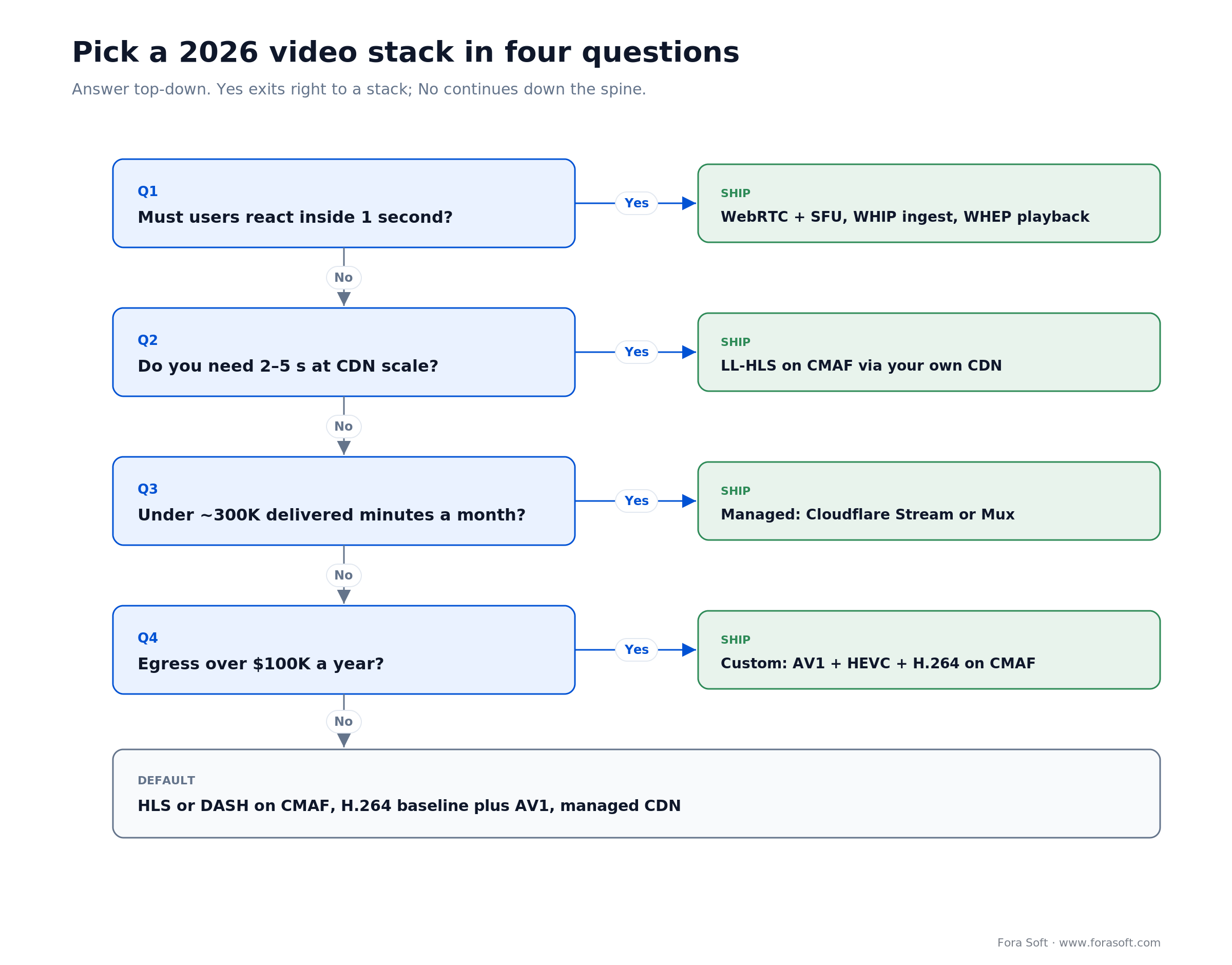
Figure 4. The same four questions as a tree. Start at the top; the leaf you land on is a stack, not a shopping list.
If your answers land in two different rows, you have two products in one codebase — which is fine, but scope them as two media paths, not one compromise. That's the point where a 30-minute call with people who've built both saves a quarter of engineering: our video and streaming engineering team does this scoping every week, and our LiveKit versus Agora cost analysis shows the shape of the numbers when the answer is a managed SFU.
FAQ
What is digital video technology in simple terms?
Digital video technology is the six-layer chain that turns light into numbers and numbers back into moving pictures: a sensor samples the scene into pixels and frames, a colour model assigns values to each pixel, a codec compresses those values, a container wraps the compressed video with audio and subtitles, a transport protocol moves the file or stream across a network, and a player decodes it. Every product decision in video — quality, latency, cost, device reach — lands on one of those six layers.
Which video codec is the right default in 2026?
Ship H.264 as the universal fallback, AV1 as the modern primary for web and Android, and HEVC for the Apple and smart-TV tier. AV1 saves 30–50% bitrate against H.264 in published codec comparisons, and browser vendors document the same order of gain (MDN web video codec guide), but Apple decodes it only on hardware-capable devices, so you still need the HEVC rung. AV2 was released on 9 June 2026 and measures about 30% below AV1 on objective metrics in AOMedia's own tests, but no browser decodes it yet, so plan for it in 2027, don't scope it today.
Is AV1 really royalty-free?
AOMedia licenses AV1 royalty-free to its members and implementers, and that has not changed. What changed is the other side: Access Advance's Video Distribution Patent pool and the Avanci Video program both list AV1 among the codecs they license for content distribution (alongside VP9, HEVC and VVC). So the encoder is free; whether a large distributor gets a royalty invoice for the content is now a legal question, not a technical one. Budget for legal review at scale, not for a licence fee on day one.
What's the difference between a codec and a container?
The codec compresses the pixels (H.264, HEVC, AV1). The container is the file wrapper that keeps the compressed video, the audio track, subtitles and timing metadata in sync (MP4, WebM, fMP4/CMAF, MKV). The same codec can sit in several containers: AV1 ships inside both MP4 and WebM. “MP4 video” describes the box, not the compression.
What latency can I actually promise users?
With WebRTC or WHIP ingest plus an SFU, 200–500 ms glass-to-glass is realistic for conferencing and trading-desk streams. Low-Latency HLS lands at 2–5 s in production while keeping CDN scale. Standard HLS or DASH sits at 5–15 s. Anything that quotes sub-second over a plain CDN without WebRTC or MoQ is quoting a lab number.
How much does video delivery cost per viewer-hour?
At an average delivered bitrate of 3.5 Mbps, one viewer-hour is about 1.6 GB. On CloudFront's 2026 US/EU ladder that is roughly $0.13 per hour in the first 10 TB tier, about $0.063 per hour in the 150–500 TB band and about $0.047 per hour above 500 TB a month. Managed platforms price differently: Cloudflare Stream charges $1 per 1,000 delivered minutes regardless of resolution, which works out to $0.06 per viewer-hour flat.
Do I need 4K, HDR and 10-bit for my product?
Usually not — 1080p SDR 8-bit is the right default for most products. Conferencing, telehealth, classrooms and surveillance are well served by 1080p SDR 8-bit, and the bandwidth saved buys you a more stable stream. 4K HDR 10-bit earns its cost in premium entertainment, sports and a handful of medical-imaging cases. A mismatched HDR pipeline (HDR captured, SDR delivered without tone mapping) produces washed-out playback, which is one of the most common quality complaints we get asked to audit.
Should I build a video pipeline or buy a managed platform?
Buy while your differentiator is the product around the video; build when the video behaviour itself is the differentiator or when per-minute pricing crosses your engineering cost. Managed platforms are cheap up to a few hundred thousand delivered minutes a month and get expensive fast beyond that. Custom pays back when you need sub-second latency, unusual codec ladders, on-prem or sovereign hosting, or you are large enough that egress is a negotiated line item.
What is per-title encoding and is it worth it?
Per-title (and per-shot) encoding tunes the bitrate ladder to the content instead of applying one fixed ladder to everything. Netflix published the numbers for its Dynamic Optimizer: at the same VMAF score, bitrate dropped 28.04% for x264, 33.51% for x265 and 37.61% for VP9. It is worth it once your catalogue is large enough that a percentage of egress exceeds the extra compute — roughly from a few hundred hours of varied content upward.
Written and fact-checked by the Fora Soft video engineering team, last updated 30 July 2026. Corrections and disagreements are welcome — email us and we'll fix the page.
What to read next
Architecture
WebRTC Architecture for Business in 2026
SFU sizing, cascading and the server maths behind sub-second video.
Budgets
Streaming Platform Development Cost
What a video build actually costs, broken down by stage and scope.
Ingest
WHIP & WHEP: Replace RTMP in Your Stack
The 2026 migration path off RTMP, with the standards status straight.
Latency
Low-Latency Real-Time Video Streaming
How to hit and hold sub-second glass-to-glass in production.
OTT
OTT Platform Development Guide
Tech stack, CDN maths and costs for a Netflix-shaped product.
How to decide your video stack in one pass
Decide a video stack in four ordered questions: the latency users need, the audience scale, the delivered-minute volume, and the licensing exposure — transport first, codec ladder second, container third. Six layers, four questions, one architecture. We've been making these calls since 2005 across 250+ projects: classrooms, telehealth, surveillance, OTT, trading floors. The expensive mistakes are always the same three: wrong transport for the promise, single codec for the budget, and licensing discovered late. Bring us your use case and we'll tell you which layer will bite you first.
Let's scope your video stack properly
Thirty minutes with engineers who've shipped this: codec ladder, transport, build-versus-buy verdict and a fixed-range estimate. If your best move is a managed platform, we'll tell you that too.

