


Key takeaways
• Seven metrics cover 95% of WebRTC quality problems. A useful WebRTC test tracks bitrate, FPS, packet loss, RTT, jitter, freeze ratio and audio–video sync continuously via getStats(), not sampled in the UI.
• Thresholds you can hold a team to. Packet loss < 1% green, 1–5% yellow, > 5% red. RTT < 150 ms green, 150–300 ms yellow, > 300 ms red. Freeze ratio < 1% green, > 10% unshippable.
• Four test layers, not one. Local dev probe (chrome://webrtc-internals) → manual QA (StreamTest) → automated load (webrtcperf / Loadero / CyaraRTC) → production telemetry (your own getStats pipeline + RUM).
• Impair the network on purpose. tc/netem profiles for 50 ms/1% loss (home Wi-Fi), 150 ms/3% loss (4G on a train) and 300 ms/5% loss (congested mobile) will expose 80% of the bugs users will ever file.
• Buy the SaaS or build the pipeline — pick on volume. Under 50 load-test runs a month, CyaraRTC (formerly testRTC) or Loadero is cheaper. Above that, a self-hosted webrtcperf or Selenium-grid rig on spot instances usually costs less.
Updated October 2026: new five-minute quick-test section, KITE flagged as archived (December 2023), CyaraRTC naming and Loadero 2026 tiers, Hamming 2026 voice-agent latency data, Firefox and Safari stats checks.
More on this topic: read our complete guide: WebRTC in Android: SDKs, Capture, Compose UI (2026).
Why Fora Soft wrote this playbook
Fora Soft has shipped WebRTC video and streaming products since 2005 — 250+ projects, from telemedicine platforms regulated under HIPAA to concert-grade live streaming with 10,000 concurrent viewers. On Worldcast Live we hold sub-500 ms glass-to-glass latency for a 1.5 Gb/s HD concert feed. On Speed.Space we run 25-way 1080p/8 Mbps video rooms for Netflix, HBO and EA with zero downtime windows. On CirrusMED we serve 1,500 active patients across 40+ U.S. states on a HIPAA-compliant WebRTC stack.
Every one of those products lives or dies by the same question: how do you prove, numerically, that the call is good? This playbook is the exact method our QAs, SREs and delivery leads use — the metrics, the tools, the thresholds, the scripts, and the trade-offs between rolling your own rig and buying a hosted platform. Read it end-to-end the first time; after that it is the reference you keep open in a second tab when a customer says “the video froze”. Want the upstream fundamentals? Our video streaming course covers the protocols these metrics measure.
If you already know you need help turning this into a working test pipeline on your own codebase, our WebRTC engineering team and video & audio streaming development service do this on a fixed scope. Otherwise, keep reading.
Need a second pair of eyes on your WebRTC quality pipeline?
30 minutes on the call, our lead WebRTC engineer, your getStats dump. Walk out with a prioritized list of what is actually wrong.
How to run a quick WebRTC test in five minutes
Short answer: a quick WebRTC test checks three things in order: can the browser get the camera and microphone, can it find a working network path through STUN and TURN, and how good the media is once the call is up. The first two take a minute in a browser tester; the third needs a live call and getStats().
1. Devices and browser support. Open the official WebRTC getUserMedia sample. If you see yourself, permissions and the camera work.
2. Network path. Paste your STUN and TURN servers into the Trickle ICE sample and press Gather. You want host, srflx and relay candidates; no relay candidate means users behind strict firewalls will fail to connect. For an end-user pre-call check, a hosted tester such as Cyara qualityRTC or a built-in call like Daily’s testCallQuality() measures RTT, jitter and loss before the user joins.
3. Live call quality. Start a call between two tabs or two devices and read chrome://webrtc-internals (or right-click the video with StreamTest). Compare the seven metrics below against the thresholds table.
4. Bad network (optional, about 10 more minutes). Repeat step 3 under one of the tc/netem profiles further down. Most bugs users report only appear here.
| Test type | Question it answers | Typical tools | Time |
|---|---|---|---|
| Connectivity test | Can this browser and network connect at all? | WebRTC samples (getUserMedia, Trickle ICE), a pre-call tester | 1 minute |
| Stream quality test | Is the call good enough to ship? | chrome://webrtc-internals, StreamTest, getStats() |
5–15 minutes |
| Load test | Does the SFU hold N users? | webrtcperf, Loadero, CyaraRTC | Hours, nightly |
| Monitoring (RUM) | Is it good for real users right now? | Your own getStats pipeline, watchRTC | Always on |
| Leak test | Does WebRTC expose my IP behind a VPN? | Privacy checkers | 1 minute; privacy, not quality |
If those four steps show a problem you cannot pin down, our WebRTC quality assurance and consulting review starts from the same webrtc-internals dump and names the layer where the call breaks: client, network path, TURN or SFU.
What “quality” actually means in a WebRTC stream
Quality in WebRTC is never a single number. Your user’s perception is a blend of intelligibility (can I understand the speaker), presence (does the call feel live), and stability (does it stay good for an hour, not just the first 30 seconds). Each maps onto a different subset of the underlying stats.
Intelligibility is dominated by audio packet loss, jitter, and the codec in use (Opus at 32 kbps is already very good; below 16 kbps quality collapses fast). Presence is about round-trip time (RTT) and audio–video sync — above 300 ms RTT, humans start interrupting each other and the call feels like a walkie-talkie. Stability is the long tail: freeze count, bitrate oscillation, and how often the encoder has to drop resolution because the CPU can’t keep up.
Testing stream quality well means mapping every business complaint (“the call was laggy”) onto the quantitative metric that would have caught it. That map is what the rest of this article gives you.
Rule of thumb: if a user opens a ticket saying “the video is bad”, your post-mortem should answer which of the seven metrics crossed which threshold at what timestamp. If it can’t, your telemetry is incomplete.
The seven metrics that actually matter
Ninety-five percent of WebRTC quality problems show up in seven numbers, all readable through the RTCPeerConnection.getStats() API. Everything else is diagnostic detail.
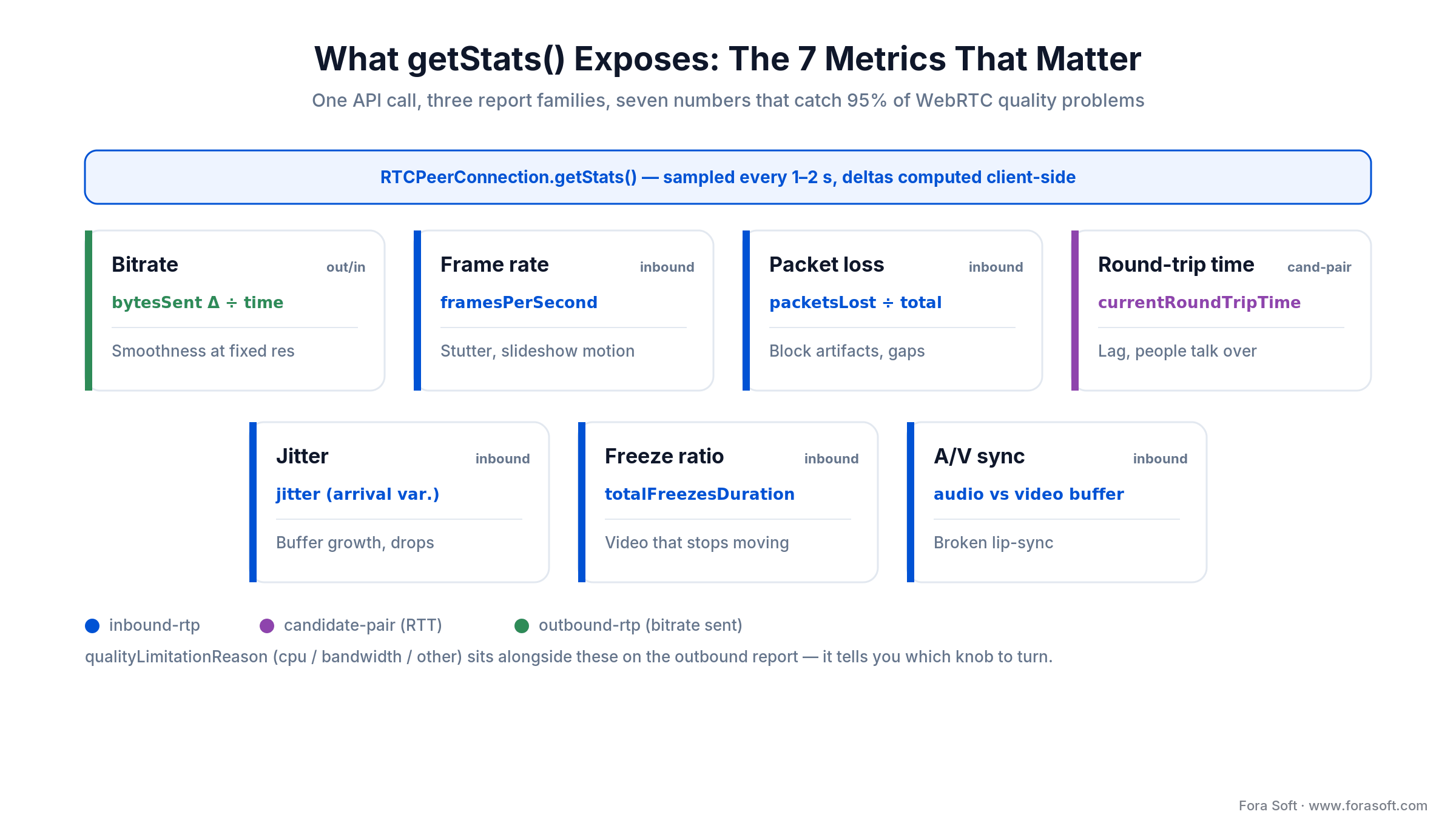
Figure 1. The single getStats() call and the seven numbers it exposes, grouped by report family.
Bitrate (Kbps)
Derived from bytesSent / bytesReceived deltas divided by the timestamp delta. The smoothness of the picture scales almost linearly with bitrate once resolution is fixed. For VP9 at 720p you need roughly 800 Kbps to look good; for H.264 on the same resolution, roughly 1.2–1.5 Mbps. Chrome’s AV1 encoder cuts video-conferencing bitrate 30–40% versus VP9 — Google says a call can hold on a link as slow as ~30 Kbps — at a real CPU cost until hardware encode is common.
Frame rate (FPS)
Read framesPerSecond on the inbound video report. Below 15 FPS the motion looks stuttery; below 10 FPS the brain parses it as a slideshow. If qualityLimitationReason on the outbound side reports "cpu" while FPS falls, the sender’s encoder is the bottleneck, not the network.
Packet loss (%)
Calculated as packetsLost / (packetsLost + packetsReceived). Under 1% is inaudible and invisible thanks to NACK and FEC. Between 1% and 5% you see block artifacts and hear small gaps. Above 5% the decoder starts requesting key frames aggressively (pliCount climbs, with firCount in SFU setups) and users notice.
Round-trip time (RTT, ms)
Available on the selected candidate pair as currentRoundTripTime. Under 150 ms conversation feels instant. At 300 ms humans start overlapping turns. Above 500 ms the call is effectively half-duplex.
Jitter (ms)
Smoothed mean deviation of RTP packet inter-arrival time (RFC 3550), reported as jitter. Up to 30 ms the jitter buffer absorbs it. Between 30 and 100 ms, the buffer grows and adds latency. Above 100 ms audio starts concealing and time-stretching samples to catch up (concealedSamples and removedSamplesForAcceleration rise).
Freeze ratio (%)
Freezes are the QoE metric users notice first. The W3C WebRTC statistics API (Candidate Recommendation Draft of 25 September 2025, still the current version in October 2026) exposes freezeCount and totalFreezesDuration, and defines a freeze precisely: any gap between two rendered frames longer than the larger of 3× the average frame time or the average plus 150 ms (MDN). Divide duration by session length to get the ratio. A production-grade call sits under 1%. Above 10% the call is unshippable. MDN still marks freezeCount as not Baseline (2026): Chromium reports it, other engines may not, so feature-detect before you compare browsers. The same W3C draft also defines totalCorruptionProbability and corruptionMeasurements for detecting corrupted video frames; treat them as experimental for now.
Audio–video sync (ms)
Compare the average jitter-buffer delay (jitterBufferDelay / jitterBufferEmittedCount) on the audio and video inbound-rtp reports of the same participant. Under 100 ms divergence is imperceptible; 100–200 ms feels “a bit off”; over 200 ms users flag it as lip-sync broken.
Red / yellow / green thresholds you can hold a team to
These thresholds are the ones we ship in our dashboards. They are synthesized from the W3C WebRTC stats spec, Google’s congestion-control papers, ITU-T G.107 (E-Model), and what our own users actually complain about. Use them as defaults; tighten them for healthcare, broadcast, and interpreter use cases.
| Metric | Green | Yellow | Red | Typical cause when red |
|---|---|---|---|---|
| Packet loss | < 1% | 1–5% | > 5% | Congested uplink, flaky Wi-Fi, TURN-relay overload |
| RTT | < 150 ms | 150–300 ms | > 300 ms | Wrong region, forced TURN, trans-oceanic relay |
| Jitter | < 30 ms | 30–100 ms | > 100 ms | Cellular radio, bufferbloat, coffee-shop Wi-Fi |
| FPS (video in) | ≥ 24 | 15–24 | < 15 | Sender CPU-limited, or decoder dropping frames |
| Freeze ratio | < 1% | 1–10% | > 10% | Bursty loss, TURN flap, hardware acceleration bug |
| Bitrate (720p VP9) | 700–1200 Kbps | 400–700 Kbps | < 400 Kbps | BWE throttled, simulcast layer dropped |
| A/V sync delta | < 100 ms | 100–200 ms | > 200 ms | Different jitter buffers on audio vs video |
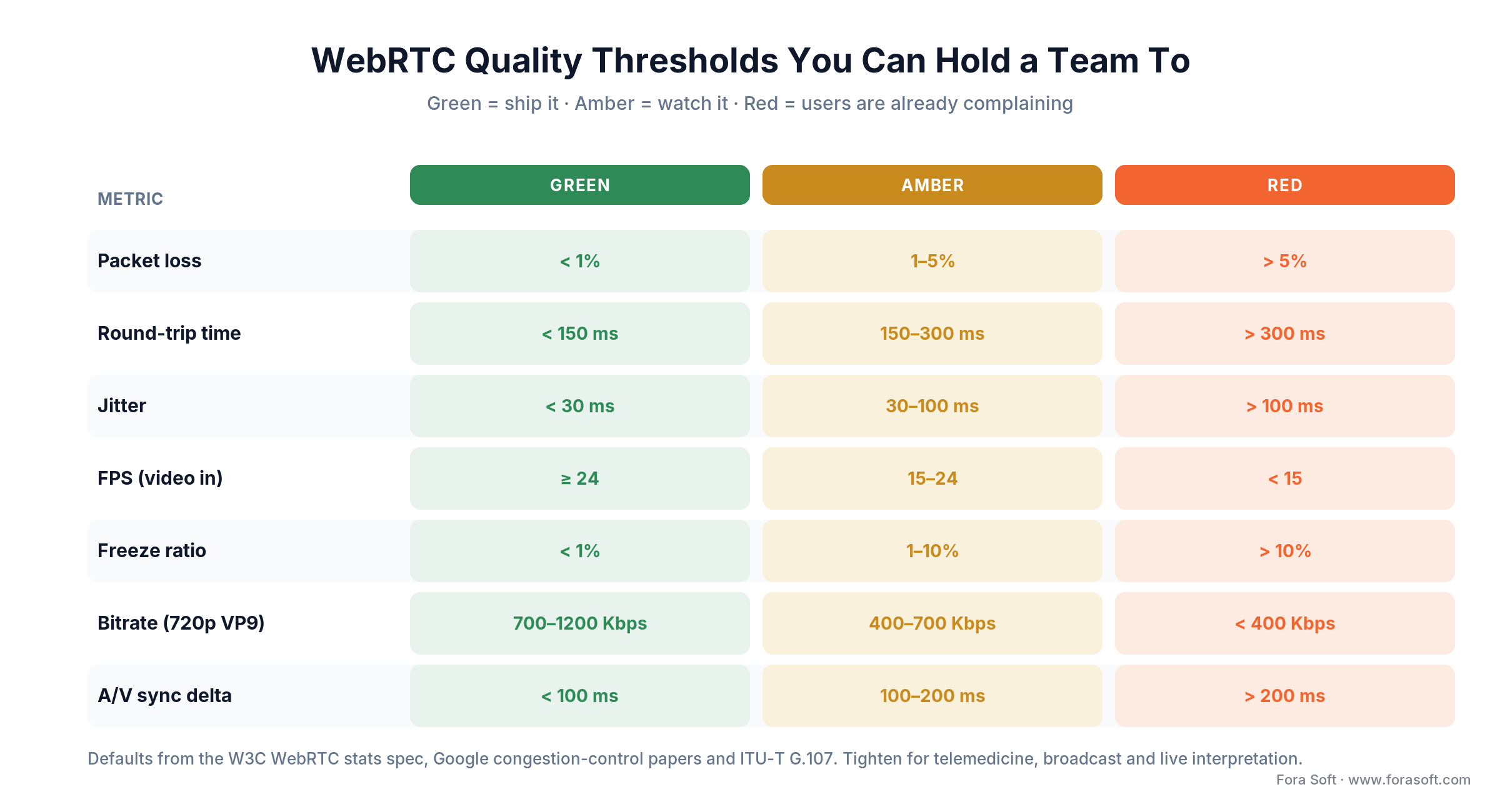
Figure 2. The same thresholds as a traffic-light matrix — ship, watch, or users are complaining.
Reach for tighter thresholds when: your use case is telemedicine (RTT < 200 ms, loss < 2%), live interpretation (A/V sync < 60 ms), or broadcast (freeze ratio < 0.1%).
Where to read the numbers: chrome://webrtc-internals
Before you write any telemetry, use what’s already in the browser. Open a new tab to chrome://webrtc-internals while a call is active. You get four report families, each with live time-series graphs:
1. Candidate-pair reports. The active path between peers — selected pair is highlighted. Watch currentRoundTripTime and availableOutgoingBitrate. If the selected pair flips from srflx to relay, you just went through TURN and RTT will spike.
2. Inbound-RTP reports. One per remote track. Pay attention to framesDecoded, framesDropped, packetsLost, jitter, and the freezeCount / totalFreezesDuration pair.
3. Outbound-RTP reports. One per local track. qualityLimitationReason is the single most diagnostic field Chrome emits — it tells you whether the bottleneck is cpu, bandwidth, other, or none. qualityLimitationDurations breaks that down by seconds.
4. API trace. Every PeerConnection method call and every event, in order. Essential when you need to figure out why renegotiation fired or why an ICE candidate was rejected.
There is a “Create Dump” button at the top that saves everything into a JSON file. Hand that file to a developer and they can reconstruct the entire call without being on the machine. In our post-mortems we ask customers to capture dumps before, during and after the incident. 70% of the time the root cause falls out of the diff.
Not on Chrome? Edge has the same page at edge://webrtc-internals. Firefox uses about:webrtc: expand the RTCPeerConnection and RTP Stats sections, use Copy Report for a JSON snapshot or Save Page for a full HTML dump; per-call history needs media.aboutwebrtc.hist.enabled on release builds (Mozilla docs). Safari has no equivalent page, so on Safari read getStats() from your own code.
// A minimal getStats probe you can paste into a DevTools console
// on a live call. Expose your RTCPeerConnection first, e.g. window._pc = pc.
// Prints the core metrics every 2 seconds.
const t0 = performance.now();                       // call start
setInterval(async () => {
  const pc = window._pc;                            // your RTCPeerConnection
  const stats = await pc.getStats();
  let inV, outV, pair;
  stats.forEach(r => {
    if (r.type === 'inbound-rtp'  && r.kind === 'video') inV  = r;
    if (r.type === 'outbound-rtp' && r.kind === 'video') outV = r;
    if (r.type === 'transport' && r.selectedCandidatePairId)
      pair = stats.get(r.selectedCandidatePairId);
  });
  console.log({
    rtt_ms:       pair && pair.currentRoundTripTime * 1000,
    jitter_ms:    inV  && inV.jitter * 1000,
    packet_loss:  inV  && inV.packetsLost / (inV.packetsLost + inV.packetsReceived),
    fps:          inV  && inV.framesPerSecond,
    freeze_ratio: inV  && inV.totalFreezesDuration / ((performance.now() - t0) / 1000),
    limitation:   outV && outV.qualityLimitationReason,
  });
}, 2000);
getStats() in production: building your own telemetry
chrome://webrtc-internals is a developer tool. For real users you need the same data streamed to a backend. The pattern is the same on every product we ship:
1. Sample every 1–2 seconds. Faster than that is noise. Slower and you miss short freezes.
2. Compute deltas client-side. Send bitrate (kbps), not raw bytesSent. The browser has the context to compute it; your ingest pipeline does not.
3. Batch and compress. 2 seconds of stats per user × N users per call × 1000 calls a day gets expensive. Batch 30-second windows, gzip, and send over WebSocket or a dedicated beacon endpoint.
4. Tag everything with a session id and a platform fingerprint. Browser + version, OS, hardware decode availability, region, TURN/STUN server used, codec negotiated. Without tags you cannot segment a regression.
5. Store time-series in ClickHouse, TimescaleDB, InfluxDB or a SaaS. We use ClickHouse on most projects because the query patterns (“show me p95 RTT for the last 7 days by region”) are columnar by nature and a single box handles hundreds of millions of stat points a day.
6. Alert on the experience metrics, not the raw ones. Alerting on “packet loss > 2%” fires every time someone’s Wi-Fi blips. Alerting on “p95 freeze ratio across a room > 3% for 3 minutes” only fires when something real is wrong.
Reach for client-side delta computation when: you have any meaningful user base. Storing raw bytesSent monotonic counters wastes 3–5× storage and makes every downstream query a self-join.
How to compute MOS for audio and video
Raw metrics are engineer-facing. The business wants one number per call: the Mean Opinion Score (MOS), a 1–5 rating that correlates with what a human would say after the call. There are two accepted paths.
Audio MOS — ITU-T G.107 E-Model. The canonical formula takes delay, loss and codec impairments and returns an R-factor between 0 and 100, which maps to MOS on a 1–5 scale (the narrowband E-model tops out near 4.4; ITU-T G.107.1 covers wideband codecs such as Opus). Open-source rtcscore implements it cleanly from getStats output. A production call should hold MOS above 4.0; anything under 3.5 is unacceptable for business use.
Video MOS — logarithmic regression. For video, ITU-T P.1203/P.1204 cover adaptive streaming and G.1070 covers videophone planning, but none is a drop-in model for live WebRTC signals. The common approach is a regression over bitrate, resolution, FPS and codec efficiency, calibrated to subjective tests. Some teams use VMAF-based models offline; for live signals rtcscore has a reasonable default. Calibrate against your own users once a quarter.
Combined MOS. Weight audio 60/40 over video for conversational products (call centre, telemedicine), 40/60 for content-watching products (webinars, sports). Report the blended MOS on your exec dashboard and keep the raw audio/video scores one click away.
Want MOS on your dashboard by end of next sprint?
We wire up getStats → ClickHouse → Grafana with audio & video MOS as routine delivery. Three weeks end-to-end on most stacks.
The four layers of a WebRTC quality test plan
A complete WebRTC testing strategy stacks four independent layers. Skip one and a category of bugs reaches production.
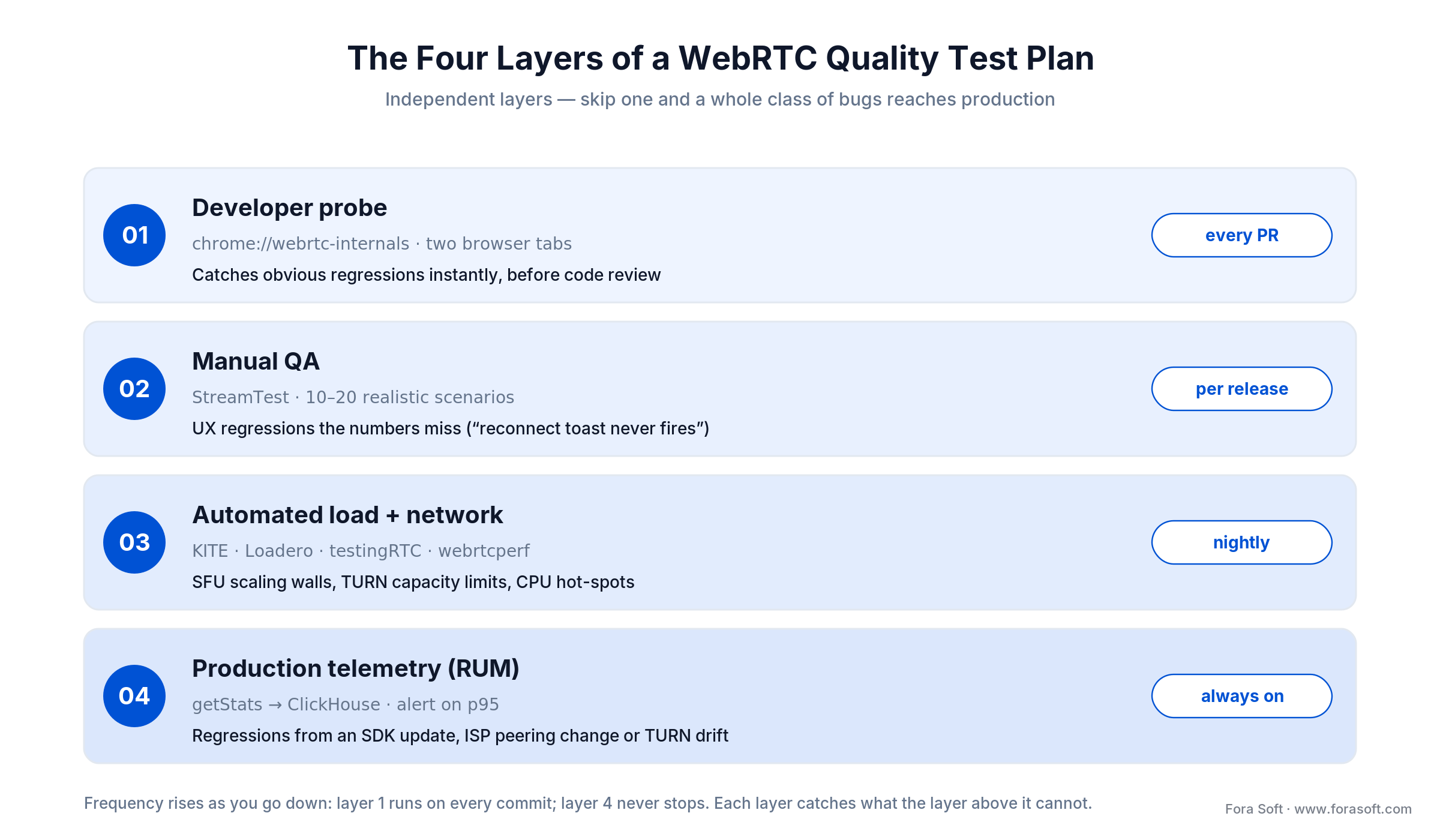
Figure 3. Four independent layers, from every-PR dev probe to always-on production telemetry.
Layer 1 — Developer probe. One engineer, two browser tabs, chrome://webrtc-internals. Runs on every PR. Catches stupid bugs instantly.
Layer 2 — Manual QA. A QA engineer reproduces 10–20 realistic scenarios using StreamTest or an equivalent extension. Done before each release. Catches UX regressions that numbers alone miss (“the reconnect toast never fires”).
Layer 3 — Automated load and network testing. webrtcperf, Loadero, CyaraRTC or a self-hosted Selenium grid spin up 100–10,000 fake clients under realistic network conditions. Runs nightly or before a major release. Catches SFU scaling bugs, TURN capacity limits, CPU hot-spots.
Layer 4 — Production telemetry. getStats samples from every real user, funnelled into ClickHouse, alerting on p95. Always on. Catches regressions introduced by a third-party SDK update, a regional ISP peering change, or a TURN server that silently began to drop packets.
Manual QA in the browser: StreamTest and friends
For any QA who doesn’t write code in their day job, the fastest way to read a WebRTC call is a browser extension that surfaces getStats in human-readable form. StreamTest is our in-house pick — free, Chrome-only, zero configuration. Our step-by-step StreamTest guide walks through every screen and the ten problems it names.
Right-click a participant’s video in Chrome 116+, pick Test stream, and StreamTest 2.0 watches that one received stream second by second. A compact panel shows seven metrics (frame rate, video and audio delay, packet loss, resolution, freezes and bitrate), each green, yellow or red against a fixed threshold. When something breaks, it names one of ten problems (bandwidth drop, video freeze, page jank, connection path change, reconnection, upload limited, audio stutter, audio/video out of sync, blurry picture, slow start) with a start time, a severity, a likely cause and what to check.
For the bug report, a Timeline lines up bitrate, frame rate, loss and delay on one time axis, a Mark button flags the second a tester saw the glitch, and the Report adds percentiles and a comparison with the previous run on the same site. Copy summary puts the verdict and key numbers on the clipboard, and the JSON or CSV export carries every per-second sample plus both SDPs. Nothing leaves the browser.
If there’s no WebRTC connection behind the video you clicked (an HLS player, your own camera preview), StreamTest says so in a clean error, so QA can sanity-check that the extension is seeing what they think it’s seeing.
Alternatives worth knowing
Cyara watchRTC embeds a widget into your own app and is the right path if you want users to self-report a bad call. Fippo’s webrtc-stats library on npm gives you a programmatic version of the same data if you want to build your own dashboard.
Load testing at scale: KITE, Loadero, Cyara testRTC, webrtcperf
Functional tests pass at N=1. Your users break at N=500. Load testing is where you discover that your SFU handles 200 publishers fine but the subscriber path collapses at 1,000, or that the TURN server has a 5,000-session hard limit in its config that nobody remembers setting. The four tools below cover the full cost spectrum.
KITE (open source, archived since 2023)
Created by CoSMo Software, open-source on GitHub, written in Java, scriptable in JavaScript. Drives real Chrome/Firefox/Safari/Edge instances across a Selenium grid. Ships with WebRTC-specific checks out of the box. The catch in 2026: the repository was archived on 11 December 2023 and is read-only, so nothing gets fixed for new browser versions. Where a client already owns a KITE grid we keep it running (2,000-client runs on AWS spot cost us under $15 each), but new rigs start on webrtcperf or a Selenium/Playwright grid of our own. Best when you already have it and need multi-browser interop.
Loadero (SaaS, premium)
Point and click. Selenium-based, scriptable in JS / Java / Python. Real Chrome and Firefox across regions. Injects fake camera and microphone tracks, applies network profiles, gives you waterfall charts and per-client getStats. Pricing is compute-unit based. As of October 2026, pay-as-you-go plans carry a monthly base from $250 (Essential) or $375 (Ultimate) plus per-unit usage, and the monthly subscription is $399 with 10,000 compute units included, then $0.045 per unit; one unit is half a CPU core plus 1 GB RAM per participant, and the 14-day trial includes 100 units. So a few hundred clients for a short run stays in the low hundreds of dollars. Sweet spot for teams with no SRE bandwidth.
Cyara testRTC, now CyaraRTC (SaaS, enterprise)
Formerly testRTC; in 2026 Cyara sells it as one platform, CyaraRTC, built from testingRTC for scripted load and stress, watchRTC for real-user monitoring you embed in your own app, and qualityRTC for pre-call network diagnostics. The most polished QA-first option: scripted scenarios, screen-sharing tests, cross-browser interop, SLA monitoring. Enterprise-tier pricing (per-seat subscription plus per-run credits). Pick it when the business wants a vendor it can escalate to and you have the budget.
webrtcperf (open source, lightweight)
Node.js + Puppeteer, single repo, runs anywhere Docker runs. Designed for SFU benchmarking — LiveKit, Janus, mediasoup, Jitsi. 100–500 clients on a single mid-size EC2 instance. No UI, all config-file driven. When you just need to answer “does my new SFU build hold 500 publishers”, this is the fastest way.
Reach for KITE when: you already run a KITE grid and cross-browser interop matters; it is archived, so do not start a new rig on it. Reach for Loadero when: you need results this week and don’t want to own infrastructure. Reach for Cyara when: the compliance and account-management story matters more than the price. Reach for webrtcperf when: you just need to beat up your SFU.
Tools compared
| Tool | Best for | Scale | Pricing model | Key limitation |
|---|---|---|---|---|
| StreamTest | Manual QA, live debugging, support triage | 1 received stream | Free | Desktop Chrome 116+ only, one stream at a time |
| KITE | Cross-browser interop on an existing grid | Sized by your grid | Open source + your infra | Archived Dec 2023; high ops overhead |
| Loadero | QA-friendly load runs | Low thousands | Compute units, from $250–$399/mo | Cost scales with session-minutes |
| CyaraRTC (testRTC) | Enterprise QA + RUM widget | Tens of thousands | Per-seat subscription + credits | Heavier onboarding |
| webrtcperf | SFU benchmarking | 100–500 per node | Open source + your infra | No UI, config-only |
| Your own getStats + ClickHouse | Real-user monitoring | Unlimited | Storage & egress only | Build time (2–4 weeks) |
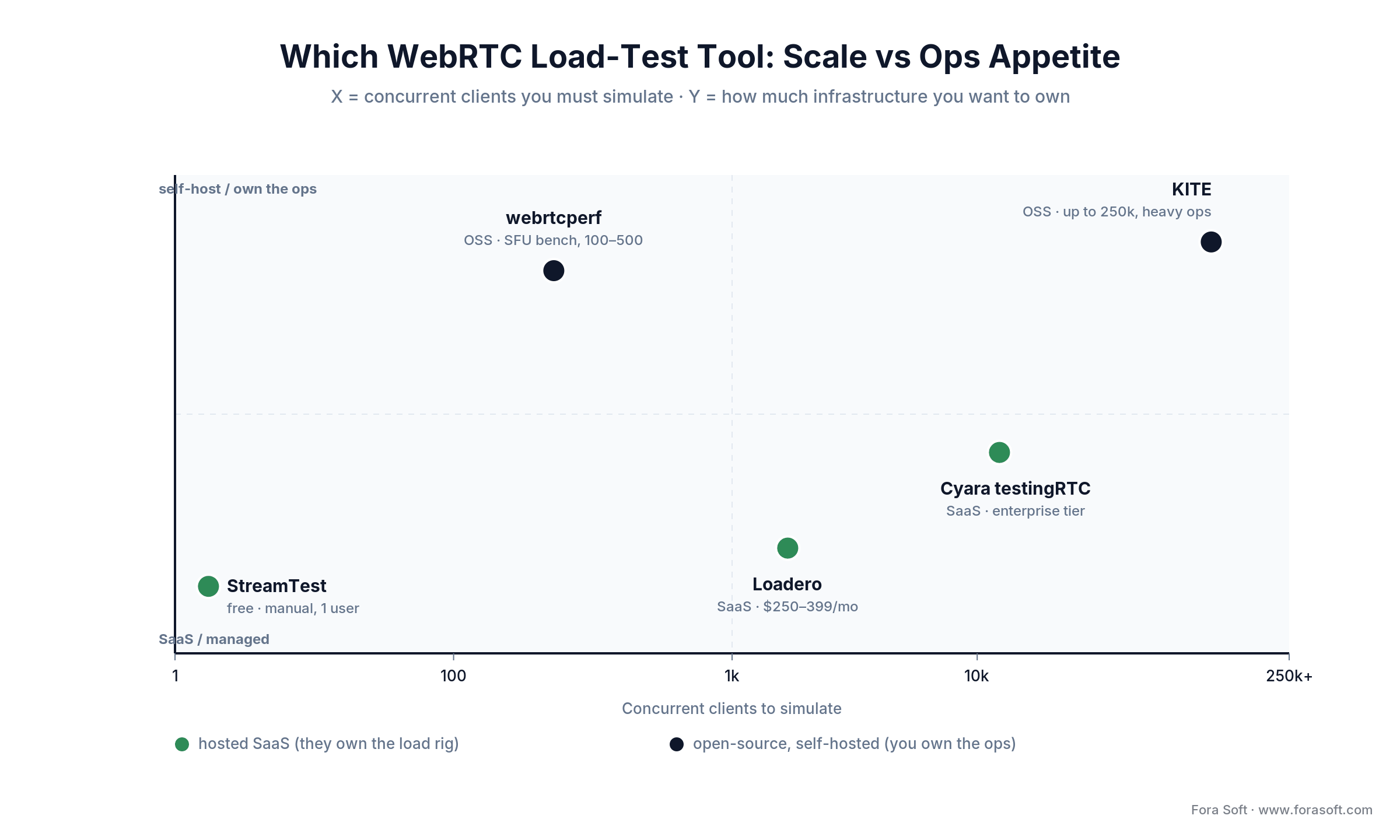
Figure 4. Pick a load-test tool by the scale you must simulate and how much infra you want to own.
Network impairment: tc/netem scenarios that break WebRTC
Testing on office Wi-Fi proves almost nothing. Your users are on hotel Wi-Fi, 4G on a train, tethered hotspots in cafes, and the occasional 10-year-old DSL line. You need to simulate bad networks deliberately. Linux tc with the netem qdisc is the standard instrument.
# netem shapes egress only: the delay below is added once per round trip.
# Profile 1 — home Wi-Fi  (+50 ms RTT, 1% loss, 10 ms jitter)
sudo tc qdisc add dev eth0 root netem delay 50ms 10ms loss 1%

# Profile 2 — 4G on a train (+150 ms RTT, 3% loss, 40 ms jitter, 1 Mbps cap)
sudo tc qdisc add dev eth0 root netem delay 150ms 40ms loss 3% rate 1mbit

# Profile 3 — congested mobile  (+300 ms RTT, ~6% bursty loss, Gilbert-Elliott model)
sudo tc qdisc add dev eth0 root netem delay 300ms 60ms loss gemodel 2% 30%

# Clean up after
sudo tc qdisc del dev eth0 root
We run every release through all three profiles on CI before merge. On Loadero the same profiles are click-apply; on webrtcperf they are a one-line config. Large jitter values also reorder packets, which is a useful stress case in itself. The goal is not to make the call perfect under 5% loss. The goal is to know exactly how it degrades and whether the degradation matches the thresholds you published to the business.
Synthetic monitoring vs real-user monitoring
These two observability modes answer different questions. Ship both.
Synthetic monitoring runs scripted fake users against your infrastructure every N minutes. It is proactive: the alert fires before a real customer hits the bug. It is deterministic: the same path every time, so a regression shows up as a metric step change. Downsides: it covers only the paths you scripted, and it cannot reproduce the weirdness of a real user’s home network.
Real-user monitoring (RUM) passively collects getStats from every production call. It is reactive: you learn about an issue after real people hit it. But the sample is the real world: every browser, every OS, every ISP, every TURN region. RUM is where you discover that Safari 16 on iOS 17.4 has a specific pathological packet-loss pattern, because only RUM sees that slice at volume.
The cheap combo is Loadero or CyaraRTC for synthetic plus your own getStats pipeline for RUM. The expensive combo is Cyara for both — their watchRTC widget and their scripted scenarios share a dashboard.
How to test WebRTC voice AI agents
Voice AI agents move the goalposts. A LiveKit or Pipecat agent can be correct as code and still fail as a call — text-only evals never touch the audio path, the barge-in logic, or the round-trip a caller actually feels. So test the agent the way a user meets it: over a real WebRTC connection, under the same bad networks as everything else.
The metric that decides whether an agent feels human is time-to-first-word (TTFW) — the gap from the caller finishing their turn to the first syllable of the reply. Under 300 ms it feels human; 300–600 ms is sluggish but usable; past 600 ms callers slip back into touch-tone habits; past 1.5 s hang-ups climb. Hamming’s production benchmark (January 2026) puts median end-to-end latency at 1.5–1.7 s, p90 near 3 s and p99 at 8–15 s. There is real headroom to win by measuring it.
Layer the tests the same way you would for any WebRTC product, then add three agent-specific checks. Measure TTFW and turn-taking under the tc/netem profiles above, not just on a clean line. Script barge-in: does the agent actually stop talking when interrupted? And watch the audio pipeline for stalls even when the LLM answered correctly. A perfect transcript with a two-second gap still loses the caller. Voice-agent QA platforms such as Hamming, Coval and Cekura simulate callers at scale; they cover dialogue and latency, and the network-level tests in this article cover the WebRTC path underneath. We build these agents on LiveKit; the production stack is in our LiveKit AI agents playbook.
Reach for agent-layer testing when: your product answers calls autonomously. TTFW, interruption handling and audio-pipeline liveness are the metrics that ship or sink a voice agent — getStats alone will not catch a two-second thinking pause.
Mini case: taking an e-learning platform from 12% to 0.8% freeze ratio
Situation. An e-learning customer using a mediasoup-based SFU reported that “classes freeze” — but support tickets came only from the UAE and South Africa, while the platform looked fine in our own testing from Europe. NPS was sliding and the product team was getting pressure to migrate to a commercial SDK.
12-week plan. Week 1–2 we built a getStats RUM pipeline tagging every session with region and TURN server used. Weeks 3–4 the data showed p95 freeze ratio of 12% from UAE, 9% from South Africa — vs 1.5% from Europe. Traceroute and WebRTC dumps showed that local ISPs were silently blocking high-port UDP, forcing TURN-TCP relay at 350 ms RTT. Weeks 5–8 we deployed regional TURN clusters inside the affected countries and added a connectivity-check fallback that promoted TCP early. Weeks 9–12 we validated the fix with Loadero synthetic tests on a 500-student profile and kept RUM dashboards as the canary.
Outcome. UAE freeze ratio dropped from 12% to 0.8%, South Africa from 9% to 1.1%. Ticket volume fell 73% in the quarter, the SDK-migration discussion was tabled, and the same RUM pipeline now catches regressions before support even sees them. The platform is InstaClass — still running on the same architecture today.
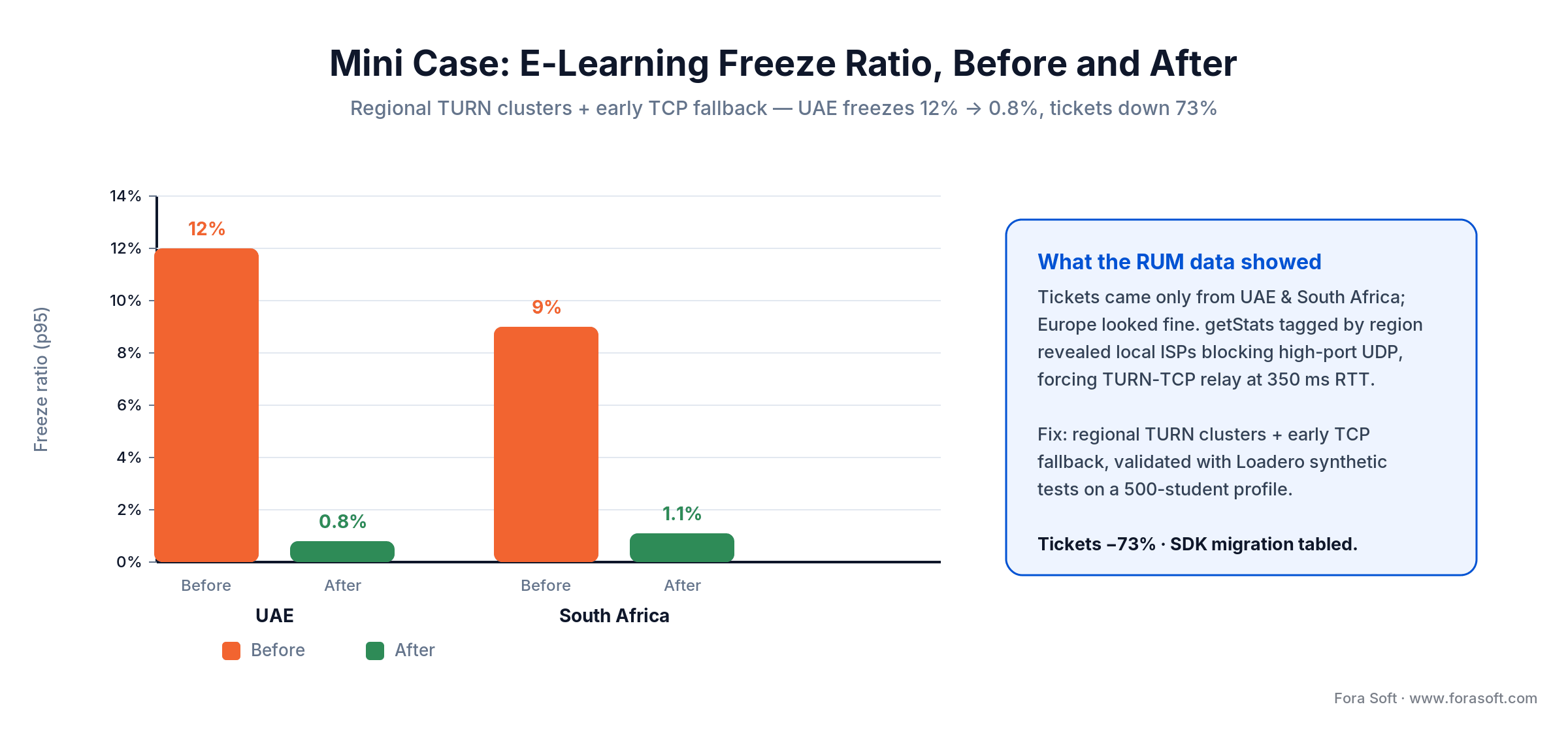
Figure 5. Before and after regional TURN clusters: p95 freeze ratio collapses, tickets fall 73%.
If you want a similar 12-week assessment against your own numbers, book a 30-minute call and bring a recent webrtc-internals dump.
A decision framework — pick your test stack in five questions
1. How many users in the largest call you need to support? Under 10, manual QA plus getStats is enough. 10–100, add webrtcperf for SFU load. 100–1,000, add Loadero or a self-hosted browser grid. Above 1,000, you are in Cyara + custom RUM territory.
2. Do you ship cross-browser (Safari + Firefox + Chrome)? If yes, you need CyaraRTC, Loadero (Chrome and Firefox) or your own Selenium/Playwright grid — webrtcperf drives Chrome only. Safari has unique ICE and codec edge cases you will not catch otherwise.
3. Is the product regulated (HIPAA, HITECH, GDPR, SOC 2)? Regulation demands auditable logs of quality incidents. Build your own RUM (so you own the data residency) and complement with a vendor that signs a BAA (ask before you buy; an open-source tool has no vendor to sign one).
4. How fast is your release cadence? Daily deploys need layer-3 tests in CI, gated on metrics. Weekly or slower, nightly is fine. Monthly release cycles can get away with per-release campaigns.
5. Do you run your own SFU or use a managed service (Twilio / Agora / LiveKit Cloud / Daily)? Own SFU means you must own the benchmarking (webrtcperf + custom load). Managed service shifts the server load test to the vendor; focus your budget on client-side RUM and cross-browser synthetic tests.
Five pitfalls that make WebRTC testing feel useless
1. Only measuring on Wi-Fi at the office. Your users aren’t you. Every test environment needs a forced bad-network profile, and production dashboards must segment by network class (wifi, cellular, ethernet) or the noise drowns the signal.
2. Alerting on raw getStats fields. Packet loss pings above 2% for half a second on every user in the world. Alert on sustained p95 over a meaningful window (3–5 minutes) or your on-call engineer will mute the channel.
3. Ignoring qualityLimitationReason. It is the single most under-used field. If it says cpu, no amount of bandwidth engineering will help. You need to lower resolution, enable hardware codecs, or move to AV1 where the client supports it.
4. No session-id tagging on telemetry. Without a common id across logs, stats, and application events, post-mortems become archaeology. Propagate a session UUID from the backend all the way to the browser console and stamp every metric with it.
5. Testing the happy path only. The reconnect path, the permission-denied path, the camera-unplugged-mid-call path, the bandwidth-drops-from-5Mbps-to-200kbps path — these are where users actually churn. Budget 30% of the QA matrix for failure modes.
Stuck at “is my call good enough to ship”?
We’ve answered that question for 100+ WebRTC products across telemedicine, e-learning, broadcast, and courtroom verticals. Let’s answer it for yours.
KPIs: what to report to the business
The metrics engineering cares about and the metrics the business cares about are not the same. Report three buckets on your executive dashboard; keep the raw stats one click down.
Quality KPIs. Blended MOS p50 and p5. Target p50 ≥ 4.2, p5 ≥ 3.5. Freeze ratio p95 per region, target < 2%. Setup time p95 (time from join-click to first decoded frame), target < 3 s.
Business KPIs. Call completion rate (fraction of calls that finished without a user-visible error), target > 98%. Reconnect rate per hour of call, target < 0.5. Support tickets per 1,000 hours of call, target < 1.
Reliability KPIs. SFU availability per region, target 99.95%. TURN relay hit rate (high is bad — means more calls forced off P2P), target < 20%. ICE failure rate, target < 0.5%.
When NOT to build your own test stack
Rolling your own pipeline is only the right call above a size and a pace. If any of the following are true, skip it and start with CyaraRTC or Loadero for 6–12 months:
Under 50 load-test runs a month. You will pay for infrastructure you don’t use. SaaS credits scale to zero on quiet weeks.
No full-time SRE. A Selenium grid on spot instances is not a set-and-forget system. Without someone to own it, your tests will be red for reasons unrelated to the product and nobody will trust them again.
You are using a managed WebRTC SDK (Twilio, Agora, Daily, LiveKit Cloud). Most of the load-side coverage is on the vendor. Your job is to verify their SLA, not to re-benchmark their SFU. Their support team will do it if you file a ticket.
Your product is pre-PMF. Spend the engineering hours on the product, not the test rig. Good enough manual QA plus a paid tier of Loadero for release gates is the right point on the curve until you hit meaningful revenue.
FAQ
What is the single most important metric for WebRTC call quality?
Freeze ratio. Humans forgive pixelation and low resolution; they do not forgive a video that stops moving. If you only have budget to track one number, track totalFreezesDuration divided by session length and alert when the p95 crosses 2%.
Can I test a WebRTC stream without writing any code?
Yes. Install the free StreamTest Chrome extension, right-click a participant’s video and choose “Test stream”. You get seven core metrics live, ten named problems with a likely cause, and a report you can copy into a ticket or export as JSON or CSV. For more rigorous work, Loadero offers a no-code scripting UI for synthetic tests.
What is a good packet loss threshold for WebRTC video?
Under 1% is invisible thanks to NACK and FEC recovery. 1–5% produces visible artifacts and the receiver starts requesting more key frames (PLI/FIR). Above 5% the call degrades rapidly. For telemedicine and broadcast, hold the bar at < 2%.
How do I read a chrome://webrtc-internals dump?
Click “Create Dump” during an active call — the browser saves a JSON file with all candidate pairs, inbound- and outbound-RTP reports, and the API trace. Upload it to a viewer like fippo’s web page or webrtc-dump-importer, or feed it into a Jupyter notebook with pandas. The common post-mortem workflow: plot RTT and freeze count over time, find the inflection, correlate with the API trace around that second.
How many concurrent users can a WebRTC load test simulate?
It depends on the tool and the budget. webrtcperf on a single mid-size EC2 instance holds 100–500 headless Chrome clients. Loadero scales horizontally to thousands of real browsers across regions. A self-hosted Selenium or Playwright grid scales with the machines you give it (KITE, the classic option, is archived since 2023). CyaraRTC supports tens of thousands with enterprise tiers. For most products the honest need is 500–2,000 simulated users.
How do I test WebRTC on a bad network?
Linux tc qdisc with netem injects latency, jitter, packet loss and bandwidth caps at the kernel level. Three profiles cover 80% of what users actually see: home Wi-Fi (50 ms / 1% loss), 4G on a train (150 ms / 3% loss), congested mobile (300 ms / 5% burst loss). Loadero and Cyara expose the same profiles via UI.
What is MOS and should I care?
MOS (Mean Opinion Score) is a 1–5 rating that correlates with perceived call quality. Audio MOS is rigorous (ITU-T G.107 E-Model). Video MOS is regressed from bitrate, resolution, FPS and codec. A blended MOS on your dashboard lets product people reason about quality without learning RTP. Target p50 ≥ 4.2.
How much does it cost to build a production WebRTC test pipeline?
With AI-assisted engineering we typically scope a 3-week build to wire getStats collection, ClickHouse ingestion, Grafana dashboards with MOS, and a Loadero or webrtcperf synthetic job in CI. Infrastructure runs ~$150–$400 a month at modest scale. Exact pricing depends on volume, retention and whether compliance is in scope — book a call for a specific number.
What is the quickest way to run a WebRTC test?
Open the WebRTC samples getUserMedia and Trickle ICE pages to confirm devices and ICE candidates, including a relay candidate from your TURN server. Then start a two-tab call and read chrome://webrtc-internals or StreamTest. That takes about five minutes and covers connectivity plus the seven quality metrics.
Is KITE still maintained?
No. The webrtc/KITE repository on GitHub was archived on 11 December 2023 and is read-only. Existing grids still run, but for a new load-test rig use webrtcperf, Loadero, CyaraRTC or your own Selenium or Playwright grid.
Is a “WebRTC leak test” the same as testing stream quality?
No — they answer different questions. A WebRTC leak test (browserleaks and VPN tools) checks whether your browser exposes your real IP address through WebRTC while you are behind a VPN; it is a privacy check. Testing stream quality, the subject of this guide, measures whether the call looks and sounds good: packet loss, jitter, freeze ratio, MOS. Same API, opposite goal.
What to read next
Latency
How to minimize latency to under 1 second at mass scale
Protocol-level decisions that cap your glass-to-glass latency.
Cost model
Server cost for a video platform in 2026
The four-line model and three worked examples.
Fundamentals
What is WebRTC? Best explanation for non-developers
The mental model your PM or CEO actually needs.
Reliability
How to build reliable, crash-proof software in 2026
SLOs, DORA metrics, and the patterns we ship on.
Mobile
Android WebRTC screen sharing: complete 2026 guide
The mobile edge cases your test plan has to cover.
Ready to stop guessing your call quality?
A disciplined WebRTC stream quality program comes down to three habits. You decide what “good” means as seven numbers with published thresholds. You run those numbers at four layers — dev probe, manual QA, automated load, real-user telemetry — so no bug class escapes. And you report quality to the business as MOS and completion rate, not as raw packet loss.
Do those three things and you stop shipping unmeasured calls. Start with StreamTest this week, add a getStats pipeline next month, and a load-testing rig next quarter. Or let our team do all three in a single 3-week engagement. It’s what we ship on every WebRTC build we run.

The book · Volume 3 of 7
Video Streaming: A Complete Guide to Video Delivery: From ABR and CDNs to Players, WebRTC, DRM, and the Economics of Streaming
The seven getStats metrics and the thresholds above tell you when a call degrades; the next question is why. Volume 3 of our handbook covers the delivery side behind those numbers: WebRTC and real-time transport, ABR, players and stall recovery, and QoE monitoring at scale. QA engineers and team leads use it to turn red metrics into fixes. Written by Nikolay Sapunov, CEO at Fora Soft.
Read it on Amazon →Kindle & paperback · Fora Soft Video Engineering Handbook
Want a production-grade WebRTC quality pipeline in three weeks?
getStats, ClickHouse, Grafana, MOS, synthetic tests in CI, RUM dashboards. Fixed scope, fixed timeline. Bring a dump, leave with a plan.

