

![How To Implement Screen Sharing To Your Android App [2023]. With Code Examples — cover illustration](https://cdn.prod.website-files.com/64e8910adc5a63966a68acea/69e38bbfbcb595eaa2d77d68_64e8910adc5a63966a68ae22_%25D1%2581%25D0%25BA%25D1%2580%25D0%25B8%25D0%25BD%25D1%2588%25D0%25B0%25D1%2580%25D0%25B8%25D0%25BD%25D0%25B3%2520%25D0%25BD%25D0%25B0%2520android.avif)
Key takeaways
• Android screen sharing is three parts: MediaProjection + a foreground service + a WebRTC ScreenCapturerAndroid. Miss one and Android 14+ either crashes your app or silently refuses to start the broadcast.
• Android 14 enforces foregroundServiceType="mediaProjection" + a matching runtime permission. Without FOREGROUND_SERVICE_MEDIA_PROJECTION, startForeground() throws SecurityException.
• As of August 31, 2026, Google Play wants new apps and updates on Android 16 (API 36). The projection token is single-use, and Android 16 re-asks consent every session. Code that cached the consent intent is already broken.
• The old org.webrtc:google-webrtc artifact no longer resolves. In 2026 you pull a maintained fork such as io.getstream:stream-webrtc-android. Most tutorials still hand you a dependency that Gradle can't find.
• We ship this in production. The MediaProjection + SFU pattern runs on ProVideoMeeting, Nucleus, and TransLinguist. See the mini case below.
Why Fora Soft wrote this playbook
We have built Android WebRTC clients since 2013: video-conferencing products, telemedicine apps, on-premise secure-comms tools, interactive classrooms. Screen sharing looks like a weekend feature in the docs, then breaks the moment Android ships a new version. Android 10 forced a foreground service. Android 13 added POST_NOTIFICATIONS. Android 14 tied each foreground-service type to its own permission and made the projection token single-use. Android 15 and 16 tightened re-consent and stopped you caching the token across app restarts.
The 2023 version of this guide covered the basic MediaProjection + WebRTC flow. That flow is still correct, but it stops short. It never showed the API 34+ crashes a target-SDK bump triggers, the SFU-direct pattern for large rooms, the on-device audio trick behind every "share sound" button, or the fact that the library everyone imports has gone dark. This rewrite fixes all of that as of August 2026, with the Kotlin we actually ship. For the deeper WebRTC-transport view, we keep a companion piece: Android WebRTC screen sharing: the complete implementation guide.
A targetSdk bump killed your screen share?
We have migrated MediaProjection pipelines across a dozen Android video apps. Send your Crashlytics trace and manifest; we will pin the missing permission or policy in 30 minutes.
What changed in Android 14, 15, and 16 — the 2026 briefing
Four platform shifts broke code that used to work. Skim them before copying any snippet.
1. Android 14 (API 34): type + permission enforcement. Your foreground service must declare android:foregroundServiceType="mediaProjection" and your manifest must include <uses-permission android:name="android.permission.FOREGROUND_SERVICE_MEDIA_PROJECTION"/>. Miss either and you get a SecurityException the instant startForeground() runs (Android docs, 2024).
2. Android 14 QPR2: partial, single-app capture. This is the one every 2024-era article gets wrong by pinning it to Android 15. The share picker gained a "single app" option in Android 14 QPR2, alongside new MediaProjection callbacks so you can react when the user shares a window instead of the whole screen (Android 14 app screen sharing).
3. Android 15/16: consent is single-use and per-session. You can't cache the consent intent and reuse it. Every broadcast needs a fresh createScreenCaptureIntent() and user prompt, and Android 16 stops you caching the token across app restarts too (Android 16 behavior changes).
4. Google Play now points at API 36. Since August 31, 2026, new apps and updates must target Android 16 (API 36) to reach Google Play; existing apps need API 35 to stay visible to new users. There's an extension window to November 1, 2026, and that's it (Play target-API requirements). If you're still on targetSdk 33, screen sharing is the least of your worries.
Reach for the single-app picker (Android 14 QPR2+) when you share sensitive apps in the same session and want the presenter to expose one window, not their whole notification shade. Handle the Surface resize when the chosen window rotates, and you inherit the feature for free.
Which WebRTC library actually builds in 2026
Start here, because most guides send you into a wall. Google's org.webrtc:google-webrtc (last real build 1.0.32006) has been unmaintained for years and dropped off Gradle-reachable repositories after the JCenter shutdown. Paste implementation 'org.webrtc:google-webrtc:1.0.32006' into a fresh project in 2026 and the build fails to resolve it.
The maintained answer is a prebuilt fork that mirrors upstream WebRTC and keeps the same org.webrtc.* package, so ScreenCapturerAndroid, PeerConnection, and VideoTrack keep their import paths. The one we reach for is GetStream's, on Maven Central:
// build.gradle.kts (module) — maintained WebRTC, same org.webrtc.* package
dependencies {
    implementation("io.getstream:stream-webrtc-android:1.3.8")
    // alternative: io.github.webrtc-sdk:android (webrtc-sdk build)
}
Everything below imports from org.webrtc unchanged, so if you migrate an old client you swap the dependency line and keep your capture code. GetStream publishes the source and versioning on its webrtc-android repo; pin an explicit version rather than a range so a silent bump can't change encoder behavior mid-release.
Reach for stream-webrtc-android (or webrtc-sdk) when your build can no longer resolve org.webrtc:google-webrtc. If your CI still fetches it from a cached mirror, treat that as tech debt: the mirror will vanish and take a release with it.
Architecture — the five moving parts
Every production Android screen share we ship has the same shape. Knowing which component owns which job keeps you from rewriting half the app when Android changes another rule.
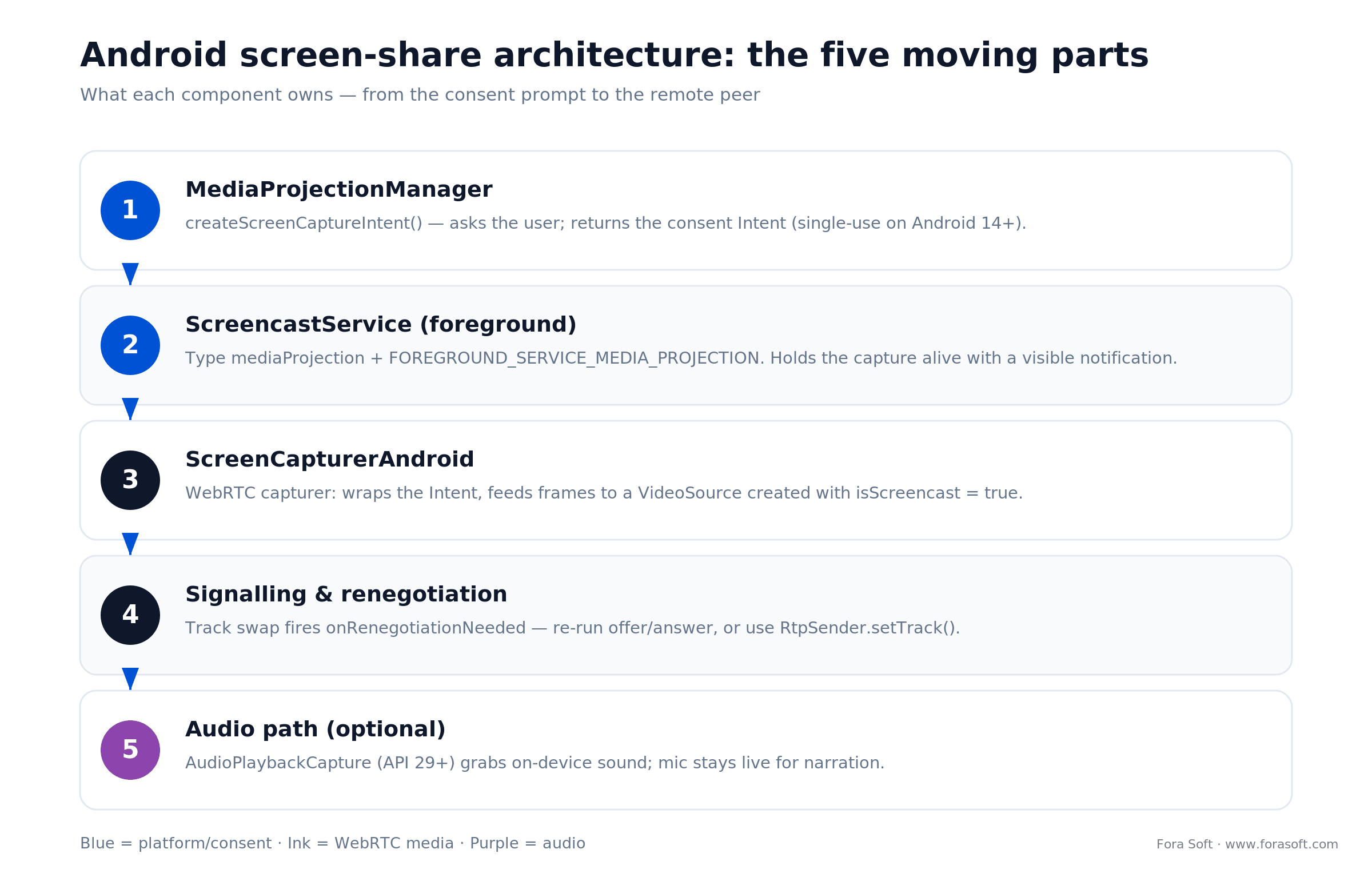
Figure 1. The five components, top to bottom, and what each one owns from consent prompt to remote peer.
- MediaProjectionManager & consent intent. Asks the user to allow screen capture; returns an
Intentyou hand to WebRTC. Single-use on Android 14+. - A dedicated foreground service (
ScreencastService). TypemediaProjection, with a persistent CallStyle or progress notification. - WebRTC
ScreenCapturerAndroid. Wraps the consent intent and delivers frames to aVideoSource. - Signalling & renegotiation. Fires on track swap so the remote peer learns about the new stream.
- Audio path. Optional
AudioPlaybackCapturefor on-device sound (API 29+) or the microphone for narration.
Step 1 — request MediaProjection consent
Use the ActivityResult API. startActivityForResult is deprecated and fights Compose-first navigation.
private val screenPermissionLauncher = registerForActivityResult(
    ActivityResultContracts.StartActivityForResult()
) { result ->
    if (result.resultCode == Activity.RESULT_OK && result.data != null) {
        startScreencastService(result.data!!)
    } else {
        // user declined; fall back to camera-only UX
    }
}

fun requestScreenCapture() {
    val manager = getSystemService(MEDIA_PROJECTION_SERVICE) as MediaProjectionManager
    screenPermissionLauncher.launch(manager.createScreenCaptureIntent())
}
One trap for Android 14+: don't reuse the Intent for a second session. The system invalidates the token after the first use, so every broadcast needs a fresh prompt.
Step 2 — manifest and ScreencastService
<uses-permission android:name="android.permission.FOREGROUND_SERVICE" />
<uses-permission android:name="android.permission.FOREGROUND_SERVICE_MEDIA_PROJECTION" />
<uses-permission android:name="android.permission.POST_NOTIFICATIONS" />
<uses-permission android:name="android.permission.RECORD_AUDIO" />

<service
    android:name=".ScreencastService"
    android:foregroundServiceType="mediaProjection"
    android:exported="false"
    android:stopWithTask="true" />
class ScreencastService : Service() {
    override fun onBind(intent: Intent?): IBinder? = null

    override fun onStartCommand(intent: Intent?, flags: Int, startId: Int): Int {
        val notification = ScreencastNotificationBuilder(this).build()
        ServiceCompat.startForeground(
            this,
            NOTIFICATION_ID,
            notification,
            ServiceInfo.FOREGROUND_SERVICE_TYPE_MEDIA_PROJECTION,
        )
        return START_STICKY
    }
}
Two details save days later. First, use ServiceCompat.startForeground with the type argument so the compat library passes the right flag on every API level. Second, keep the notification build synchronous: do no I/O before startForeground or you trip the 5-second ForegroundServiceDidNotStartInTimeException. Pair the service with a CallStyle notification so the OS treats it as an active call; we walk through that in custom Android call notifications.
Step 3 — wire ScreenCapturerAndroid into WebRTC
fun startScreenTrack(permissionData: Intent): VideoTrack {
    val surfaceTextureHelper = SurfaceTextureHelper.create(
        "ScreencastThread", eglBase.eglBaseContext,
    )

    val mediaProjectionCallback = object : MediaProjection.Callback() {
        override fun onStop() { stopScreencastService() }
    }

    val capturer = ScreenCapturerAndroid(permissionData, mediaProjectionCallback)
    val source  = peerConnectionFactory.createVideoSource(/* isScreencast = */ true)
    capturer.initialize(surfaceTextureHelper, context, source.capturerObserver)

    val metrics = context.resources.displayMetrics
    capturer.startCapture(metrics.widthPixels, metrics.heightPixels, 24) // 24 fps is plenty

    return peerConnectionFactory.createVideoTrack(SCREEN_TRACK_ID, source)
}
isScreencast = true tells the encoder to use content-type=screen settings: lower keyframe frequency, higher quality for motion-free regions, and an RTP layer tuned for text. Leave it false and you get a smeary broadcast that looks worse than the camera stream it replaced.
Step 4 — renegotiate the peer connection
Swap the camera track for the screen track and WebRTC flags the peer connection dirty, firing onRenegotiationNeeded. Your signalling layer has to rerun the offer/answer exchange, or the remote peer keeps staring at a frozen camera track.
val peerObserver = object : PeerConnection.Observer {
    override fun onRenegotiationNeeded() {
        scope.launch {
            val offer = peerConnection.createOfferSuspend()
            peerConnection.setLocalDescriptionSuspend(offer)
            signallingClient.send(SignalingMessage.Offer(offer.description))
        }
    }
    // ... other callbacks
}
Use RtpSender.setTrack() instead of removeTrack / addTrack and WebRTC can often skip full renegotiation: the SDP doesn't change, only the track binding does. That's the pattern LiveKit and the current Google sample use. The picture below shows why that choice matters once you leave 1-1 calls.
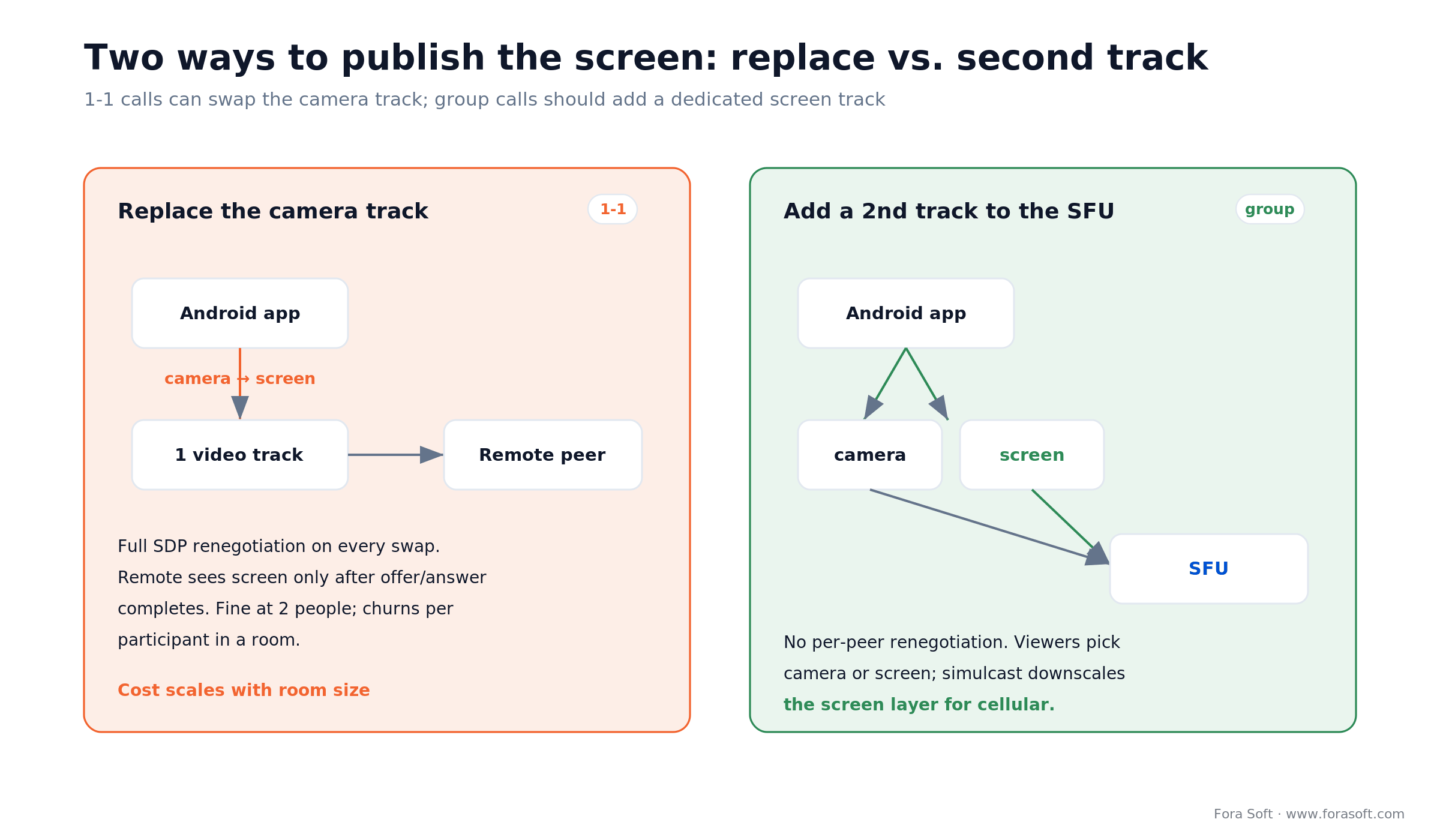
Figure 2. Replace-the-track works for two people; group rooms want a dedicated screen track so renegotiation doesn't churn per participant.
Need Android + iOS screen share on one SFU?
We ship cross-platform screen sharing end-to-end on LiveKit, Janus, and custom SFUs. Describe your call topology and we will scope a delivery plan fast.
Stopping the broadcast cleanly
Three stop paths exist, and your code has to handle all three or the notification lingers:
1. In-app stop button. Call capturer.stopCapture(), remove the screen track, swap the camera track back in, then stopSelf() on the ScreencastService.
2. User ends the share from the status bar. Android fires MediaProjection.Callback.onStop(). Mirror the teardown from path 1 and tell the remote peer over your signalling channel.
3. Call ends entirely. Shut the service down from the same call-teardown path that releases your peer connection, or the notification outlives the call.
On-device audio capture — the underused piece
Android 10 introduced AudioPlaybackCaptureConfiguration (API 29), which lets a screen-share session capture the audio the device is playing: a training video, a music app, a podcast. Bolt it onto ScreenCapturerAndroid and you get parity with the "share sound" toggle in Zoom, Meet, and Discord (Android playback capture).
val config = AudioPlaybackCaptureConfiguration.Builder(projection)
    .addMatchingUsage(AudioAttributes.USAGE_MEDIA)
    .addMatchingUsage(AudioAttributes.USAGE_GAME)
    .build()

val audioRecord = AudioRecord.Builder()
    .setAudioPlaybackCaptureConfig(config)
    .setAudioFormat(AudioFormat.Builder()
        .setEncoding(AudioFormat.ENCODING_PCM_16BIT)
        .setSampleRate(48_000)
        .setChannelMask(AudioFormat.CHANNEL_IN_STEREO)
        .build())
    .setBufferSizeInBytes(bufferSize)
    .build()
Hook the PCM frames into a custom AudioSource and publish them as a second audio track alongside the screen video. Keep the microphone path alive so the presenter can talk over the captured audio, and mix at the remote peer or on the SFU. One caveat: the app producing the sound can opt out with allowAudioPlaybackCapture="false", so DRM-protected media may stay silent by design.
Reach for AudioPlaybackCapture when presenters demo a video or a music tool and the room needs to hear it. Skip it for slide-only sharing: the mic track is enough, and you avoid the RECORD_AUDIO prompt and the opt-out edge cases.
Performance and encoder choices
Three levers control CPU, battery, and picture quality:
1. Resolution. Capture at device resolution and let WebRTC scale down via simulcast. On a Galaxy S23 that means 1080p at source with 540p and 360p simulcast layers for the SFU.
2. Codec. H.264 hardware encoder for broad compatibility. VP9 or AV1 on devices that support them for sharper screen text; WebRTC negotiates automatically when both peers agree.
3. Frame rate. 15 fps for slides, 24 fps for general content, 30 fps for games and video. Higher rates drain battery fast and rarely help. If you want the fundamentals behind frame rate and bitrate, our Learn primer on digital video covers the basics.
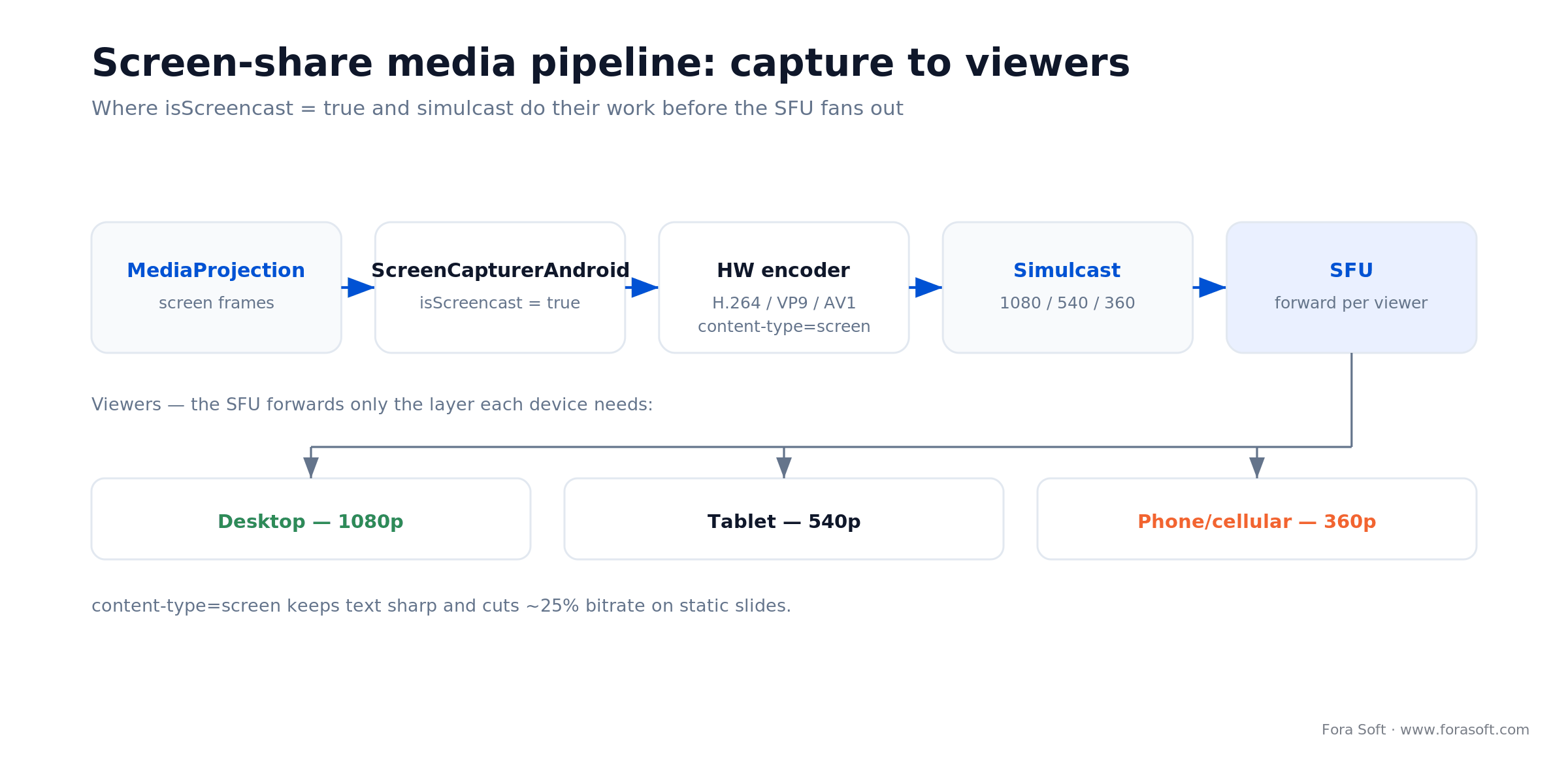
Figure 3. Where content-type=screen and simulcast do their work before the SFU forwards the right layer to each viewer.
Always create the source with createVideoSource(isScreencast = true). The screencast flag flips the encoder into content-type=screen mode, which keeps text crisp and cuts bitrate by roughly 25% on static slides.
Reach for VP9 or AV1 when the shared content is a text-heavy IDE or a spreadsheet and both peers can decode it. The keyframe savings show up exactly where H.264 smears: thin fonts on flat backgrounds. Keep an H.264 fallback for the phones that can't.
Publishing the screen as a second track to your SFU
Small 1-1 calls survive a track swap. Rooms with 10+ participants should publish the screen as a separate SFU track instead of replacing the camera. Three reasons:
- Participants decide whether to show camera, screen, or both in a tiled grid.
- Renegotiation cost scales with room size when you swap tracks; a dedicated screen track avoids SDP churn per participant.
- Mobile data savings: SFUs with simulcast can drop the screen layer independently when a viewer is on cellular.
LiveKit, Agora, Janus, Daily, 100ms, and mediasoup all accept a second RtpSender from the same peer connection with a different MediaStreamTrack. Label the screen track clearly (say screen_presenter_123) so the UI can tell it apart from camera tiles. If you're still choosing a media topology, our P2P vs MCU vs SFU breakdown covers the trade-offs.
Reach for a dedicated SFU screen track when your rooms pass three or four people. Below that, a plain camera-to-screen swap is simpler and fine. Above it, the second track is what keeps join latency and CPU flat as the room grows.
Mini case — screen share for an on-premise comms platform
On Nucleus, an on-premise comms product used in regulated environments, we shipped Android screen sharing for Samsung Galaxy A-series fleets running Android 13 and 14. The original build replaced the camera track, forced full SDP renegotiation, and crashed on any device where the target hit API 34 after a firmware bump.
Our fix, over three weeks: added FOREGROUND_SERVICE_MEDIA_PROJECTION and POST_NOTIFICATIONS, moved to ServiceCompat.startForeground with the type argument, switched to publishing the screen as a second SFU track, and added the AudioPlaybackCapture path so users can share a training video with sound. The numbers moved the way you'd hope.
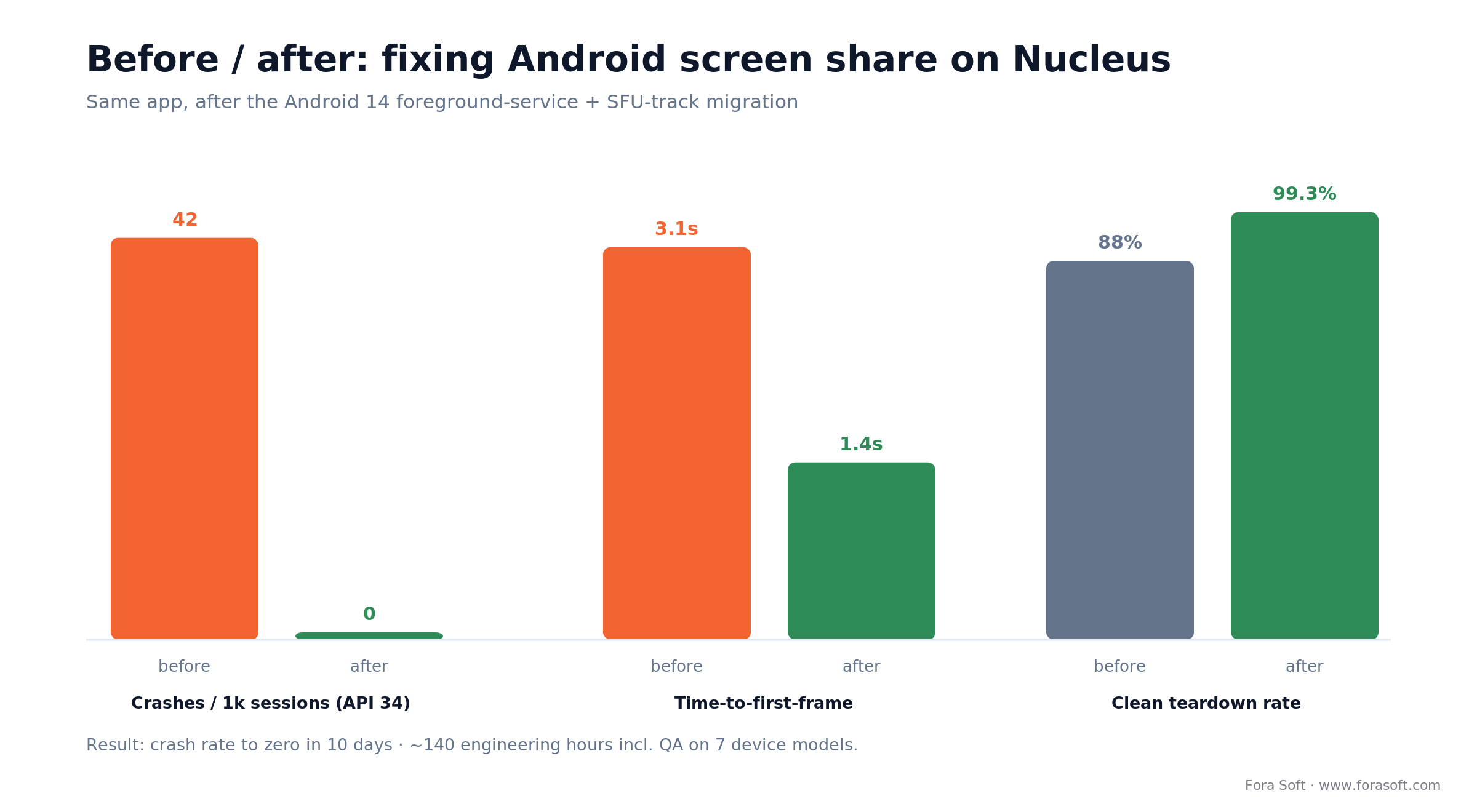
Figure 4. Same app, after the Android 14 foreground-service and SFU-track migration.
Crash rate on API 34 devices went to zero inside 10 days. Median time-to-first-frame after the picker tap dropped from 3.1s to 1.4s. Total effort was roughly 140 engineering hours including QA across seven device models, accelerated with our Agent Engineering workflow. Want the same triage for your app? Book a 30-min review.
Permissions and policy matrix (Android 13–16)
| Item | Android 13 | Android 14 | Android 15 | Android 16 |
|---|---|---|---|---|
FOREGROUND_SERVICE |
Required | Required | Required | Required |
FOREGROUND_SERVICE_MEDIA_PROJECTION |
— | Required | Required | Required |
foregroundServiceType="mediaProjection" |
Required | Required | Required | Required |
POST_NOTIFICATIONS |
Runtime prompt | Runtime prompt | Runtime prompt | Runtime prompt |
| MediaProjection token reuse | Allowed | One-shot | One-shot, re-consent | One-shot, no cache across restart |
| Partial-app-window sharing | — | QPR2+ | User-selectable | User-selectable |
| Google Play target-SDK to reach new users | — | Legacy only | Minimum (existing apps) | Required (new apps & updates) |
A decision framework — pick the right pattern in five questions
1. 1-1 call or group? 1-1 → track swap is fine. Group → publish the screen as a second SFU track.
2. Do presenters share audio? Yes → AudioPlaybackCapture + a second audio track. No → skip it.
3. What's your content? Slides → 15 fps, 1080p. Demo video or game → 30 fps, let simulcast downscale. Text-heavy IDE → VP9 or AV1 if both peers support it.
4. Which Android minimum? API 26 is the realistic floor; API 29+ for AudioPlaybackCapture; target API 36 for new Play releases.
5. Do you have a WebRTC SFU already? Yes → done. No → stand up LiveKit or mediasoup before building screen share on peer-to-peer, which won't scale past four participants.
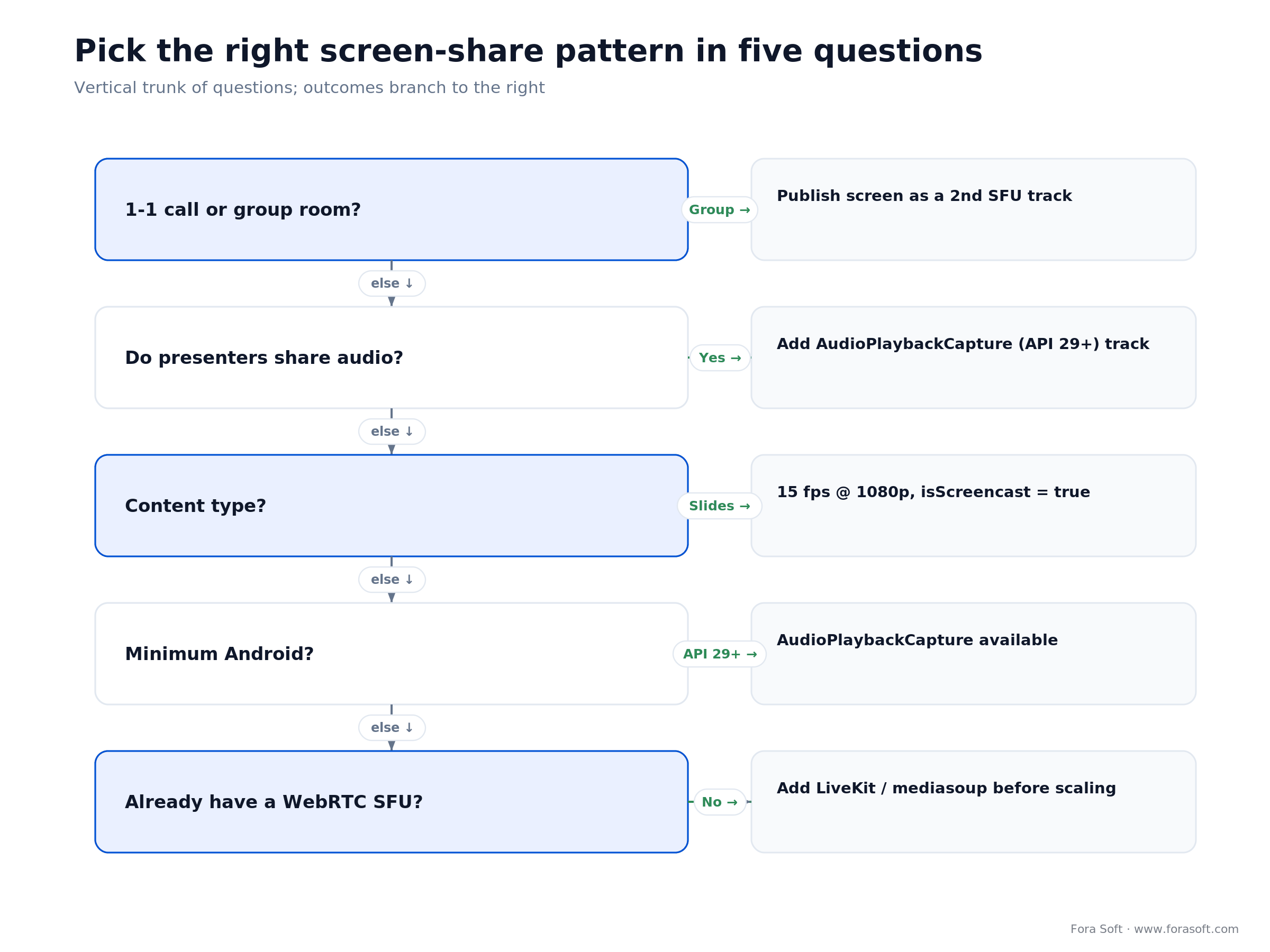
Figure 5. The same five questions as a decision tree; follow the trunk down until an outcome branches right.
Six pitfalls we keep finding in audits
1. Importing org.webrtc:google-webrtc. The build fails to resolve it, or worse, resolves from a cached mirror that will disappear. Move to io.getstream:stream-webrtc-android or webrtc-sdk.
2. SecurityException: Media projections require a foreground service of type FOREGROUND_SERVICE_TYPE_MEDIA_PROJECTION. You forgot the permission or the foregroundServiceType attribute. Add both.
3. Starting the foreground service from the background. Android 12+ throws ForegroundServiceStartNotAllowedException. Start it from the user-gesture activity that also launches the consent picker, or from a high-priority FCM callback.
4. Passing isScreencast = false to createVideoSource. You waste 25–40% bandwidth on static slides and the text looks blurry. Flip it on.
5. Caching the MediaProjection intent across sessions. Worked on Android 13, throws on 14+. Request fresh consent every broadcast.
6. Ignoring MediaProjection.Callback.onStop. The user can end the share from the status bar; if your service doesn't tear down, the notification lingers and Android may flag the app. Wire onStop to stopSelf(). Many of these overlap with generic foreground-service rules we cover in foreground services and deep links on Android.
KPIs — what to measure after shipping
Quality KPIs. Time-to-first-frame after consent (target < 1.5s), crash rate of ForegroundService*Exception per 1,000 sessions (target 0), and frozen-screen rate (target < 0.5%).
Business KPIs. Screen-share adoption per call (baseline vs post-launch), paid-plan conversion lift when the feature is gated, and the retention delta on sessions that included a screen share.
Reliability KPIs. Clean-teardown rate (target > 99%), median battery drain over a 30-minute broadcast (benchmark < 8% on a Pixel 8), and on-device audio-capture success rate (target > 97% on devices at API 29+).
When not to ship Android screen sharing
1. Peer-to-peer only, three or more participants. Screen share multiplies media paths; without an SFU, uplink on a mid-tier phone collapses after the third viewer. Move to a media server first.
2. Strict compliance environments without MediaProjection approval. Some MDM profiles disable MediaProjection entirely; confirm before you promise the feature. A server-rendered document-sharing flow may be the right alternative.
3. Android TV or kiosk devices. MediaProjection exists there but rarely helps: the screen is the product. Ship in-app slides instead.
How much does Android screen sharing cost to build?
On an app that already has a working WebRTC client, budget 7–10 engineering days for the core: MediaProjection consent, the foreground service, the capturer, renegotiation, and QA across three or four device classes. Add 3–5 days for AudioPlaybackCapture and SFU multi-track publishing. Here's the arithmetic we use to sanity-check a quote:
Core screen share      8 dev-days
Audio + SFU track       4 dev-days
QA (7 device models)    2 dev-days
--------------------------------
Total                  14 dev-days  x  ~7 focused hrs  =  ~98 hours
That lines up with the ~140 hours the Nucleus fix took once you add the platform-migration and regression work a live app carries. Green-field is cheaper; a tangled legacy client is more. We use Agent Engineering to compress the routine parts, so our estimates land below the typical agency day-count for the same scope. If a number feels too precise to trust, treat it as a range and let us scope the real thing against your codebase and custom software development needs.
Planning an Android 14/15/16 screen-share migration?
We have done it for telemedicine, video-calling, and regulated comms apps. Send your manifest and we will scope a fixed delivery.
FAQ
Why does my app crash with SecurityException on Android 14 the moment screen sharing starts?
Android 14 needs two things: the FOREGROUND_SERVICE_MEDIA_PROJECTION permission in the manifest, and android:foregroundServiceType="mediaProjection" on the <service>. The manifest declaration and the startForeground() type argument must match exactly.
Which WebRTC library still builds for Android screen sharing in 2026?
Not org.webrtc:google-webrtc — it's unmaintained and no longer resolves through Gradle. Use a maintained prebuilt fork such as io.getstream:stream-webrtc-android or the webrtc-sdk build. Both keep the org.webrtc.* package, so ScreenCapturerAndroid keeps working unchanged.
Is the MediaProjection consent reusable for a later broadcast?
Not on Android 14+. The system invalidates the token after the first broadcast ends, and Android 16 also blocks caching it across app restarts. Every session calls createScreenCaptureIntent() and re-prompts the user.
Replace the camera track, or add a separate screen track?
Replace for 1-1 calls where bandwidth is tight. For group calls on an SFU, publish the screen as a second track so participants can show camera and screen at once, and simulcast can downscale the screen layer for viewers on cellular.
Why does my shared screen look blurry, especially the text?
You almost certainly called createVideoSource(false). Passing true flips WebRTC into content-type=screen mode: fewer keyframes, tuned bitrate, sharper text. You can also raise the simulcast high layer to 1080p and drop the frame rate to 15 fps for slide-heavy content.
How do you capture device audio (not the mic) during screen sharing?
Use AudioPlaybackCaptureConfiguration (API 29+) on the same MediaProjection token, build an AudioRecord with it, and push the PCM frames into a custom WebRTC audio track. This is how "share audio" works in Zoom, Meet, and Discord. Apps can opt out, so DRM-protected media may stay silent.
The remote peer never sees the screen after a track swap. What's wrong?
You're missing the renegotiation step. Swapping tracks fires onRenegotiationNeeded; your signalling code must recreate the SDP offer and send it to the remote. Or use RtpSender.setTrack(), which often avoids renegotiation entirely.
How long does it take to ship production-quality Android screen share?
On an existing WebRTC Android client, budget 7–10 engineering days for MediaProjection integration, the foreground service, and QA across three or four device classes. Add 3–5 days for AudioPlaybackCapture and SFU multi-track publishing. We usually land the full scope in about 10 calendar days with Agent Engineering.
What to read next
WEBRTC
Android WebRTC Screen Sharing: Complete Guide
The deeper WebRTC-transport companion to this platform-focused playbook.
ANDROID PLATFORM
Foreground Services and Deep Links on Android
The Android 14 type + permission rules your screen-share service has to follow.
iOS
Implement Screen Sharing in an iOS App
The ReplayKit Broadcast Upload Extension counterpart to this Android guide.
MEDIA ARCHITECTURE
P2P vs MCU vs SFU — Which Media Server Fits?
The media topology that dictates how you publish the screen track.
Ready to ship Android screen sharing that survives the next platform bump?
Android screen sharing in 2026 comes down to five decisions: pull a WebRTC library that still builds, request consent the modern way, run a foreground service of type mediaProjection with the matching permission, wire ScreenCapturerAndroid into a WebRTC source with isScreencast = true, and let your SFU own the track so group calls scale. Add AudioPlaybackCapture when the presenter shares sound.
If you want a team that has shipped this across WebRTC, telehealth, and regulated-comms products, we have the Kotlin templates, the Android 14/15/16 compliance checklist, and the QA matrix ready to go.

The book · Volume 3 of 7
Video Streaming: A Complete Guide to Video Delivery: From ABR and CDNs to Players, WebRTC, DRM, and the Economics of Streaming
Getting MediaProjection to capture is the first half; the second is sending a screen track that stays sharp on a weak network. Volume 3 covers WebRTC and real-time delivery, simulcast and bitrate adaptation, how SFUs forward extra tracks, and QoE monitoring. It gives Android teams the delivery side of screen sharing. Written by Nikolay Sapunov, CEO at Fora Soft.
Read it on Amazon →Kindle & paperback · Fora Soft Video Engineering Handbook
Book a 30-minute review of your Android screen-share design
We will critique your manifest, service, WebRTC pipeline, and SFU track strategy, then hand back a concrete punch list. Agent Engineering-accelerated.

