

Key takeaways
• P2P owns 1:1. Two peers connect directly, no media server, 50–150 ms. The ceiling is roughly four, because every peer uploads a copy to every other.
• An SFU is the default for real group calls. Each peer uploads once, the server forwards, no transcoding. One box serves hundreds; you shard to go past that.
• An MCU only earns its cost for one composited feed. It decodes, mixes and re-encodes, so it is the priciest to run. Reach for it for recording, broadcast, or thin/legacy clients.
• Hybrid wins in production. Route 1:1 through P2P, escalate to an SFU past four participants, add an MCU only when you need a recording or a single broadcast feed.
• Build vs buy is a scale question. A CPaaS ships in weeks; a self-hosted SFU (mediasoup, LiveKit) wins on unit cost once you pass ~50–100 concurrent and have WebRTC people on staff.
Updated October 2026: CPaaS list prices re-checked (LiveKit Cloud, 100ms, Cloudflare RealtimeKit, Deepgram), a new SFU vs MCU table, cascaded-SFU scaling, and the 2026 status of HEVC in WebRTC and WHEP.
Why take this from Fora Soft
The choice between P2P vs MCU vs SFU is the one architecture call that is expensive to reverse. Pick P2P and grow past four users, and calls start failing in production; pick an MCU when an SFU would do, and you pay for GPUs you never needed. Fora Soft has built video conferencing since 2005 — 250+ shipped projects, a 50+ person in-house team, and real-time media as the core specialty, not a side quest.
We built BrainCert, the WebRTC + HTML5 virtual classroom, from the architecture up. It now delivers 500M+ classroom minutes across 10 datacenters at 99.995% uptime for 100K+ customers. At that volume, mesh is off the table and the media plane is selective forwarding. We also shipped CirrusMED, a HIPAA-compliant telemedicine platform where the topology choice was inseparable from the compliance and recording requirements. This guide is the decision framework we actually use, with the arithmetic, the vendor picks, and the failure modes named honestly. For architecture principles that sit underneath it, see our WebRTC architecture reference.
Architecting a video app and unsure which topology?
Book a 30-minute call with a senior WebRTC engineer. We will map P2P vs MCU vs SFU to your call sizes, budget and timeline — no pitch, just the decision.
Quick answer: which architecture for your call size?
Match the topology to your largest common call. For one-to-one and calls up to about four people, use P2P over WebRTC with STUN/TURN: zero media-server cost and 50–150 ms. For 5–50 active participants, use an SFU (Selective Forwarding Unit): each peer uploads one stream, the server forwards it, and cost stays linear. For 50+ participants, recording, or a single broadcast feed, keep the SFU for ingest and add an MCU (Multipoint Control Unit) for the composited output. The production-grade answer is usually a hybrid that does all three automatically.
- 1–4 participants: P2P / mesh. No media server, 50–150 ms, best for 1:1 sales, therapy, and support calls.
- 5–50 participants: SFU. Roughly $300–500/month per 100 concurrent on your own infra, 100–200 ms.
- 50+ or recording/broadcast: SFU for ingest, MCU for the mixed feed. Highest server cost, 200–400 ms.
- Not sure yet, or usage varies: hybrid P2P→SFU with MCU on demand. One code path, cost that tracks headcount.
SFU vs MCU in one table
SFU vs MCU, in one line: an SFU forwards every participant’s stream without touching it, so it is cheap and fast; an MCU decodes and mixes all streams into one, so it is expensive and slower but hands every viewer a single finished feed. For live, interactive calls the SFU wins; the MCU wins only when you need that one composited output.
| SFU (Selective Forwarding Unit) | MCU (Multipoint Control Unit) | |
|---|---|---|
| What the server does | Forwards each stream as-is, no decoding | Decodes, mixes into one canvas, re-encodes |
| Server CPU | Low: packet routing | High: decode + composite + encode, often GPU |
| Added latency | Tens of ms | Typically 200–400 ms end-to-end |
| What each client downloads | One stream per visible participant | One composited stream |
| Per-viewer quality | Yes, via simulcast or SVC | No, one layout and bitrate for everyone |
| Recording | Per-track, composite later if needed | One finished file out of the box |
| Best for | Interactive group calls, webinars, AI agents | Recording, broadcast, legacy or thin clients |
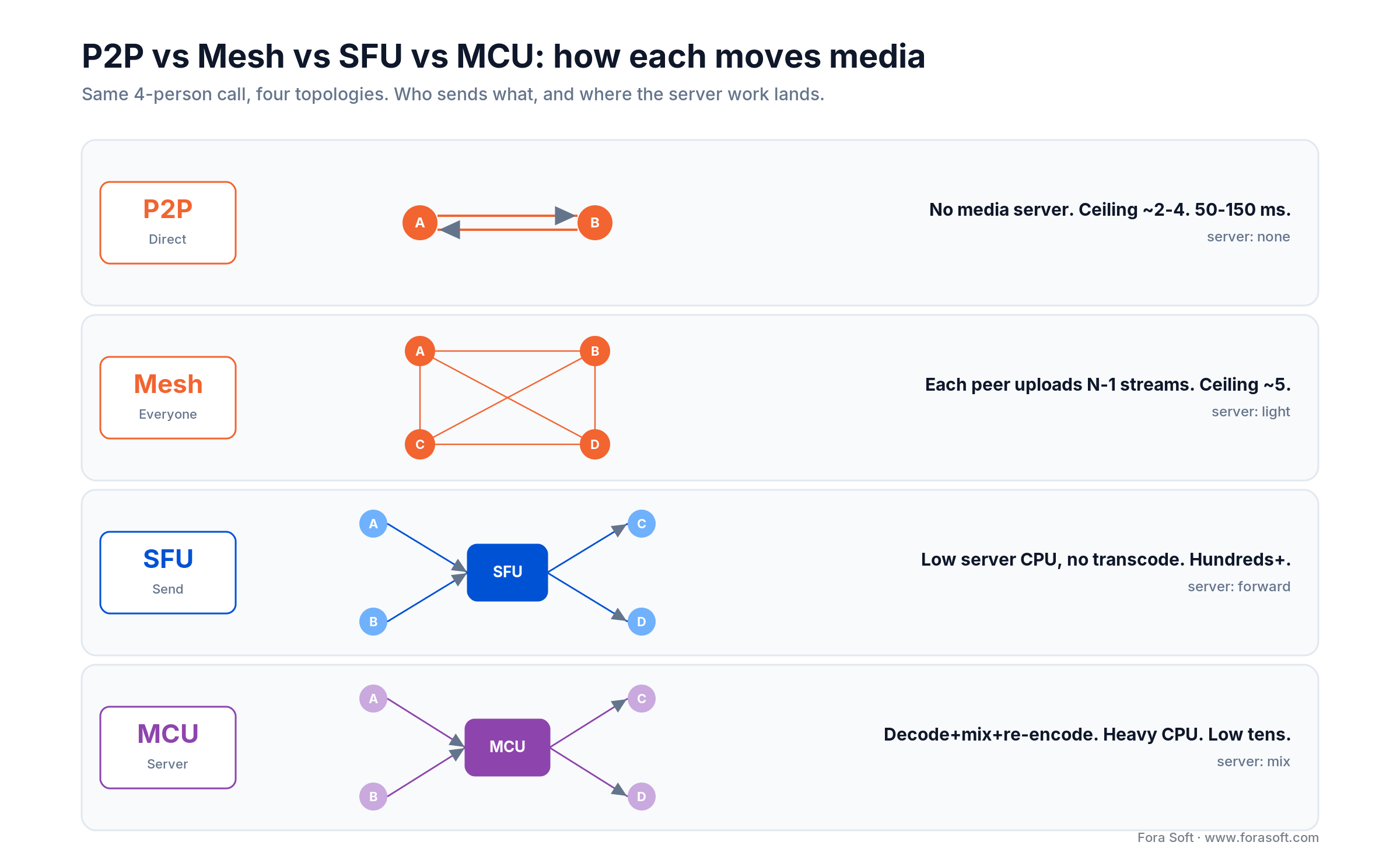
Figure 1. The same four-person call in four topologies. P2P and mesh keep media peer-to-peer; an SFU forwards each stream; an MCU mixes one composite.
One query worth settling up front: does Google Meet use an SFU or an MCU? An SFU-style design. Meet forwards selectively and adapts per-viewer quality rather than mixing one canvas server-side, which is why it holds latency low across large gallery views. Nearly every modern conferencing product — Zoom, Teams, Meet — runs selective forwarding, not mixing, for the live path. Zoom calls its media servers “multimedia routers”, and the name is the point: they route each stream at the quality a receiver can take instead of mixing it, which is SFU behaviour, not MCU behaviour. If you are mapping this choice to a product roadmap and budget rather than to call sizes, our WebRTC architecture guide for business covers that angle.
The WebRTC foundation every topology shares
P2P, mesh, SFU and MCU all sit on the same three WebRTC primitives, standardized by the W3C WebRTC Recommendation (first published 2021, revised in March 2025). Get these right and the topology becomes a routing decision rather than a rewrite.
getUserMedia: capture and constraints
navigator.mediaDevices.getUserMedia() grabs the camera and microphone under constraints you set. On mobile or a weak network, dropping to 360p at 15 fps cuts upstream bandwidth by roughly 75% and still holds a usable MOS of 3.5–4.0.
const constraints = {
  video: { width: 1280, height: 720, frameRate: 30 },
  audio: { echoCancellation: true, noiseSuppression: true }
};
const stream = await navigator.mediaDevices.getUserMedia(constraints);
RTCPeerConnection: the media pipeline
This object owns the actual transport: codec negotiation, bandwidth estimation, jitter buffering, and encryption. WebRTC media is always encrypted with DTLS-SRTP — there is no unencrypted mode to turn off — so P2P is not less secure than a server topology on the wire.
const pc = new RTCPeerConnection();
stream.getTracks().forEach(t => pc.addTrack(t, stream));
pc.ontrack = e => { remoteVideo.srcObject = e.streams[0]; };
Signaling, ICE, STUN and TURN: crossing NAT
WebRTC moves media but leaves signaling to you: exchange the SDP offer/answer and ICE candidates over your own WebSocket or service. Most users sit behind NAT, so ICE discovers routable paths through a STUN server (Google runs a public one at stun.l.google.com:19302), and when a direct path is impossible it relays through a TURN server (RFC 8656). Plan for roughly 10–20% of connections to need TURN — symmetric NAT and locked-down corporate or school firewalls — and remember TURN is billed by relayed gigabytes, not minutes. Offer TURN over TLS on port 443 (TURNS) as well: it is often the only path through firewalls that allow nothing but HTTPS.
P2P: the latency champion that will not scale
P2P connects two participants directly. Peer A sends media straight to Peer B and back. No forwarding, no mixing, no server in the media path. That is why it posts the lowest numbers of any topology and costs nothing to run beyond a fallback TURN server.
- Practical ceiling: 2–4 participants.
- Latency: 50–150 ms end-to-end, set mostly by network round-trip.
- Upload per peer: one stream per other participant — the problem below.
- Media-server cost: $0. You still pay for STUN/TURN fallback.
- Best for: 1:1 sales demos, tele-therapy, support, high-touch consults.
Here is where it breaks. In a five-person full-mesh P2P call, each peer uploads its own stream four times (once to every other peer) and downloads four streams. That peer is now pushing ~4 Mbps up and decoding four video streams at once. A phone on LTE with 2–3 Mbps of uplink is already underwater, and the CPU cost of four simultaneous decodes drains the battery fast. The wall is the client uplink, and it arrives around five participants.
Reach for P2P or mesh when: your calls are 1:1 or small and private, latency matters more than headcount, and you would rather ship zero media infrastructure than shave a server bill.
Mesh: P2P with awareness, same hard ceiling
Mesh keeps media peer-to-peer but adds a lightweight coordination layer: who is in the room, who left, which paths are healthy. It buys you a few more participants and cleaner join/leave handling, but it does not change the physics. Every peer still uploads one stream per other peer, so the client-uplink curve is the same one that kills P2P. This split — a central server for signaling and room state, peer-to-peer links for the media itself — is the model most small-group WebRTC apps use to combine centralized coordination with direct data transfer.
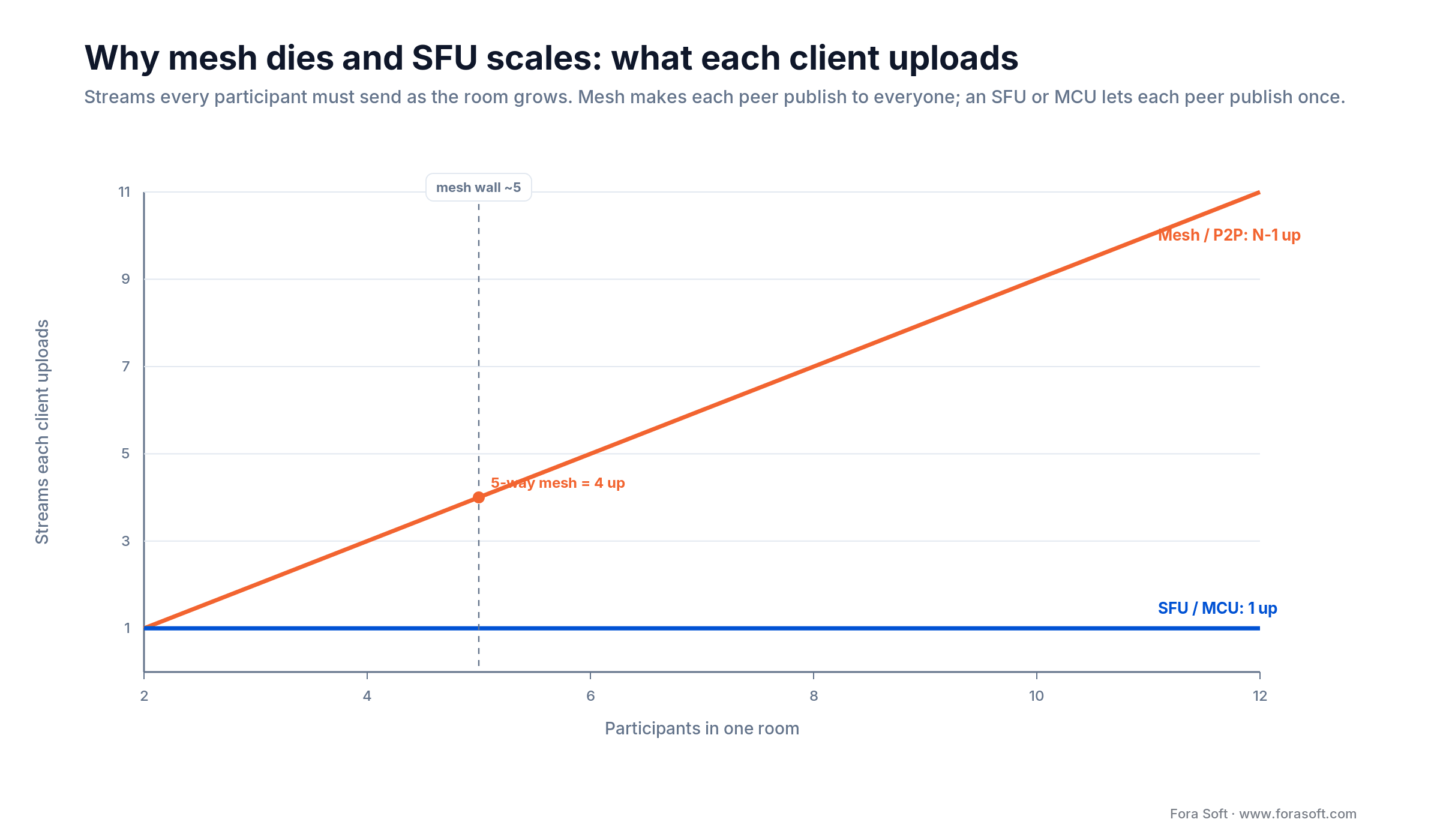
Figure 2. Why mesh dies and an SFU scales. In mesh each peer uploads N−1 streams; an SFU or MCU holds every peer at a single upload regardless of room size.
The chart is the whole argument for a media server. Mesh asks a five-person room to have every client upload four streams; a ten-person room, nine. An SFU flattens that to one upload each, forever. That single line is why every product past a handful of users forwards through a server instead of meshing.
Reach for mesh when: you want small-group calls (up to about five) without standing up an SFU, and you can accept that the sixth participant is where quality falls off a cliff.
SFU: the selective forwarding workhorse
An SFU receives every participant’s stream and forwards each one to the other participants without decoding or mixing. Peer A publishes one VP8 stream; the SFU relays that same stream to B, C and D. Because it never transcodes, server CPU stays low and each viewer adapts quality independently. That combination is why the SFU is the default for group video — and the answer to most "sfu vs mcu" debates.
The bandwidth arithmetic
In a ten-person SFU call, each peer uploads 1 Mbps (its own stream) and downloads up to 9 Mbps (the others). The server ingests 10 Mbps and egresses up to 90 Mbps — ten streams forwarded to nine recipients each. Server egress is the line item that scales, and it is cheap and shardable in a way client uplink is not.
How far one box goes
mediasoup runs about 500 consumers per worker, and one worker pins to one CPU core, so you scale by spawning workers up to the core count and sharding rooms across machines. Jitsi Videobridge scales the same way, by adding bridges. Either way, "how many users can an SFU handle" has the same shape of answer: hundreds per box, then linear with hardware.
What is the most scalable meeting architecture? A cascaded SFU. Rooms are split across SFU nodes that relay streams to each other, often one node per region, so no single box carries the whole meeting: mediasoup does it with pipeToRouter, Jitsi with cascaded bridges (Octo), LiveKit with its multi-node mesh. Research is pushing the forwarding into network hardware: a SIGCOMM 2025 paper from Princeton, Scalable Video Conferencing Using SDN Principles, reports a Tofino2 switch handling up to about 128,000 concurrent meetings, 7–422× the scale of a 32-core server running mediasoup (simulated, not a production deployment).
Simulcast and SVC
Two techniques keep an SFU from sending a 1080p stream to a phone on 3G. Simulcast has the publisher encode up to three resolution layers; the SFU forwards whichever fits each viewer (VP8 and H.264). SVC packs the layers into one bitstream the SFU peels per viewer, and applies to VP9 and AV1. Skip both and your SFU freezes the instant a network degrades — that is the single most common self-built-SFU failure.
Reach for an SFU when: you run real group calls (5–50 active, or hundreds one-to-many), you want low latency and per-viewer quality, and you do not need a single mixed canvas on the server.
MCU: broadcast-ready mixing, at a price
An MCU decodes every incoming stream, composites them into one canvas (a 2x2 or 3x3 grid, say), and re-encodes a single output. Each participant then downloads one feed instead of many. That is genuinely useful for three things: recording a single file, broadcasting one gallery view to a large passive audience, and serving thin or legacy clients that cannot decode several streams. Everything good about an MCU is downstream of that single composited output; everything expensive about it is the decode-mix-re-encode loop.
In video conferencing, “MCU” first meant the H.323-era hardware bridge that joined room systems from vendors such as Polycom and Cisco. Today an MCU server is usually software on commodity or GPU machines. The same idea answers a common live-streaming question: to composite several broadcasters into a single output stream, the way co-streaming platforms do, run a compositor that subscribes to every stream, lays them out on one canvas and pushes one encoded feed over RTMP, SRT or HLS. LiveKit’s room-composite egress (a headless browser) and GStreamer or FFmpeg mixers are the usual building blocks.
The cost math is unforgiving. Mixing is CPU- and often GPU-bound, so an MCU commonly runs several times the server cost of an SFU for the same room, and the extra pipeline adds 200–400 ms of latency. You are trading money and delay for a clean single feed. If you do not need that feed, you do not need an MCU.
Reach for an MCU when: you need one recorded or broadcast file, a fixed gallery layout, or support for clients that can only handle a single decode — and you have budgeted for the CPU/GPU to mix it.
Hybrid: escalate P2P to SFU, add MCU on demand
The deployment that wins in production does not pick one topology — it switches. Route 1:1 and tiny calls through P2P for zero cost and the lowest latency, escalate to an SFU the moment a room passes four participants, and spin up an MCU only when someone hits record or starts a broadcast. One rule set, cost that tracks headcount.
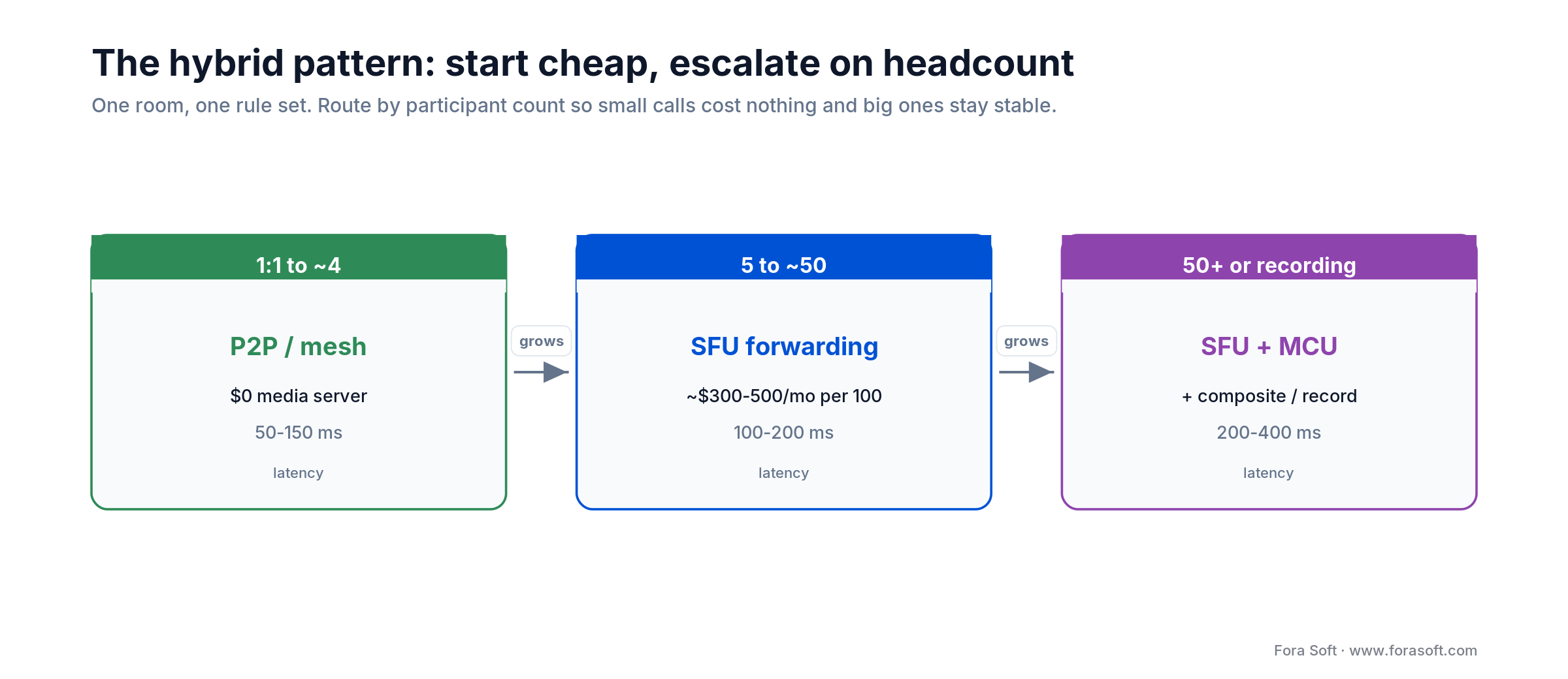
Figure 4. The hybrid pattern. Small calls stay on P2P at $0, group calls run on an SFU, and only recording or broadcast pulls in an MCU.
if (participantCount <= 4) {
  mode = "p2p";        // direct mesh, no media server
} else if (participantCount <= 50) {
  mode = "sfu";        // SFU with simulcast (3 quality layers)
} else {
  mode = "sfu_record"; // SFU for live + MCU for the composite/recording
}
Reach for hybrid when: call sizes vary, you care about both unit cost and quality, and you would rather maintain one adaptive path than argue P2P vs MCU vs SFU for every feature.
P2P vs MCU vs SFU: the comparison matrix
Shortlist with this, then use the arithmetic and the decision tree below to commit. Numbers are typical production ranges from our own builds (2026 estimates), not vendor maximums.
| Architecture | Max concurrent | Server cost / 100 users | Upload per peer | Latency | Best for |
|---|---|---|---|---|---|
| P2P | 2–4 | $0 | N−1 streams | 50–150 ms | 1:1, high-urgency calls |
| Mesh | ~5 | $50–150 | N−1 streams | 100–300 ms | small private groups |
| SFU | hundreds+ / box | $300–500 | 1 stream | 100–200 ms | group calls, webinars, social |
| MCU | low tens / box | $2,000–5,000 | 1 stream | 200–400 ms | recording, broadcast, thin clients |
| Hybrid (P2P+SFU) | unlimited | $0–500 (dynamic) | 1 stream | 50–200 ms | mixed call sizes, cost-optimal |
Architecting a video app and unsure which topology?
Book a 30-minute call with a senior WebRTC engineer. We will map P2P vs MCU vs SFU to your call sizes, budget and timeline — no pitch, just the decision.
Bandwidth math: the real cost per hour
Estimate the bill before you build. These are the two formulas that decide it, plus the TURN line most teams forget. The one conversion to memorize: 1 Mbps sustained for an hour is about 0.45 GB, so a megabit per second of egress is roughly half a gigabyte an hour.
SFU egress
Egress = N participants x (N-1 viewers) x bitrate
50-way call at 1 Mbps (worst case, everyone sees everyone):
  50 x 49 x 1 = 2,450 Mbps
  2,450 Mbps x 0.45 = ~1,100 GB/hour (~1.1 TB)
At $0.05/GB (Cloudflare Realtime):  ~$55/hour
At $0.09/GB (AWS-class internet egress): ~$99/hour
MCU egress
Egress = N participants x composite bitrate
50-way call, one 4 Mbps mixed feed:
  50 x 4 = 200 Mbps
  200 Mbps x 0.45 = 90 GB/hour  =  ~$4.50/hour bandwidth
But CPU/GPU to mix dominates: a GPU instance runs $3-12/hour
Read those two together and the trade is clear: the MCU sends far fewer bytes but burns money on the mix; the SFU sends more bytes but on cheap, shardable egress. That 1.1 TB/hour worst case is also why real SFUs cap visible tiles and lean on simulcast — you rarely forward every stream at full rate. For a like-for-like build-cost model, our video-platform server-cost guide walks through server sizing with current provider pricing.
TURN relay
TURN cost = egress x (share of calls on TURN) x $/GB
2,450 Mbps SFU call, ~15% relayed:
  0.15 x 1,100 GB = ~165 GB/hour
At $0.05/GB (Cloudflare Realtime TURN): ~$8/hour
Latency, MOS and codecs
Perceived quality tracks latency, and the thresholds are not opinion — ITU-T G.114 sets them. One-way mouth-to-ear delay under ~150 ms is effectively transparent; up to ~400 ms is the upper bound for comfortable back-and-forth; past ~400 ms conversation degrades into walkie-talkie turns. Mean Opinion Score (MOS) puts numbers on it: above 4.0 feels natural, below 2.5 is unusable. The bands below assume an otherwise clean network — packet loss and jitter drag MOS down on their own, independent of delay.
- 50–150 ms: imperceptible. Natural flow. MOS 4.5–5.0. This is P2P and a well-run SFU.
- 150–300 ms: noticeable but fine for most calls. MOS 3.5–4.5.
- 300–400 ms: the top of acceptable. Slight talk-over. MOS 2.5–3.5. MCU territory.
- 400 ms+: conversation breaks down. One speaker at a time.
Codec selection
VP8 stays the safe cross-browser real-time default. H.264 gets hardware-accelerated decode on most phones, which saves battery. VP9 and AV1 add SVC. AV1 has been usable in WebRTC since Chrome 90 (2021); with the encoder update in Chrome 113 (2023), Google measured 45% better compression than VP9 for screen sharing and 12% better quality at the same bandwidth for camera video — at materially higher encoder CPU, so it earns its place on broadcast tails and Chromium-only rooms before it becomes the everywhere default. H.265/HEVC joined Chrome’s WebRTC stack in Chrome 136 (2025), but Chrome only decodes it in hardware, so treat it as an option for known device fleets rather than a default.
Open-source SFUs: mediasoup, LiveKit, Janus, Pion
Building on open source buys control and unit economics, at the cost of 3–12 months of engineering. The four that matter in 2026:
mediasoup ships as a Node.js library with a C++ core. It is deliberately low-level and signaling-agnostic — just the media layer — with full simulcast and SVC across VP8, VP9, H.264 and AV1. Steep learning curve; budget 4–6 months for a team of two or three. It is what powers a lot of production video, including work we have shipped.
LiveKit is an SFU written in Go, built on Pion and Apache-2.0 licensed. One binary plus Redis scales horizontally, and since 2025 it is positioned hard around voice and vision AI agents. In January 2026 it raised a $100M Series C at a $1B valuation, and it carries ChatGPT’s Advanced Voice Mode. It is not a mediasoup wrapper — it is its own Go stack, which is why its operational story is simpler.
Janus is a mature C server from Meetecho with a plugin architecture and a small footprint that runs on modest hardware. Pion is the Go WebRTC stack that underpins both ion-sfu and LiveKit; reach for it when you want to assemble your own SFU from parts. Jitsi Videobridge is the Java/Kotlin SFU from 8x8 — a full stack if you want batteries included rather than a library.
Reach for self-hosting when: you expect to run past ~50–100 concurrent regularly, you have (or will hire) WebRTC engineers, and per-minute CPaaS pricing has started to dwarf what a couple of servers would cost. If you need the engineers rather than the advice, our WebRTC development team builds and runs mediasoup, LiveKit, Janus and Pion SFUs in production.
CPaaS in 2026: Agora, Daily, 100ms, LiveKit, Cloudflare
If you would rather ship in weeks than build an SFU, a CPaaS gives you managed infrastructure and SDKs. Prices below are list rates checked in October 2026, normalized per 1,000 participant-minutes of video so you can compare meters that are deliberately not alike.
| Vendor | ~Price (video) | Model | Notes |
|---|---|---|---|
| Agora | $3.99 / 1k min (HD) | per participant-minute | tiered by resolution; 10k free min/month |
| Daily | $4 / 1k min | per participant-minute | developer-first API; 10k free min |
| 100ms | $4 / 1k min | per participant-minute | flat rate; recording $0.0135/min; 10k free min |
| Cloudflare RealtimeKit | $2 / 1k min | per participant-minute | built by the Dyte team, which joined Cloudflare in April 2025; recording export $0.01/min |
| LiveKit Cloud | ~$0.40–0.50 / 1k min + bandwidth | minutes + $0.10–0.12/GB | cheapest at scale; Ship plan $50/mo, Scale $500/mo; AI agent minutes $0.01/min |
| Cloudflare Realtime | $0.05 / GB | bandwidth-metered SFU+TURN | 1,000 GB free; not per-minute |
One myth to retire: Twilio Video did not shut down. Twilio announced a sunset, then reversed it in October 2024 and kept the product, after recommending Zoom’s Video SDK as the interim path. Plenty of ranking articles still say it died; it did not. If you are weighing a move anyway, our Twilio Video migration guide and LiveKit vs Agora cost analysis run the numbers.
Reach for a CPaaS when: you need to launch in under six months, you lack in-house WebRTC depth, or your volume is low enough that managed per-minute pricing beats running servers. Abstract the vendor behind an interface so switching later is a swap, not a rewrite.
AI agents as a fourth participant
The 2026 shift is that transcription, translation and meeting-summary agents join the room as ordinary SFU subscribers rather than bolting onto a recording. An SFU makes this clean: the agent subscribes to the audio track it needs, runs inference, and publishes captions or a data message back. The cost you have to model is stacked — participant-minutes plus the AI on top. Budget roughly $0.0077/min for real-time speech-to-text (Deepgram Nova-3 streaming list price, October 2026; a promotional $0.0048/min was running at the time) and about $0.01/min for a managed agent session on LiveKit. Our guide to video AI agents breaks down the latency budget, and our AI integration team builds these pipelines onto existing SFUs.
The topology consequence is simple: if AI is on the roadmap, choose an SFU (or a CPaaS built on one). An MCU hands you a single mixed feed, which is worse for per-speaker transcription; pure P2P gives the agent no server-side vantage point at all. See our OpenAI Realtime API integration walkthrough for a working voice-agent path.
Case in point: BrainCert at 500M+ minutes
BrainCert is the WebRTC + HTML5 virtual classroom we built from the architecture up. The product runs live classes, breakout rooms, screen sharing and cloud recording — the exact feature set that forces the P2P vs MCU vs SFU decision in the first place.
The scale settles the argument. BrainCert now delivers 500M+ real-time classroom minutes across 10 worldwide datacenters at a guaranteed 99.995% uptime, serving 100K+ customers at roughly $3M ARR (2024, up 58% year over year). Nothing in that sentence is possible on mesh: a class of thirty on mesh would ask every student to upload twenty-nine streams. The live path is selective forwarding, with recording handled as a separate composited job so the interactive latency never pays the mixing tax. That is the hybrid pattern from the diagram above, in production.
The lesson we hand every founder: pick the topology for the call you will have at scale, not the demo you have this week. Want the same architecture read on your product? Grab a 30-minute review and we will sketch it with you.
A decision framework in five questions
Answer these in order. The first Yes usually settles it; the diagram after captures the same path.
1. Is your largest common call four or fewer, and mostly 1:1? Then P2P or mesh is viable and cheapest. Past four, plan for a media server now rather than retrofitting one under load.
2. Do you need one recorded or composited feed, or to reach 50+ passive viewers? That is the one job an MCU does better than an SFU. Keep the SFU for the live room and add the MCU for the mixed output.
3. Must you ship in under six months without a WebRTC team? Buy a CPaaS on an SFU (Agora, Daily, LiveKit Cloud). Weeks to integrate, and you can move to self-hosting later if unit economics demand it.
4. Will you run past ~50–100 concurrent regularly? Self-hosting an SFU (mediasoup, LiveKit) starts to win on unit cost. Below that, managed pricing is usually cheaper than an ops team. If you go self-hosted, our custom WebRTC architecture team sizes the SFU cluster and the P2P-to-SFU escalation before the first load test.
5. Is real-time AI on the roadmap? Choose an SFU or a CPaaS built on one, so agents can subscribe to per-participant streams. This quietly rules out both a pure MCU and pure P2P.
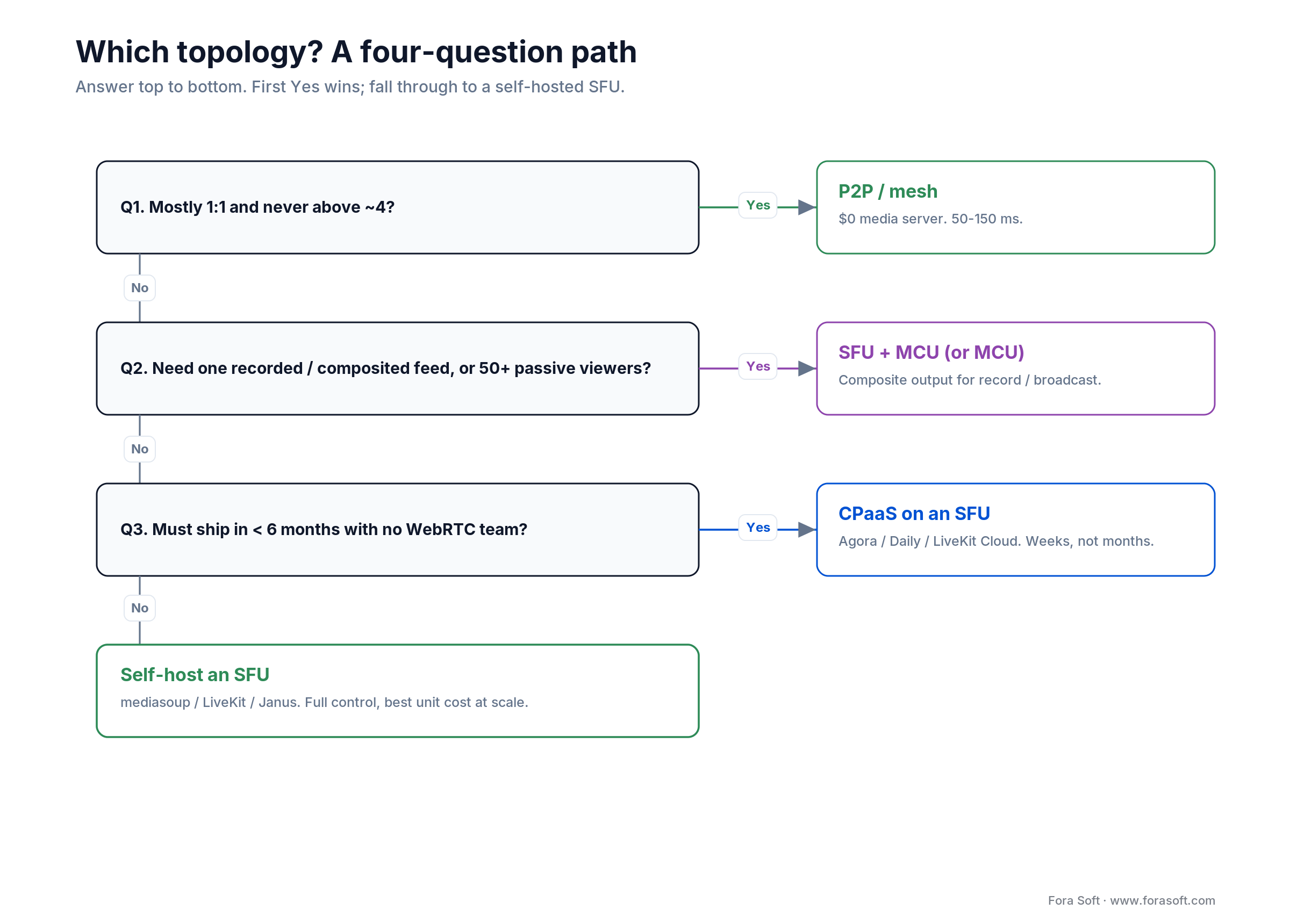
Figure 3. The same five questions as a path: first Yes wins, and anything that falls through lands on a self-hosted SFU.
Five pitfalls that force rewrites
1. Choosing P2P for a product that will hit 10 people. Launch on P2P "to scale later," and calls start failing at five participants. Retrofitting an SFU mid-launch is 3–6 months of work while users churn. Decide for the call you will have at scale.
2. Forgetting TURN in the budget. Assume everyone gets a direct path and your first enterprise customer, behind a strict firewall, blows the estimate. Reserve for the 10–20% of calls that relay, and price TURN by the gigabyte.
3. Building an SFU without bitrate adaptation. Hand-roll mediasoup, skip simulcast and bandwidth estimation, and the first congested network freezes the room. Adaptation is not a nice-to-have; an SFU without it is broken.
4. Ignoring mobile decode. An SFU forwarding nine streams to a phone maxes the CPU and drains the battery in half an hour. Cap receiver-side decodes to the three or four visible tiles even when the SFU offers more.
5. Welding yourself to one CPaaS. Integrate a vendor SDK deep into your client and a later move to self-hosting becomes a six-month rip-out. Put the vendor behind your own interface on day one.
KPIs worth wiring to a dashboard
Quality. Track MOS (target 4.0+), round-trip time (under ~200 ms), jitter (under 20 ms), and packet loss (under 1%; video breaks past 2%, audio past 5%). These predict churn before a support ticket does.
Reliability. Watch call setup time (under 3 seconds to first frame), call failure rate within the first five minutes (under 0.5%, sliced by network and geography), and media-server uptime (four nines is 52 minutes of downtime a year).
Business. Cost per concurrent user and cost per participant-hour tell you which topology you can actually afford, and whether it is time to move from CPaaS to self-hosted. Keep revenue per concurrent user at a healthy multiple of that cost, or the unit economics never close.
When not to build a custom architecture
Honesty sells better than a pitch, so here is when you should not hire anyone to build this — us included.
Under ~50 concurrent, ever. The overhead of running an SFU is not worth it. Take a CPaaS on a per-minute plan and spend the saved months on your actual product.
You must launch in under six months. A custom SFU is 4–12 months. CPaaS integration is 2–4 weeks. Ship on managed infrastructure and optimize once the unit economics force the question.
No WebRTC depth in-house. Debugging SFU media needs real RTP/SRTP/codec knowledge. Buy first, and add that expertise deliberately rather than learning it during an outage.
Per-minute or per-call revenue. If you charge per minute and pay a CPaaS per minute, the margin can go negative. Model it before you commit, and self-host or renegotiate before you scale the loss.
Need a second opinion on SFU vs MCU?
Our engineers have shipped selective-forwarding platforms handling 500M+ minutes. Bring your scale and budget; we will tell you what actually fits.
Frequently asked questions
What is the difference between P2P, MCU and SFU?
P2P sends media directly between two peers with no server. An SFU (Selective Forwarding Unit) receives each participant’s stream once and forwards it to the others without decoding, so it scales to hundreds cheaply. An MCU (Multipoint Control Unit) decodes every stream, mixes them into one composite, and re-encodes a single feed — the most server work, best only when you need one recorded or broadcast output.
Does Google Meet use SFU or MCU?
An SFU-style design. Google Meet forwards streams selectively and adapts quality per viewer rather than mixing a single canvas on the server, which is how it keeps latency low across large gallery views. Zoom and Microsoft Teams follow the same selective-forwarding approach for the live path.
Is an SFU better than an MCU for large calls?
For interactive calls, yes. An SFU is several times cheaper to run and adds far less latency, and it scales to hundreds of participants on modest hardware. Add an MCU only when you specifically need a composited feed for recording, broadcast, or clients that can decode just one stream.
How many participants can an SFU handle?
Hundreds per server, then linear with hardware. mediasoup handles roughly 500 consumers (forwarded streams) per worker, and one worker uses one CPU core; Jitsi Videobridge scales out by adding bridges. Past one box you shard rooms across machines, so the ceiling is budget, not architecture.
Did Twilio Video shut down?
No. Twilio announced a sunset and then reversed the decision in October 2024, keeping Twilio Video as a standalone product. During the uncertainty it recommended migrating to Zoom’s Video SDK, but the shutdown never happened.
Can I record an SFU call without an MCU?
Yes. Attach a recorder that subscribes to the SFU like any participant and writes each track, or mux server-side. mediasoup and LiveKit both support this. You skip the MCU’s cost and latency, at the price of compositing the gallery view in post if you need one.
What is the best codec for mobile video calls?
H.264 for decode, because most phones accelerate it in hardware and save battery, with VP8 as the safe upstream default. Let WebRTC negotiate and prefer hardware paths. AV1 saves bandwidth but costs more encoder CPU, so reserve it for Chromium-only or broadcast scenarios for now.
Can an SFU scale to 10,000 participants?
Not as a live interactive call. Ten thousand two-way streams is a bandwidth and cost wall. For audiences that large, keep the interactive core on an SFU and fan out to passive viewers over HLS or a CDN, or bridge through WHIP (RFC 9725, 2025) and WHEP (an IETF draft sent to the IESG for publication in 2026) to a streaming tier.
What is an MCU in video conferencing?
A Multipoint Control Unit is a server that decodes every participant’s video, mixes it into one layout and sends each person a single re-encoded stream. It began as the H.323-era hardware bridge for room systems and now usually runs as software; use one when you need a single recorded or broadcast feed.
What is the most scalable video meeting architecture?
A cascaded SFU: an SFU forwards streams without transcoding, and cascading links several SFU nodes, often across regions, so one meeting is not limited by one server. For audiences beyond a few thousand, keep the interactive core on SFUs and deliver to passive viewers over HLS or a CDN.
What to read next
Architecture
Which WebRTC Architecture Fits Your 2026 Roadmap?
P2P, SFU, MCU and hybrid mapped to business goals and budgets.
Cost
Video Conferencing App Development Cost
Honest 2026 pricing for MVP through enterprise builds.
Vendors
LiveKit vs Agora: Complete Cost Analysis
Side-by-side pricing for two leading WebRTC platforms.
AI
How Video AI Agents Work
Architecture, latency budget and per-minute economics.
Guide
Video Conferencing Software Development
From WebRTC fundamentals to scaling patterns.
Ready to pick your topology?
The decision compresses to a few lines. P2P and mesh own 1:1 and tiny private calls at zero server cost. An SFU is the default for real group video, because it holds every peer to a single upload and scales to hundreds. An MCU earns its higher cost only when you need one composited feed for recording or broadcast. In production, a hybrid that escalates P2P to an SFU and adds an MCU on demand beats committing to any single topology.
Match the architecture to the call you will have at scale, budget TURN and mobile decode from day one, and keep AI agents in mind — they want an SFU. If you would like that decision pressure-tested against your product, our video team has made it a few hundred times.

The book · Volume 3 of 7
Video Streaming: A Complete Guide to Video Delivery: From ABR and CDNs to Players, WebRTC, DRM, and the Economics of Streaming
Once you know whether your calls need P2P, an SFU or an MCU, the next questions are bitrate adaptation, client behaviour and what each minute costs. Volume 3 picks up there with WebRTC and real-time delivery, ABR ladders, players, QoE monitoring and the economics of delivery. Written by Nikolay Sapunov, CEO at Fora Soft.
Read it on Amazon →Kindle & paperback · Fora Soft Video Engineering Handbook
Let us architect the right video stack for your product
P2P for 1:1, an SFU for groups, a hybrid that does both — bring your scale and timeline and we will help you pick and ship it.

