


Key takeaways
• Pick the analytic before the vendor. Detection, LPR, PPE, loitering, heat mapping and forensic search each carry different hardware, latency and bias profiles. Don’t buy a “platform” for a use case you haven’t defined.
• Edge-first cuts cost and unblocks privacy. Running YOLO26 and ByteTrack on a Jetson Orin or a Hailo-8 edge box next to the camera keeps video local, drops cloud egress, and gets you under 150 ms alert latency.
• Integrate through ONVIF Profile M plus the VMS SDK. Milestone MIP, Genetec Security Center SDK, Avigilon Unity Video (formerly ACC), Nx Witness and BriefCam all expose metadata APIs that land analytics events on the timeline operators already use, with no bespoke glue.
• Compliance moved in 2026 — and the new dates are now law. The EU AI Act ban on real-time remote biometric ID in public spaces for law enforcement has applied since Feb 2025. The Digital Omnibus (Regulation (EU) 2026/1744, in force 27 July 2026) moved the high-risk obligations for biometric AI from Aug 2026 to 2 Dec 2027. Design for them now anyway.
• Measure false alarms and response time. A tuned video analytics surveillance stack cuts false alarms 70–90% and forensic search from hours to seconds. Those are the two numbers a security director signs off on.
Updated October 2026: EU AI Act dates now final under Regulation (EU) 2026/1744, a VMS-by-VMS API table for analytics events, and 2026 edge hardware (Jetson AGX Thor, Hailo-10H) plus VLM alert verification.
Video analytics for surveillance is software that runs computer-vision models on camera feeds and turns pixels into timestamped, searchable events: a person in a restricted zone, a plate at the gate, a bag left behind. Integration is the work of pushing those events into the VMS, access control and alerting tools operators already use, so an alert reaches a person in under a second instead of sitting in a separate dashboard. Analysts expect the video analytics market to reach about $37.8 billion by 2030, growing 19.5% a year from 2025 (Grand View Research, 2025).
“Video analytics surveillance” is really a dozen separate products wearing one label: person and vehicle detection, licence-plate recognition, loitering and intrusion, heat maps, queue length, PPE compliance, weapon detection, fire and smoke, natural-language forensic search, and real-time alerting into the VMS. Most retrofits fail because they try to bolt all of them onto an existing surveillance stack at once. If you need the primer on what each analytic does first, start with our guide to how AI video analytics works for security. This is the sequenced playbook we run on real sites: pick the analytic, choose the deployment pattern, integrate through the VMS, size the hardware, gate with compliance, measure ROI, and only then scale.
Who this is for: CTOs, security-platform product managers, heads of loss prevention, and smart-city or industrial-site operators scoping a VMS upgrade or an AI-analytics overlay. Every decision below maps back to a real protocol, a real accelerator and a real vendor. No hand-waving.
Why Fora Soft wrote this playbook
Fora Soft has built video and real-time-communication products since 2005: 250+ projects across 20+ years, with a heavy concentration in surveillance, computer vision for video surveillance and VMS. We are the sole development team behind V.A.L.T., a video surveillance and review platform now used by 770+ US organizations and 50,000+ users for multi-camera capture, forensic review and secure, HIPAA-compliant storage. We’ve wired AI inference pipelines on top of Milestone, Genetec, NX Witness and custom VMS stacks, including a Kazakhstan courtroom deployment where evidentiary-grade recording, indexing and search had to survive legal scrutiny.
This playbook distills that work plus 2026 research into one reference: the analytic to ship first, the protocol to integrate through, the accelerator to buy, the compliance shape to respect, the ROI to expect, and the pitfalls that sink rollouts. Want a second opinion on your architecture, or a fixed-price estimate accelerated by our Agent Engineering workflow (AI agents handling the repetitive build work under senior review)? Book a call at the end — or read the 12 features every modern VMS needs first.
Retrofitting analytics onto an existing VMS?
Share your camera count, VMS vendor and the one outcome that matters. In 30 minutes we’ll sketch the edge-vs-cloud split, the hardware bill and a realistic integration timeline.
How does video analytics integration work?
Video analytics integration turns the pixels a surveillance system already records into timestamped events (“person entered zone 3 at 14:02:31”) that the VMS can surface to an operator, store as metadata, cross-reference with access control, and expose through search. Every deployment already captures the video; integration is what makes it queryable. The table below shows the canonical analytic types, the model family that powers each today, and the workload each fits.
In practice, every integration runs the same five steps:
- Capture. The camera sends a recording stream and a lighter analytics stream over RTSP (ONVIF Profile S/T).
- Decode and infer. An edge box or server decodes the analytics stream and runs a detector plus tracker, such as YOLO26 with ByteTrack.
- Apply rules. Zones, dwell times and object classes turn raw detections into events (“person in zone 3 for 40 s”).
- Publish. Events and bounding boxes go to the VMS as ONVIF Profile M metadata or through the VMS SDK, and to other systems over MQTT or webhooks.
- Act and search. The operator gets an alarm on the same timeline as the video, and the metadata becomes searchable for investigations.
| Analytic | Model family (2026) | Where it runs | Best use case |
|---|---|---|---|
| Person / vehicle detection | YOLO26 / YOLO11, RT-DETR | Edge | Intrusion zones, perimeter, line-crossing alerts |
| LPR / ANPR | OCR-tuned CNNs (Vaxtor, Rekor, OpenALPR); see our ANPR/LPR build guide | Edge | Parking, logistics yard, blacklist alerts |
| Face detection & matching | ArcFace, AdaFace, InsightFace | Edge or on-prem | Access control, watchlist, time & attendance |
| Loitering / dwell / line-cross | Detector + ByteTrack / BoT-SORT | Edge | Retail shrink, perimeter, critical infrastructure |
| Abandoned / removed object | Background subtraction + detector | Edge | Airports, rail stations, bank lobbies |
| PPE compliance | Fine-tuned YOLO or DETR | Edge | Construction, manufacturing, utilities, HSE audit |
| Fire / smoke | Visual + thermal classifier (AI fire detection) | Edge | Warehouses, data centers, critical infrastructure |
| Weapon detection | Fine-tuned detector + human-in-loop (weapon detection guide) | On-prem server | Schools, transit, high-risk venues |
| Heat map / occupancy / queue | Detector + tracker aggregates | Edge + cloud | Retail merchandising, transport hubs, events |
| Forensic / VLM search | CLIP + Grounding DINO / SAM 3 / VLM | Cloud or on-prem GPU | “Find the person in the red jacket, 14:00–16:00” |
Reach for person + vehicle detection first when: you’re retrofitting a mixed-use site and want the biggest false-alarm cut with the smallest model footprint. YOLO26 or RT-DETR on a Jetson Orin or a Hailo-8 edge box covers most day-one incident types in the retrofits we run.
Reach for LPR when: you control parking, yard or toll-gate scenarios and need plate events tied to access-control, payment or watchlist workflows. A purpose-built camera plus firmware beats general-purpose CV here.
Reach for forensic VLM search last: only after the event stream, metadata store and clip indexing are solved. Search is compelling, but it’s an experience layer on top of a well-instrumented VMS, not a shortcut to one.
Reference architecture: camera to edge to VMS to operator
Every serious integration uses the same skeleton; the boxes change vendor, the protocols stay put. Pick each box on merit instead of buying one vendor’s suite that locks out the rest.
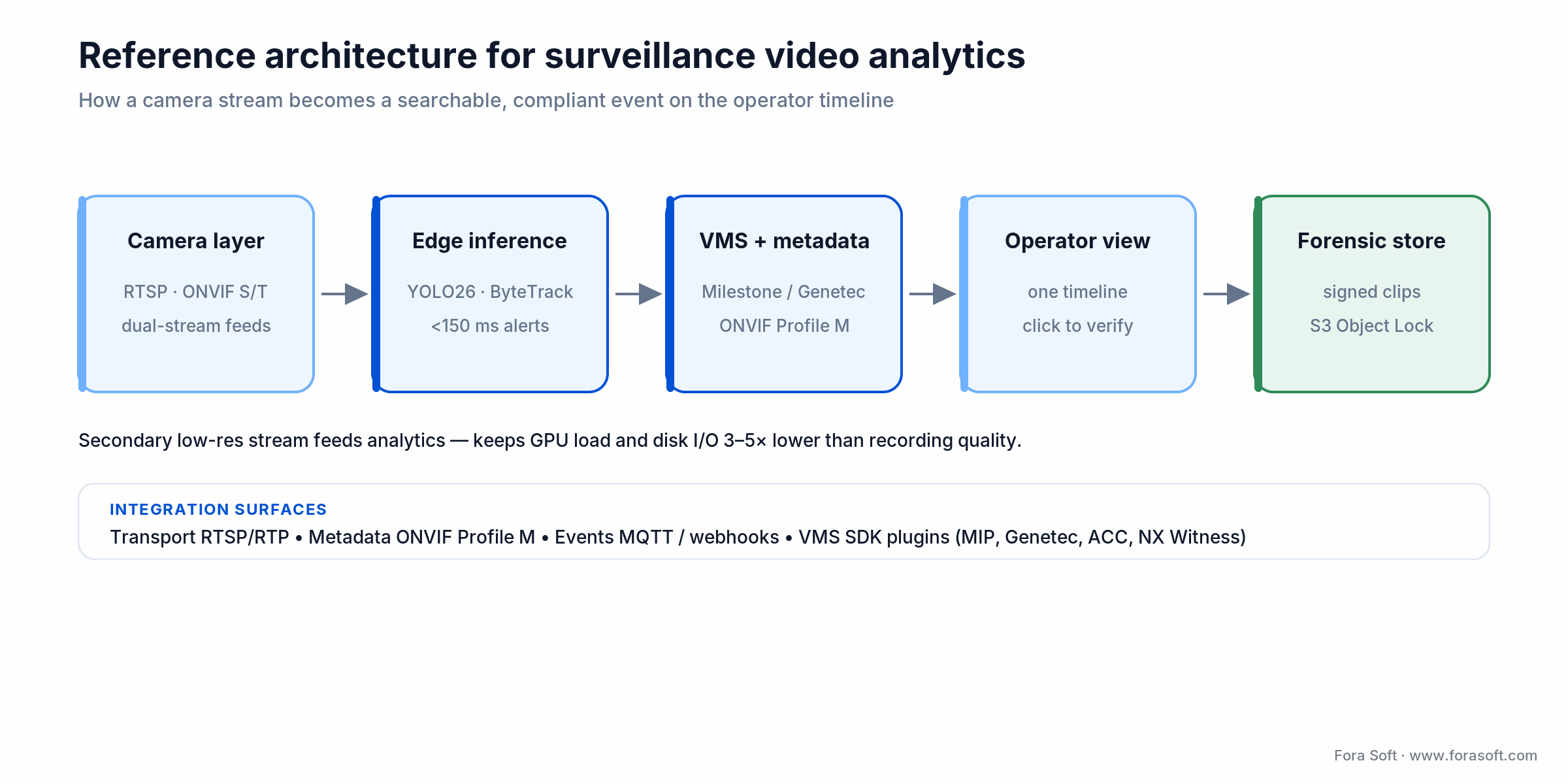
Figure 1. The camera-to-operator path: dual-stream capture, edge inference under 150 ms, events onto the VMS timeline over ONVIF Profile M, and a signed forensic store.
Camera layer and RTSP hygiene
Analytics fail silently on bad feeds. Lock the basics: NTP synced to the second across every camera and server; ONVIF Profile S/T for streaming, Profile M for metadata; a primary 1080p/4K stream for recording plus a secondary 360p–720p stream for analytics to cut GPU load 3–5×. Choose cameras with an on-board NPU or vision-processor SoC (Axis ARTPEC-8/9, Hanwha Wisenet, Bosch INTEOX, or a Hailo-15 VPU camera) when privacy or latency demands in-camera inference. If ONVIF profiles are new to you, our guide to ONVIF profiles in security systems is the plain-English primer.
Edge inference node
One or more edge servers per site: NVIDIA DeepStream on Jetson Orin, a Hailo-8 M.2 accelerator (26 TOPS) dropped into an energy-constrained edge box, or an Intel OpenVINO box for CPU-only workloads. A DeepStream pipeline fuses decode → detection → tracker → ROI filter → event publisher into one GPU-efficient graph, so you pay the decode cost once.
VMS and the metadata bus
Events land back in the VMS as bookmarks or native metadata. Milestone MIP, the Genetec Security Center SDK, the Avigilon Unity Video SDK (formerly ACC), the Nx Witness Metadata SDK and BriefCam expose equivalent hooks. MQTT or webhooks bridge to third-party systems: access control, intrusion panels, VoIP paging, Slack or Teams alerting. For the buy-side view of the platforms themselves, see our overview of video surveillance management systems.
Operator workstation and forensic store
The operator sees events on the same timeline as the recording, with one-click playback and click-to-acknowledge. A separate forensic store (object-addressable, retention-tagged, cryptographically signed) keeps evidentiary clips for investigators. For courtroom-grade work we sign clips with a timestamp-authority token so chain-of-custody stays auditable.
Edge vs cloud vs hybrid: the deployment decision
Three deployment shapes cover almost every project we see. The right one matches your bandwidth, latency budget and privacy posture, not the vendor’s preferred SKU.
| Pattern | Typical latency | Bandwidth | When it wins |
|---|---|---|---|
| On-camera (NPU) | <50 ms | Events only (KB/s) | Privacy-sensitive sites, mass fleets, sparse WAN |
| Edge server | 50–150 ms | Local LAN video | Multi-camera sites, heavy analytic mix, on-prem VMS |
| Cloud | 500 ms–2 s | Full video egress (Mbps/cam) | Single-digit cameras, latency-tolerant, big-model search |
| Hybrid (edge + cloud) | Live <150 ms, forensic secs | Metadata + clips only | The default for real production deployments |
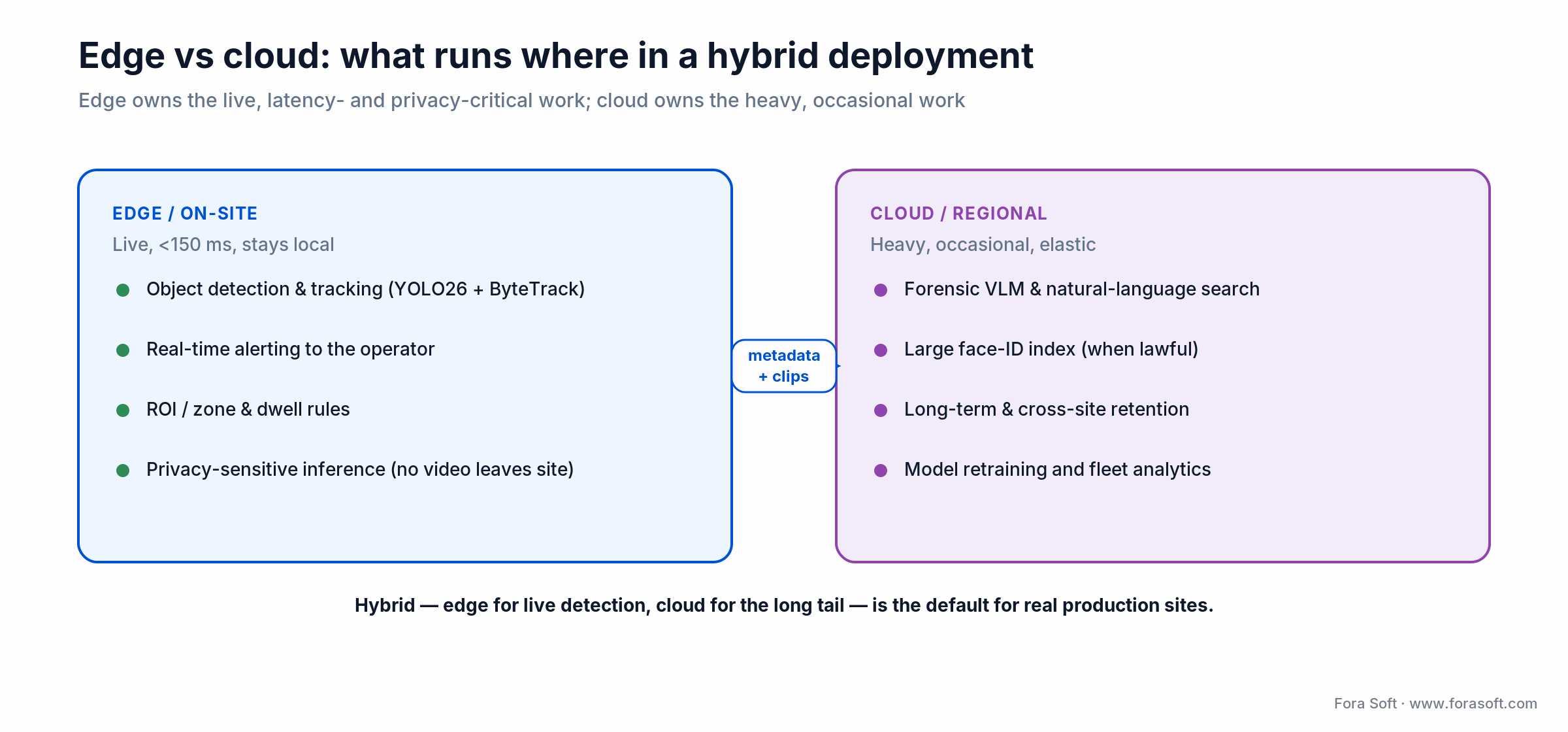
Figure 2. In a hybrid deployment the edge owns the live, latency- and privacy-critical work; the cloud owns the heavy, occasional work — connected by metadata and clips, not raw video.
Reach for hybrid edge + cloud when: you run more than a handful of cameras and need both sub-150 ms live alerts and heavy forensic search. Keep detection, tracking and alerting on the edge; push only metadata and short clips to the cloud for VLM search and cross-site retention.
Hybrid wins in practice: the edge handles live detection, tracking and alerting; the cloud handles the long tail that a big VLM or a huge face-ID index makes economic at scale. For the latency engineering behind that split, see our edge computing playbook.
Integration protocols and VMS APIs: ONVIF, RTSP, MQTT, SDKs
ONVIF is the lowest-common-denominator glue. Profile S is streaming, Profile T is advanced streaming with H.265 and imaging events, Profile G is edge storage, and Profile M, the one that matters here, is a standard schema for metadata (bounding boxes, classifications, zones). Event streams ride the ONVIF event service; many current VMSes consume Profile M without custom code.
RTSP delivers the video the analytics runs on; RTMP is legacy ingest only. MQTT is the event bus for heterogeneous IoT and surveillance fleets — lightweight, auth-friendly, QoS-aware. Webhooks are the fastest path to access-control and paging systems.
VMS SDKs. Milestone MIP is the richest: plugin architecture, UI extension points, metadata-on-timeline, recording-agent hooks. Genetec Security Center SDK is a close second with tight unified-security integration. Avigilon Unity Video SDK (formerly ACC), Nx Witness Metadata SDK, BriefCam API, Hanwha Wisenet SDK and Dahua DSS API cover the rest.
How do you integrate APIs with a video management system? You send each analytics detection to the VMS as an event the VMS already understands, then map that event to an alarm or bookmark on the camera’s timeline. Every major VMS has a documented way to do it; the table shows where analytics events land in each one, as documented by the vendors in 2026.
| VMS | Integration surface | How analytics events land | Watch out for |
|---|---|---|---|
| Milestone XProtect | MIP SDK, API Gateway (REST), XProtect App Platform (shown at ISC West 2026) | Analytics Events in MAD XML to the Event Server (default port 9090), with bounding boxes; AlarmCommand web service | Analytics event types must be pre-defined in the Management Client |
| Genetec Security Center | .NET SDK and Web SDK role | Custom Events mapped to alarms; overlays shown in Security Desk | Each SDK connection needs a Genetec certificate (licence) |
| Avigilon Unity Video (ex-ACC) / Alta | Unity Video SDK, Alta cloud API | Events and alarms in the Unity or Alta client | Two product lines with different APIs: on-prem vs cloud |
| Nx Witness | Nx Metadata SDK plugins, REST API | Object metadata and analytics events on the Nx timeline | Plugin runs inside the media server, so test CPU headroom |
| Cloud VMS (Eagle Eye, Verkada) | REST API and webhooks | Events through the vendor’s cloud API | Raw video and metadata stay inside the vendor cloud |
Which vendors have the widest third-party integration? Milestone and Genetec have the largest partner ecosystems for analytics plugins; Nx Witness is the most open for custom plugins at a lower licence cost. Cloud VMS products integrate fastest but give you the least control over where video lives. Pick the VMS first, then build the analytics layer around its strongest integration surface; if you need that layer written and maintained, our AI video recognition software team builds detection, tracking and VMS plugins on YOLO26, RT-DETR, ByteTrack and Jetson.
External references worth bookmarking: the ONVIF profile specifications for the metadata schema, and the Ultralytics YOLO11 docs for the detector most edge pipelines start from.
The 2026 AI model stack for surveillance
Object detection. YOLO26 (Ultralytics; previewed Sept 2025, released 14 Jan 2026) is the current edge-first standard: an end-to-end, NMS-free redesign that runs up to ~43% faster on CPU than YOLO11, which is still the most widely deployed detector in the field. RT-DETR is the transformer alternative when accuracy on small objects matters. Grounding DINO adds open-vocabulary detection (“find people wearing blue hats”) without custom training.
Tracking. ByteTrack and BoT-SORT are the 2026 defaults; DeepSORT is still fine where simplicity beats accuracy; StrongSORT adds appearance features for crowded scenes.
Re-identification. OSNet and TransReID embed a person into a vector that survives camera-to-camera transitions, the backbone of “find this person across the campus” workflows.
Semantic and forensic search. CLIP embeddings plus a vector store (pgvector, Weaviate, Pinecone) let you search clips in plain language. Add a VLM (GPT-class vision, Gemini, Claude Vision) for human-in-the-loop review that explains why a clip matched.
VLM alert verification (new in 2026). The fastest-moving layer this year sits between the detector and the operator: a vision-language model watches the clip behind each alert and labels it real or false before a person sees it. NVIDIA’s Video Search and Summarization blueprint 3.1 (docs updated July 2026) ships an Alert Verification Service that marks upstream alerts confirmed, rejected or unverified using Cosmos Reason or Qwen3-VL, and Milestone added Cosmos Reason-based video summaries to XProtect in 2026. Keep the detector as the trigger and use the VLM as a second opinion; it is too slow and too costly to run on every frame.
Segmentation. SAM 3 (Meta, Nov 2025) is the default when pixel-level masks matter (abandoned-object, vehicle counting); it adds promptable concept segmentation and object tracking across video, so a text prompt returns every matching instance. Pair it with a detector rather than running it on every frame.
For anomaly-specific approaches (isolation forests, autoencoders, one-class SVMs), see our surveillance anomaly-detection guide, and the video enhancement tooling roundup for pre-processing choices. If you’re grounding a team in the fundamentals first, our Learn primer on digital video explains the frames, codecs and bitrates every analytic depends on.
Need a proof-of-concept pipeline in 4 weeks?
We ship end-to-end detection + tracking + VMS integration proofs in under a month on your existing cameras. Share your site layout and we’ll scope the fastest path.
Hardware sizing: streams per accelerator, bandwidth, storage
The most common 2026 procurement mistake is under-sizing accelerators. Use these thresholds as a starting point, then benchmark on your actual resolution, frame rate and analytic mix.
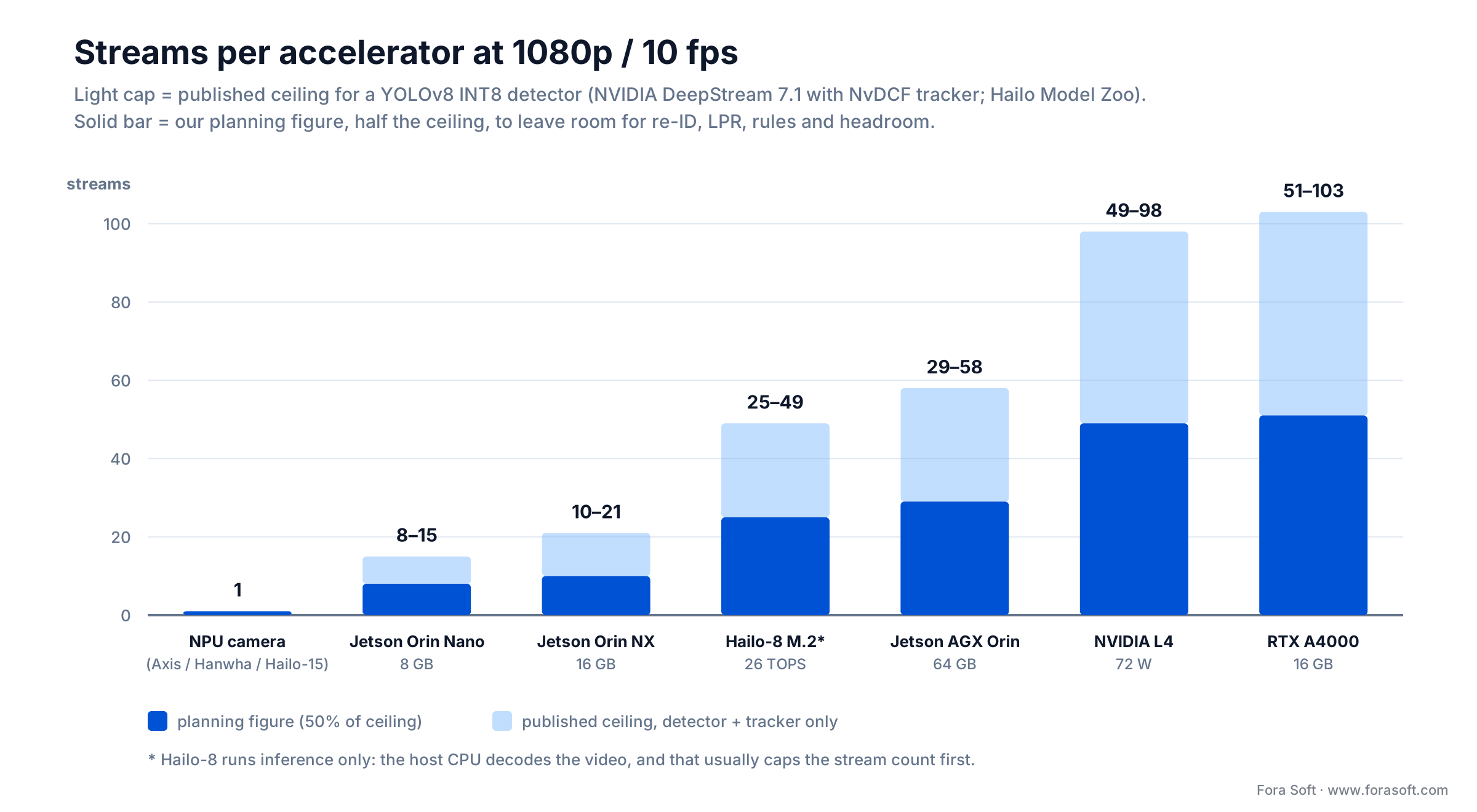
Figure 3. Streams one accelerator handles at 1080p/10 fps. The light cap is the published ceiling for a YOLOv8 INT8 detector (NVIDIA DeepStream 7.1 with the NvDCF tracker; Hailo Model Zoo for Hailo-8); the solid bar is our planning figure at half the ceiling.
How we got the numbers. The ceilings come from vendor benchmarks, divided by 10 fps per camera: NVIDIA’s DeepStream 7.1 performance tables list end-to-end YOLOv8 INT8 + NvDCF throughput of 155 FPS on Orin Nano, 211 on Orin NX, 579 on AGX Orin, 984 on L4 and 1,027 on RTX A4000, and the Hailo Model Zoo lists 491 FPS for YOLOv8s on Hailo-8. We plan at half of that, because production adds re-ID, LPR, zone rules, recording and failover headroom.
| Accelerator | Plan for (streams) | Published ceiling | Best fit |
|---|---|---|---|
| Axis / Hanwha / Hailo-15 NPU camera | 1 (its own feed) | — | Mass deployments, privacy-sensitive sites |
| NVIDIA Jetson Orin Nano 8 GB | 8 | 15 | Single-door or small-shop edge box |
| NVIDIA Jetson Orin NX 16 GB | 10 | 21 | Compact edge box for one building |
| Hailo-8 M.2 (26 TOPS) | 25* | 49* | Low-power edge boxes and NVR accelerators |
| NVIDIA Jetson AGX Orin 64 GB | 29 | 58 | Site-level edge server with DeepStream |
| NVIDIA L4 | 49 | 98 | Data-center or rack analytics, 72 W per card |
| NVIDIA RTX A4000 | 51 | 103 | On-prem analytics servers, VMS plugins |
* Hailo-8 runs inference only; the host CPU or a separate decoder handles the video, and that usually caps the stream count before the accelerator does. A desktop GPU such as the RTX A4000 has more compute and memory bandwidth than a Jetson module, so it carries more streams on the same model. Heavier models (transformer detectors, segmentation, VLMs) cut every row by a factor of several, so benchmark on your own streams before you buy.
New hardware since 2025. Three parts change sizing plans in 2026, and we benchmark each on the customer’s own streams before quoting stream counts. NVIDIA Jetson AGX Thor (2025): 2,070 sparse FP4 TFLOPS, 128 GB memory and a 40–130 W power range, with 7.5× the performance of AGX Orin by NVIDIA’s figures. It is the edge box that can run VLM alert verification on site. Hailo-10H: 40 TOPS INT4 at about 2.5 W typical, built for small LLMs and VLMs at the edge. NVIDIA RTX PRO 4000 Blackwell: the RTX A4000 successor for on-prem analytics servers, with 24 GB GDDR7, 145 W and 2 NVDEC decoders.
Bandwidth math, shown. A 1080p H.264 stream at 5 Mbps is 5 ÷ 8 = 0.625 MB/s; over a 30-day month (2.592M seconds) that’s ~1.6 TB per camera in raw recording. H.265 roughly halves it to ~0.8 TB, and AV1 cuts another 20–30%. So a 50-camera site at 1080p H.265 lands near 0.8 × 50 ≈ 40 TB/month before motion-activated reduction. Feed analytics from the secondary low-res stream to keep GPU and disk throughput bounded.
Storage. Erasure coding (Ceph, MinIO) beats RAID-6 above ~100 TB; both are fine below. Object-lock immutability (S3 Object Lock, Azure immutable Blob) is mandatory for evidentiary deployments. For fleet-scale storage and streaming decisions, our scalable VMS guide covers the trade-offs.
Commercial VMS and analytics vendors compared
You don’t have to build everything. Here’s the 2026 competitor map, useful for benchmarking and for deciding what to buy versus build. For per-camera pricing models and a wider platform list, see our AI video analytics software comparison. The incumbents are investing in AI: Milestone grew 2025 net revenue 10% to about $348 million and spent 28.8% of it on R&D (SecurityInfoWatch, March 2026).
| Vendor | Layer | Where it wins | Pricing shape |
|---|---|---|---|
| Milestone XProtect | VMS | MIP plugin ecosystem, BriefCam, XProtect App Platform, Cosmos-based VLM summaries | Per-camera perpetual + SMA |
| Genetec Security Center | VMS + unified security | Enterprise-grade, deep access-control / ALPR | Per-channel licence |
| Avigilon Alta / Unity (ex-ACC) | VMS + built-in analytics | Motorola ecosystem, self-learning analytics | Per-camera SaaS |
| Hanwha / Dahua / Hikvision | Camera + VMS | Integrated NPU cameras, wide AI portfolio | Hardware margin |
| Verkada / Spot AI / Eagle Eye | Cloud VMS | Fast deploy, SaaS simplicity, cloud search | SaaS per camera |
| BriefCam / Irisity / Senstar | Analytics add-on | Forensic search, retail analytics, perimeter AI | Enterprise contract |
| IronYun / Everseen / Deep Sentinel | Analytics SaaS | Retail shrink, alarm verification, managed monitoring | Per-camera + monitoring fee |
Where each breaks: single-vendor suites lock analytics to one camera line and one licence model; pure-SaaS clouds hit egress and residency walls at scale; camera-bundled AI is cheapest but hardest to extend. Our own V.A.L.T. build exists precisely because evidentiary, on-prem, multi-site review outgrew every off-the-shelf option. If you’re weighing buy-versus-build for an industrial site, our industrial video surveillance AI guide covers the harsh-environment delta.
Compliance: GDPR, EU AI Act, BIPA, NIST FRTE
Surveillance analytics is one of the most heavily regulated AI domains. Treat compliance as design input, not a legal review bolted on at the end.
1. GDPR. Biometric identification is “special category” data under Article 9 of Regulation (EU) 2016/679. Public-space signage, a documented purpose, access logs, retention limits and a DPIA are baseline obligations. (Untargeted scraping of facial images is banned separately under Article 5 of the EU AI Act.)
2. EU AI Act — the 2026 calendar is now final. Under Regulation (EU) 2024/1689, bans on real-time remote biometric identification in public spaces have applied since 2 Feb 2025 for law-enforcement purposes (narrow carve-outs aside). The high-risk obligations that catch biometric surveillance analytics (remote biometric identification, biometric categorisation and emotion recognition, all listed in Annex III) — risk management, logging, human oversight, post-market monitoring — were due on 2 Aug 2026. The Digital Omnibus on AI, Regulation (EU) 2026/1744, was published in the Official Journal on 24 July 2026 and entered into force on 27 July 2026 (Cooley, 2026). It moves Annex III high-risk duties, which include biometrics, to 2 Dec 2027, and AI built into regulated products to 2 Aug 2028. Article 50 transparency duties still apply from 2 Aug 2026, and processing special-category data to detect and fix bias is allowed only where strictly necessary. Design for high-risk now; the extra 16 months are for evidence, not for skipping the controls.
3. US state laws. Illinois BIPA demands written consent before biometric capture and carries a private right of action; Texas CUBI and Washington H.B. 1493 are close cousins, alongside a growing patchwork of city bans (Portland, Oakland). CCPA extends access and deletion rights to video where it’s linkable to a person.
4. UK DPA 2018. Biometric-data protection under Article 9 mirrors UK GDPR; ICO guidance on public-space surveillance is specific and worth reading before deployment.
5. Bias. The NIST Face Recognition Technology Evaluation (FRTE, the ongoing program that succeeded FRVT) keeps publishing demographic performance gaps. Use independently benchmarked models, evaluate on your own demographic mix, and document the outcome.
6. Data residency. EU and GCC customers frequently forbid cloud face recognition outside the region. Pick a vendor that supports on-prem or regional-cloud inference from the start — retrofitting residency is brutal. This is exactly the kind of constraint we scope up front in a video surveillance development engagement.
Real outcomes and the ROI numbers you can show the board
False-alarm reduction. Vendor case studies and our own deployments routinely land in the 70–90% range after two rounds of tuning. The mechanism is unglamorous: class filtering, dwell thresholds and zone-of-interest masks together eliminate the bulk of motion-triggered noise.
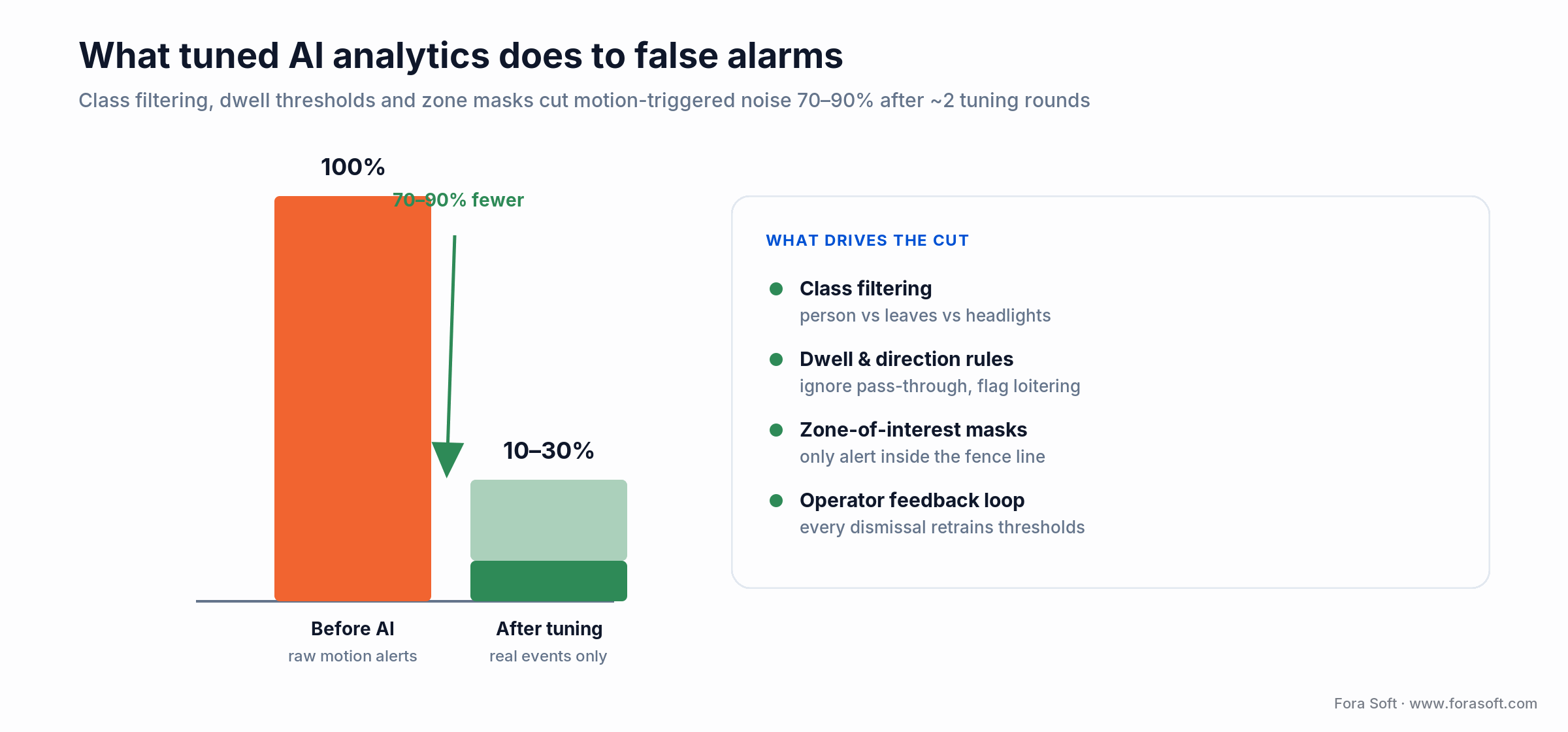
Figure 4. A tuned video analytics surveillance stack drops raw motion alerts to the 10–30% that are real events — a 70–90% cut — driven by class filtering, dwell rules, zone masks and an operator feedback loop.
Forensic search time. In our deployments, natural-language search over CLIP-embedded clips drops “find the person in the red jacket” from ~45 minutes of scrubbing to under 30 seconds. That single outcome is what most security directors actually fund the project for.
Retail shrink. Targeted analytics (sweet-hearting, self-checkout fraud, cart push-outs) is where retail chains see payback first, but published shrink figures come mostly from vendor case studies and vary by store format, so build the business case on your own incident log. The store-side build, including which analytics pay back per store and what a full fleet costs, is in our retail video analytics guide.
Response time. Edge-inference alerts under 150 ms versus a 500 ms–2 s cloud round-trip change the nature of active-threat response. For a school, transit hub or industrial site, that delta is the difference between an intervention and an investigation.
Operator productivity. In our deployments, one operator handles 3–5× more cameras after integration, because the system only raises events worth their attention. Most of the ROI arrives as deferred monitoring headcount.
Mini case: V.A.L.T. — evidentiary-grade recording with AI review
Situation. V.A.L.T. is a Fora-Soft-built recording and review platform used in clinical, medical-training and legal settings — today across 770+ US organizations and 50,000+ users. The brief: multi-camera simultaneous capture, tamper-evident storage, role-based access, and searchable review of long recordings where operators need minute-level precision.
What we built. RTSP ingest from professional PTZ cameras to an on-prem NVR; simultaneous recording at archival quality plus a secondary low-res analytics stream; CLIP-based clip embeddings for natural-language search; cryptographically signed clip storage with chain-of-custody metadata; a role-based viewer with annotation and tagging. That core pattern — dual-stream ingest, secondary analytics, signed forensic archive, search over embeddings — is the one we now reach for in every surveillance engagement.
Outcome. Reviewers locate specific moments in multi-hour recordings in seconds, not minutes; evidentiary integrity passes legal review; the system scaled across multi-site deployments with low operational burden. Want a similar assessment for your own VMS? Book 30 minutes and we’ll walk through scope and cost.
Cost model: a 50-camera retrofit worked example
Scenario. A mid-size campus with 50 IP cameras on Milestone XProtect wants person and vehicle detection, LPR, PPE compliance and forensic VLM search across a 3-year TCO window.
| Approach | Year-1 CapEx / setup | Ongoing (annual) | Trade-off |
|---|---|---|---|
| DIY DeepStream + YOLO on Jetson | Mid-five figures (hardware + integration) | Low (hosting, maintenance) | Lowest steady-state cost; highest engineering ownership |
| Cloud SaaS (Spot AI / Verkada) | Low (SaaS onboarding) | Per-camera subscription | Fastest deploy; cloud egress & residency caveats |
| Hybrid edge + VMS plugin | Mid-to-high five figures | Low-to-moderate | Best balance of cost, latency and privacy |
| Enterprise (Milestone + BriefCam) | High (per-camera licence + hardware) | SMA + support | Highest ceiling; heaviest cost |
We keep these ranges deliberately conservative — every site has quirks (lighting, network topology, regulation) that move numbers. Our Agent Engineering workflow means the tailored quote comes back fast and the build costs less than a traditional team; for a worked spreadsheet against your own site, book a scoping call.
A 12-week plan to ship your first analytics integration
This is the cadence we run for sites starting from a baseline VMS and no AI. Swap the specifics; the shape is stable.
Weeks 1–2 — Outcome, site audit, compliance shape. Lock the one outcome (false-alarm reduction? PPE compliance? forensic search?). Inventory cameras, network, VMS version, storage and existing analytics. Draft the DPIA, signage plan and access-control policy before any pixel is processed.
Weeks 3–4 — Stream hygiene and pilot cameras. Fix NTP, ONVIF, RTSP stability and secondary-stream config. Pick 3–5 representative cameras (one indoor, one outdoor, one backlit, one PTZ).
Weeks 5–7 — Edge pipeline and offline evaluation. Stand up the DeepStream or OpenVINO pipeline, wire YOLO26 + ByteTrack, tune ROI zones, and evaluate precision/recall on recorded clips before going live.
Weeks 8–9 — VMS integration and operator UI. Wire events to MIP / Genetec / Avigilon Unity / Nx Witness as bookmarks plus metadata. Train two operators, capture their override behaviour, tune thresholds.
Weeks 10–11 — Pilot and A/B comparison. Run in parallel with the old alert flow. Compare false-alarm rate, response time and clip-find time. Document the delta.
Week 12 — Roll-out or fix plan. If the KPI moved, roll out to the rest of the fleet; if not, diagnose the camera angle, model or threshold before scaling.
Five pitfalls that sink surveillance analytics rollouts
1. Bad camera angles. Models trained on upright-frontal humans fail on ceiling-mounted fish-eye cameras. Plan for retraining or a repositioning pass; don’t expect magic from pretrained weights.
2. No NTP, no deterministic replay. If cameras drift seconds apart, timeline bookmarks lose meaning and multi-camera re-ID stops working. Sync sub-second and verify regularly.
3. One model, no retraining loop. The world drifts: new PPE, new vehicles, seasonal lighting. Without a scheduled fine-tune loop and an operator feedback UI, accuracy decays by quarter two.
4. Cloud face recognition in a residency-forbidden region. Easy to forget until legal or a customer gate catches it. Design for on-prem or regional cloud from day one for any biometric workload.
5. No operator explainability. An alert without a “why” breeds alert fatigue and ignored warnings. Every event must carry the model, the confidence and the triggering frame region.
When not to integrate AI analytics
Fewer than 8–10 cameras, simple front-door and back-lot coverage, no 24/7 monitoring desk, low-risk site — classic motion-triggered recording usually wins. Real-time biometric identification in public spaces inside the EU is largely prohibited for law enforcement by the AI Act, and private biometric ID falls under its high-risk rules; don’t chase an architecture that’s illegal to deploy. Small retail stores with fewer than five checkouts and no loss-prevention mandate often don’t recover the cost of analytics inside two years. Revisit the decision when you cross ~15 cameras, start paying for a monitoring service, or have an incident log that justifies the spend. If your question is the bigger one — whether to build the whole system yourself instead of adding analytics to a VMS you already run — see our custom video surveillance build-vs-buy guide.
A decision framework: pick your stack in five questions
Q1. How many cameras, how dense the site? <20 → camera-NPU + cloud SaaS. 20–200 → edge server per site. 200+ → multi-edge + a hybrid cloud forensic layer.
Q2. Biometrics in use? Yes → on-prem or strictly regional cloud, explicit consent, bias benchmarking. No → cloud is simpler for small fleets and dodges the heaviest compliance load.
Q3. Latency budget for alerts? Sub-second → edge, or hybrid with live alerts on the edge. 1–2 s acceptable → cloud is an option. Forensic only → cloud.
Q4. Which VMS is already in play? Milestone / Genetec / Avigilon → plugin path with the native SDK. Nx Witness → Metadata SDK plugin or rules engine. Verkada / Spot AI / Eagle Eye → REST APIs and webhooks. Custom → open a metadata contract up front.
Q5. Who runs it after go-live? Dedicated security ops → DIY edge is viable. IT team only → SaaS with managed monitoring. Mixed → hybrid with outsourced alarm verification for night hours.
Want a second opinion on your surveillance architecture?
We’ve shipped analytics for clinics, courtrooms and enterprise campuses. Share your VMS, camera count and compliance shape, and we’ll pressure-test the edge/cloud split, hardware and integration plan.
KPIs: what to measure after go-live
Operational KPIs. False-alarm rate (target 70–90% reduction versus pre-AI), average alert-to-acknowledge time, operator dismissed-alert rate, multi-camera re-ID accuracy.
Business KPIs. Incidents prevented, shrinkage reduction, insurance-premium change, staff hours saved versus pre-AI, SLA breaches avoided.
Reliability and trust KPIs. Edge-node uptime, inference latency p95, storage integrity (object-lock tamper events), bias-audit metrics across demographic slices, audit-log completeness.
FAQ
Can I add analytics without replacing my cameras?
Usually yes. Any camera that exposes RTSP/ONVIF works. The analytics runs on an edge box or on-prem server that pulls the stream. You replace cameras only when you need a specific NPU-equipped model, a 4K sensor, or IR/thermal capability for a new analytic.
How many cameras can one NVIDIA Jetson Orin handle?
It depends on the module. With a YOLOv8-class detector and a tracker at 1080p/10 fps, NVIDIA’s DeepStream 7.1 benchmarks put the ceiling at about 58 streams on an AGX Orin 64 GB, 21 on an Orin NX 16 GB and 15 on an Orin Nano 8 GB. Plan for about half of that (29, 10 and 8) once you add re-ID, LPR and rules, and fewer again for transformer models or segmentation. Benchmark with your actual analytic mix before buying.
Do I need facial recognition?
Probably not. In our projects, most of the surveillance value comes from person/vehicle detection, LPR, PPE, loitering and forensic search — none of which need biometrics. Face recognition carries the heaviest compliance load; reserve it for narrow access-control or watchlist cases with an explicit legal basis.
What changed with GDPR and the EU AI Act in 2026?
GDPR still requires a DPIA, signage, access logs and retention limits. The EU AI Act has banned real-time remote biometric ID in public spaces for law enforcement (narrow exceptions aside) since Feb 2025; person, vehicle or PPE detection without biometrics is usually not high-risk. Its high-risk obligations for biometric AI were due 2 Aug 2026 but Regulation (EU) 2026/1744, in force since 27 July 2026, moved them to 2 Dec 2027; Article 50 transparency duties still started on 2 Aug 2026. Build to the high-risk bar now; you gain runway, not an exemption. If footage leaves your system for an access request, plan for automated face and plate redaction.
How much storage do I need for a year of 50 cameras?
At 1080p H.265 continuous recording, roughly 40 TB/month, so ~480 TB/year. Motion-activated recording typically cuts that 50–70%. Add an evidentiary tier with Object Lock for incident clips and keep it immutable for the regulatory retention period (1–7 years by jurisdiction).
Does AI really cut false alarms by 70–90%?
Yes, when tuned. The big wins come from class filtering (person vs leaves), motion-direction rules, dwell thresholds and zone-of-interest masks. Published vendor case studies and our own deployments land in that range after two tuning rounds.
Can Fora Soft integrate into my Milestone / Genetec / NX Witness setup?
Yes. We’ve shipped MIP plugins, Genetec SDK integrations, Avigilon Unity Video SDK extensions and Nx Metadata SDK plugins. Typical scope is 6–12 weeks depending on analytic count and compliance shape. Book a call and we’ll scope yours.
What’s a realistic PoC timeline?
Four weeks for a single-site, 3–5 camera proof-of-concept with one analytic (usually person/vehicle detection) landing bookmarks on your existing VMS. It is a compressed version of weeks 1–9 of the 12-week plan above: one site, one analytic, no fleet roll-out. That’s the cadence we quote for a discovery engagement.
How does video analytics work in a surveillance system?
The camera streams video to an edge box or server, a detection model such as YOLO26 finds people and vehicles, a tracker follows them across frames, and rules on zones and dwell time turn detections into events. Those events land in the VMS as alarms or bookmarks on the video timeline, where operators act on them and investigators search them later.
What is CCTV with video analytics?
It is a CCTV system where software watches the footage instead of only recording it. The analytics flag intrusions, loitering, plates, PPE violations or smoke in real time and index the recordings so you can search them, which cuts false alarms and the hours spent scrubbing video.
Which VMS is easiest to integrate third-party analytics with?
Milestone XProtect and Genetec Security Center have the richest documented integration surfaces and the largest partner ecosystems; Nx Witness is the most open for custom plugins at lower licence cost. Cloud VMS products such as Eagle Eye and Verkada integrate fastest through REST APIs and webhooks but keep video in their cloud.
What to Read Next
Standards
ONVIF Profiles in Security Systems
The Profile S/T/G/M decision that makes multi-vendor integration work.
VMS
12 Essential Features of Modern VMS Software
The feature checklist behind every serious surveillance platform.
Platforms
Video Surveillance Management Systems
How VMS platforms are built, compared and chosen in 2026.
Scale
Scalable Video Management Systems
The five engineering decisions that dictate cost at fleet scale.
Case study
V.A.L.T. — Evidentiary-Grade Recording
How we shipped forensic-grade surveillance analytics end to end.
Ready to integrate video analytics with your surveillance stack?
Video analytics surveillance is a well-understood problem in 2026 — the protocols (ONVIF, RTSP, MQTT, VMS SDKs), models (YOLO26, ByteTrack, CLIP, VLMs), accelerators (Jetson, Hailo, NPU cameras) and vendors (Milestone, Genetec, Avigilon, Hanwha, Spot AI, BriefCam) are all mature. What sinks projects is sequencing: teams try ten analytics at once, skip compliance design, under-size accelerators and forget the operator UI. Do the opposite — one analytic, tight VMS integration, hardware matched to the workload, compliance as architecture, and an explainable operator surface — and you land inside the 70–90% false-alarm-reduction bracket.
Want a team that has shipped this across V.A.L.T., Kazakhstan-courtroom evidentiary recording and enterprise Milestone and Genetec deployments? Book a call. We’ll walk the architecture, the hardware and the cost for your specific site, and the Agent Engineering workflow above means the quote comes back fast.

The book · Volume 6 of 7
AI for Video: A Complete Guide to Intelligence in Video Products: From Models and Inference to Computer Vision, Speech, Search, and Generative Video
Wiring analytics into a VMS starts with picking detectors and trackers that hold up on real camera feeds. Volume 6 covers that model layer in depth: object detection, tracking, segmentation, pose and OCR, along with deployment topologies from camera to cloud and the ML basics a buyer needs to judge accuracy claims from vendors. Written by Nikolay Sapunov, CEO at Fora Soft.
Read it on Amazon →Kindle & paperback · Fora Soft Video Engineering Handbook
Let’s integrate analytics with your surveillance stack
20+ years of video and AI engineering across 250+ products, including evidentiary-grade surveillance. Book 30 minutes and leave with a concrete PoC scope, a hardware bill and an integration plan.

