

Key takeaways
• Pick AWS when you need 200+ managed services, HIPAA / FedRAMP, 30+ regions, or multi-AZ enterprise SLAs — and you can absorb the price.
• Pick DigitalOcean for predictable per-month pricing, a clean control panel, App Platform / Managed K8s, and small teams that want a Heroku-feel without the Heroku bill.
• Pick Hetzner when raw price-per-core, included 20 TB egress, and EU data residency matter more than a 200-service catalog.
• The hidden killer is egress. AWS charges roughly $0.09–$0.12 per GB out; Hetzner gives 20 TB free per Cloud server. For media-heavy apps that one line item flips the verdict.
• Hybrid is normal. Many of our clients run AWS for compliance-bound services and Hetzner / DigitalOcean for compute, transcoding, or staging, cutting hosting bills 40–70% without losing certifications.
Hosting is the floor under every vendor here. All vendor comparisons, in one place.
Why Fora Soft wrote this playbook
Fora Soft has been shipping video, AI and SaaS products since 2005. We currently run production workloads across all three providers in this comparison — AWS for HIPAA-bound healthcare clients, DigitalOcean for fast-scaling SaaS startups, and Hetzner for high-throughput video transcoding and media storage where every cent of egress matters. We’ve also migrated whole stacks between them.
This article is the same shortlist conversation we have with founders during scoping calls. It’s built on real bills we paid, real outages we lived through, and the cost models we use to plan deployments, the same models behind cases like BrainCert, a virtual classroom platform serving thousands of concurrent students. Where a number could swing your decision, we name our source.
We use Agent Engineering on every engagement, which is why our scoping and infrastructure setup typically lands faster and cheaper than traditional teams. If you want that applied to your own product, it’s the core of our video streaming development work. Where we cite a price band below it’s the realistic Fora Soft band, not a generic agency one.
Stuck choosing between AWS, DigitalOcean, and Hetzner?
We’ll review your architecture, traffic profile, and compliance constraints in 30 minutes and tell you which provider (or mix) actually fits.
The quick verdict in one paragraph
If you’re a regulated enterprise needing HIPAA, FedRAMP, 30+ regions, and 200+ managed services on tap — AWS. If you’re a developer-first startup that wants flat per-month pricing, Heroku-style App Platform, and decent managed databases — DigitalOcean. If you’re a price-sensitive team running heavy CPU, GPU, or video-egress workloads in Europe — Hetzner. Most production stacks we run for clients use two of the three: AWS for compliance and BI, plus Hetzner or DigitalOcean for the heavy compute. The single best optimisation we apply is moving egress-heavy services off AWS.

Figure 1. Where each provider wins and breaks, at a glance: AWS on compliance and reach, Hetzner on price and egress, DigitalOcean in the calm middle.
Cloud Service Providers in 30 seconds
A Cloud Service Provider (CSP) rents you compute, storage, and networking out of data centres they own and operate. Instead of buying physical servers, you pay by the hour, the GB, or the month. The three providers in this guide all do that, but they target very different buyers.
AWS is the hyperscaler — deepest catalog (200+ services), broadest compliance (HIPAA, FedRAMP, PCI DSS, ISO 27001, SOC 2), 33+ regions and 100+ availability zones. DigitalOcean is the developer-cloud — ~20 services, simple control panel, App Platform / Managed Kubernetes, 15 data centres. Hetzner is the price champion — raw VMs and bare metal at the lowest per-core cost on the open market, 4 active data centres expanding to 6, EU-data-residency by default.
AWS — the deepest catalog at the highest price
AWS runs more than 200 services across 33+ regions and 100+ availability zones, with EC2 carrying a 99.99% uptime SLA when you spread across two AZs. Its catalog covers everything from raw compute to managed Postgres, GPU inference, edge compute (Lambda@Edge), HIPAA-eligible primitives, and quantum services. If you need a feature, AWS has it.
| AWS — key facts (2026) | Number / detail |
|---|---|
| Regions / AZs | 33 regions / 105+ AZs |
| Services in catalog | 200+ managed services |
| EC2 t3.medium on-demand | ~$30/mo (us-east-1, 2 vCPU / 4 GB) |
| EBS gp3 storage | $0.08/GB-month |
| Egress to internet | First 100 GB free, then $0.09/GB (first 10 TB), $0.085+ higher tiers |
| Compliance | HIPAA, FedRAMP, PCI DSS, SOC 1/2/3, ISO 27001, GDPR |
Why AWS works well
1. The catalog is unmatched. If your CTO writes “we need a managed time-series DB, ML inference at the edge, and a HIPAA BAA”, AWS is the one provider that can answer all three from a single console.
2. Compliance you can actually use. HIPAA-eligible services, FedRAMP High in GovCloud, PCI DSS Level 1, and a documented Shared Responsibility Model that your auditors will accept on day one.
3. Mature multi-AZ resiliency. Two AZs + Multi-AZ RDS + ALB gives you the 99.99% number with very little custom work. Hetzner’s Cloud has no formal SLA at all.
4. Hiring market. AWS is the most common primary cloud skill on the market, so you can staff a team faster than on either of the alternatives.
Where AWS hurts
1. Sticker-shock pricing. The same 2 vCPU / 4 GB box that costs about $9/mo on Hetzner (CPX22) is ~$30/mo on AWS on-demand. Reserved or Savings Plans cut that to ~$11–15/mo, but you trade flexibility for the discount.
2. Egress is the budget killer. $0.09/GB compounds fast. A 50 TB/month video service pays roughly $4,300 in egress alone (tiered: $0.09/GB on the first 10 TB, $0.085 after) vs about $30 on Hetzner Cloud, where 20 TB per server is free and it’s €1/TB after.
3. NAT Gateway, Load Balancer, CloudWatch. Each is small individually; together they routinely add $200–800/mo to startup bills before any compute runs.
4. Lock-in. Lambda, DynamoDB, SQS, SNS, IAM. The deeper you go, the harder you leave. Migration costs we’ve seen range from 2 to 6 months of dev time for a mid-size SaaS.
Reach for AWS when: you sell into regulated sectors (health, finance, government), you need 30+ regions out of the box, or your enterprise customers contractually require it. The premium is real but defensible.
DigitalOcean — the developer-first middle ground
DigitalOcean operates 15 data centres across 9 regions and ships a tightly curated catalog of about 20 services: Droplets (VMs), Spaces (S3-compatible object storage), App Platform (PaaS), Managed Kubernetes (DOKS), Managed Databases (Postgres / MySQL / Redis / MongoDB / Kafka), and a clean networking layer (VPC, firewalls, load balancers). Their UI and API are the cleanest of the three.
| DigitalOcean — key facts (2026) | Number / detail |
|---|---|
| Data centres | 15 across 9 regions |
| Services | ~20 (Droplets, App Platform, K8s, Spaces, Managed DBs) |
| Basic Droplet 2 vCPU / 4 GB | $24/month flat |
| Block storage | $0.10/GB-month |
| Egress (included / overage) | Pooled transfer, several TB/Droplet / $0.01/GB after |
| Compliance | SOC 2 Type II, ISO 27001, GDPR (no HIPAA BAA) |
Why DigitalOcean works well
1. Predictable pricing. Flat monthly per Droplet, generous transfer pool, and a calculator that doesn’t hide six surprise line items. Founders can model a runway in a spreadsheet.
2. App Platform feels like Heroku. Push to git, get HTTPS, autoscale, managed Postgres, without a full DevOps hire. We routinely launch MVPs on App Platform inside a sprint.
3. Managed Kubernetes (DOKS) at fair prices. Free control plane, $12/mo per worker node from a Basic Droplet up.
4. AI / GPU Droplets. NVIDIA H100 and L40S boxes available on-demand, handy for inference workloads at a fraction of AWS p5 pricing.
Where DigitalOcean falls short
1. No HIPAA BAA. If you handle PHI you cannot use DO for the production tier — full stop.
2. Catalog gaps. No managed message queue (no SQS analog), no first-class secrets manager, limited identity / IAM, weaker observability than CloudWatch + X-Ray.
3. Region count. Nine regions is fine for North America and Europe; if you need APAC plus LATAM plus Africa, DO will leave gaps.
4. Support tiers. Free email support has no response-time SLA. Premium support starts around $200/mo.
Reach for DigitalOcean when: you’re building a SaaS, marketplace, or B2B tool that doesn’t need HIPAA, fits inside ~9 regions, and benefits from a developer team that ships rather than babysits cloud config.
Hetzner — the price-per-core leader for Europe-leaning workloads
Hetzner is a German hosting company that runs Cloud (VMs), Dedicated (bare metal AX / EX series), Storage Box, and Object Storage. Six locations today (Falkenstein DE, Nuremberg DE, Helsinki FI, Ashburn VA and Hillsboro OR in the US, plus Singapore). Prices went up by as much as 37% on 1 April 2026, so the old €4-a-server numbers you see quoted around the web are stale. Current list: a 2 vCPU / 4 GB CPX22 (regular performance) is €7.99/month, the cost-optimized CX23 is €3.99, an 8 vCPU / 32 GB CCX33 with dedicated vCPUs is €48.49/month (about $53), and 20 TB of egress per server is still included in EU regions.
| Hetzner — key facts (2026) | Number / detail |
|---|---|
| Data centres | 6 (DE×2, FI, US×2, SG) |
| CX23 Cloud (2 vCPU / 4 GB, cost-optimized) | €3.99/month (~$4.40) |
| CPX22 Cloud (2 vCPU / 4 GB, regular) | €7.99/month |
| CCX33 Dedicated (8 vCPU / 32 GB, 30 TB) | €48.49/month (~$53) |
| Egress per Cloud server | 20 TB/mo included (EU) / €1 per TB after |
| Compliance | ISO 27001, GDPR by default (no HIPAA BAA, no SOC 2 Type II) |
Why Hetzner works well
1. The price floor. Roughly 3–5× cheaper than AWS for equivalent compute, even after the April 2026 increase. For batch jobs, transcoding, build farms, and CI fleets the ROI is obvious within a sprint.
2. Egress economics. 20 TB free per Cloud server makes Hetzner the natural choice for streaming, downloads, video archives, and ML model serving where AWS bills would dominate.
3. Bare metal is genuinely fast. AMD Ryzen and EPYC nodes consistently outperform virtualised AWS / GCP boxes on single-core CPU benchmarks, which helps for game servers, CAD, FFmpeg, and similar workloads.
4. EU data residency by default. If your customers are German / French / Nordic and ask “where is my data?”, you have a one-line answer.
Where Hetzner falls short
1. Thin managed-service catalog. No managed Postgres, no managed Kafka, no managed Redis, no first-party serverless. You self-run everything. Budget DevOps time accordingly.
2. No formal SLA on Cloud. Dedicated has a 99.9% SLA contractually; Cloud has none. We treat Hetzner Cloud as “reliable but not contractual”.
3. Compliance ceiling. No HIPAA BAA. SOC 2 Type II is not currently published. ISO 27001 + GDPR cover most EU SaaS but not US healthcare or US government.
4. Region coverage. One US site, one Asia site (in flight). For latency-sensitive APAC users you’ll need a CDN or a second provider.
Reach for Hetzner when: you have a strong SRE / DevOps culture, Europe is your primary market, your workload is CPU-, GPU-, or egress-heavy, and you don’t need HIPAA / FedRAMP. Expect to save 40–70% vs equivalent AWS spend.
Side-by-side comparison matrix
The AWS vs DigitalOcean vs Hetzner call usually breaks into two pairwise trade-offs. AWS vs Hetzner is price against compliance and reach. DigitalOcean vs Hetzner is managed services and developer ergonomics against raw cost and free egress. The table below is the flat version of both.
All numbers below are public list prices in mid-2026. They’ll be wrong by a few percent by the time you read this; treat them as orders of magnitude, not quotes.
| Dimension | AWS | DigitalOcean | Hetzner |
|---|---|---|---|
| 2 vCPU / 4 GB VM | ~$30/mo (t3.medium) | $24/mo | ~$9/mo (CPX22) |
| 8 vCPU / 32 GB VM | ~$280/mo (m5.2xlarge) | $252/mo (GP) | ~$53/mo (CCX33) |
| Block storage | $0.08/GB (gp3) | $0.10/GB | ~$0.05/GB |
| Object storage | $0.023/GB (S3) | $5/mo for 250 GB (Spaces) | €5/mo for 1 TB |
| Egress to internet | $0.09/GB | Pooled (several TB); $0.01/GB after | 20 TB/server free (EU); €1/TB after |
| Regions | 33 / 105+ AZs | 9 (15 DCs) | 6 (DE, FI, US×2, SG) |
| Managed services | 200+ | ~20 (App Platform, K8s, DBs) | ~6 (very thin) |
| EC2 / Droplet SLA | 99.99% | 99.99% | No formal Cloud SLA; 99.9% on Dedicated |
| HIPAA BAA available | Yes | No | No |
| SOC 2 Type II | Yes | Yes | Not published |
| GPU options | A10, L4, L40S, A100, H100, B200 | L40S, H100, on-demand | RTX series on Dedicated only |
| Best fit | Regulated enterprise, multi-region SaaS | Dev-led startups, MVPs | EU SaaS, video / batch / heavy egress |
A worked cost example: a streaming SaaS pushing 50 TB/month
This is the model we use during scoping for video, e-learning and live-stream products — the same family as our scale-to-a-million-viewers playbook. If the encoding side is new to you, our primer on how digital video works explains why egress ends up dominating these bills. Take a SaaS that runs four mid-size compute nodes (8 vCPU / 32 GB), 1 TB of object storage, and pushes 50 TB/month of egress to viewers.
| Line item (monthly) | AWS | DigitalOcean | Hetzner |
|---|---|---|---|
| 4 × 8 vCPU / 32 GB compute | $1,120 | $1,008 | $212 |
| 1 TB object storage | $23 | $25 | $5 |
| 50 TB egress | ~$4,300 | ~$260 | ~$30 |
| Load balancer + NAT + monitoring | ~$200 | ~$30 | ~$20 |
| Approx total / month | ~$5,643 | ~$1,323 | ~$267 |
The compute spread is about 5×; the egress spread is over 100×. That second number is the one that flips real architectures. We’ve helped clients drop their AWS bill by 60–70% by moving just the egress-heavy services to Hetzner Cloud while keeping AWS for control-plane, BI, and HIPAA-bound endpoints.
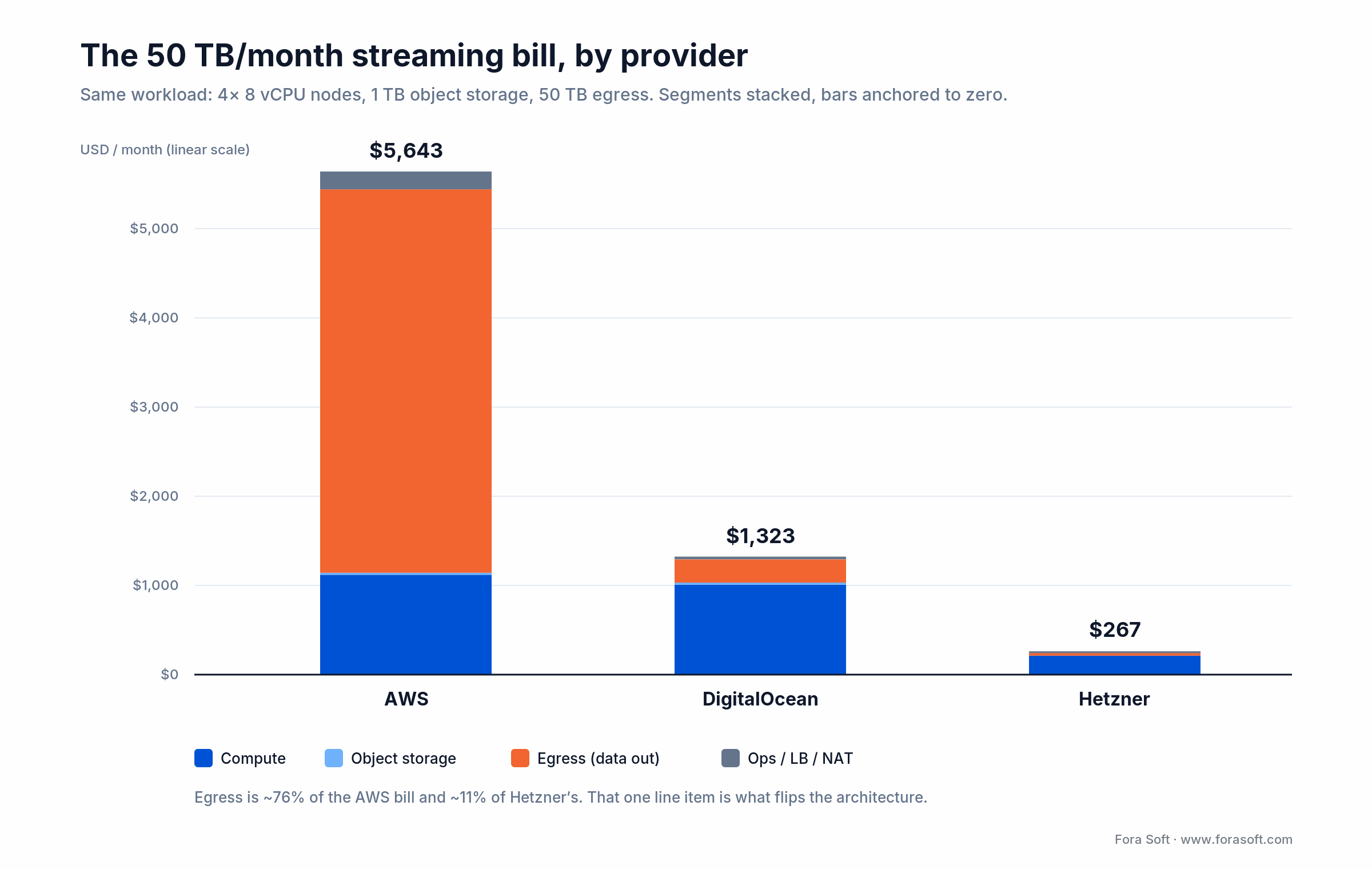
Figure 2. The same 50 TB/month workload priced three ways. Egress is about 76% of the AWS bar and roughly 11% of Hetzner’s.
Hybrid is usually the right answer
Most production stacks we run for clients aren’t single-cloud. They look like:
- Compliance core on AWS: auth, billing, PHI / PII storage, audit logs: the parts where the BAA and SOC 2 contracts pay off.
- Heavy lifting on Hetzner: transcoding, ML inference, build farms, video archives: the parts where egress and per-core cost dominate.
- Application tier on DigitalOcean: APIs, web apps, App Platform deploys, staging environments: the parts where developer ergonomics save more than the compute spread.
- CDN in front of everything: CloudFront, Cloudflare, or Bunny. Sometimes the cheapest way to neutralise an AWS egress bill is to never touch AWS for static delivery.
A small caveat: cross-cloud egress is also billed. Plan flows so the chatty traffic stays inside one provider, and only the ready-to-ship payload crosses the boundary.

Figure 3. The hybrid topology we ship most often: compliance-bound work on AWS, egress-heavy work on Hetzner, app tier on DigitalOcean, CDN in front.
Want a 60–70% AWS bill cut without losing compliance?
We design the hybrid topology, prove it on staging, and migrate the egress-heavy services. Most clients see savings inside the first month.
Performance — what the benchmarks actually say
Cloud benchmarks are noisy, so we look at three numbers that matter for production: single-core CPU, sustained network throughput, and disk IOPS. The pattern is consistent across every benchmark we’ve seen in 2024–2026:
- Single-core: AWS m7i / c7i (Sapphire Rapids) leads on absolute peak; Hetzner CCX (dedicated AMD EPYC) is a near-peer at a fraction of the price; DO Premium AMD lands in the middle.
- Network: AWS up to 50 Gbps on the larger instances; DO up to 10 Gbps; Hetzner Cloud at 1 Gbps shared, Dedicated at 10 Gbps. For most APIs even 1 Gbps is overkill; for video and ML serving, plan for it.
- IOPS: AWS gp3 is tunable (3,000–16,000 IOPS); DO Block Storage is fixed (~7,500 IOPS); Hetzner Volumes top out lower. For hot databases, prefer Hetzner Dedicated NVMe over Cloud Volumes.
Bottom line: AWS wins peak; Hetzner wins price-adjusted performance; DO is the compromise. For latency-bound real-time workloads (game servers, video conferencing, AI agents) Hetzner Dedicated is often the surprise winner.
Security and compliance — the deal-breaker filter
Compliance is the dimension that rules providers out fastest, because there’s rarely a workaround.
1. HIPAA. Only AWS will sign a Business Associate Agreement here. If you process PHI, DO and Hetzner are non-starters for the production tier, but you can still use them for non-PHI services like marketing, BI, or anonymised analytics.
2. SOC 2 Type II. AWS and DO publish current attestations. Hetzner does not, which is a hard stop for many enterprise procurement processes.
3. GDPR. All three can satisfy GDPR if you put data in EU regions. Hetzner is GDPR by default (German company, EU DCs); AWS Frankfurt / Ireland and DO Amsterdam / Frankfurt work the same way.
4. PCI DSS. AWS is a PCI Level 1 service provider; DO is PCI DSS compliant; Hetzner’s posture is less explicit. If you store cardholder data on a Hetzner box you do most of the PCI lift yourself, so most teams keep PCI on AWS or use a tokenised processor like Stripe.
5. FedRAMP. AWS GovCloud only.
Compliance shortcut: if your customers will ever ask for a SOC 2 report or a BAA, default to AWS for the regulated subsystems and put everything else on the cheaper provider. That keeps your bill sane without making your CISO’s life harder.
Regions and data residency
If your users span more than two continents, region count matters more than per-core price. AWS gives you 33 regions and 105+ AZs, basically every populated landmass. DigitalOcean covers North America, Europe, and parts of Asia (including Bangalore and Singapore) but has gaps in Africa and South America. Hetzner is mostly Europe with one US site.
For latency-sensitive products — video conferencing, real-time AI, multiplayer games — AWS or a multi-region CDN tends to be unavoidable. For asynchronous SaaS, region count matters less than CDN strategy.
Support and managed-service maturity
When something breaks at 3 a.m., the answer to “who picks up” is part of your provider choice.
1. AWS sells four support tiers, from Developer (~$29/mo) to Enterprise On-Ramp (~$5.5k/mo) to Enterprise (~$15k+/mo with 15-minute response). Most mid-size SaaS teams sit on Business support.
2. DigitalOcean ships email + ticket support free, with paid Premier and Premium tiers (response in 1–2 hours, dedicated CSM). It’s good enough for B2B SaaS but not for life-critical workloads.
3. Hetzner support is German, polite, and fast for hardware questions, but there’s no “your DB is on fire, fix it” tier. Either you have an SRE on staff, or you hire one (us, or someone like us).
If your team is small or non-technical, factor in 5–15 hours/month of DevOps time for self-managed providers. That’s often where the “cheap” provider stops being cheap.
Mini case: a streaming platform we re-platformed across three providers
Situation. A live-streaming SaaS came to us with a $14k/month AWS bill on roughly $40k MRR. Two-thirds of the bill was egress and NAT Gateway. They couldn’t justify the margin to investors and didn’t want to rewrite the app.
12-week plan. Step 1 — keep auth, billing, audit logs, and the analytics warehouse on AWS. Step 2 — move the WebRTC SFU fleet, the transcoding workers, and the recording archive to Hetzner Dedicated AX nodes (we used the same architecture pattern from our build-vs-buy playbook). Step 3 — put Bunny CDN in front of recordings to cap any remaining AWS egress.
Outcome. Bill dropped from $14k to $4.6k/month (66% reduction). Same SOC 2 controls because the regulated services stayed on AWS. P95 latency for live viewers improved by 18%. Hetzner’s Falkenstein DC was geographically closer to most of their EU audience than the AWS region they had been using.
Want a similar assessment? We’ll review your current bill and tell you what’s portable in 30 minutes.
A decision framework — pick a provider in five questions
Q1. Do you process PHI, PCI Level 1 cardholder data, or US government workloads? If yes: AWS for the regulated services, full stop. You can put everything else anywhere.
Q2. How much egress do you push per month? Under 1 TB: pricing is a rounding error, optimise for ergonomics. 1–10 TB — DigitalOcean’s included transfer wins. Above 10 TB: Hetzner’s 20 TB-per-server quota dominates and you should architect to use it.
Q3. How many regions do your users actually live in? One or two: Hetzner is fine. Three or four: DigitalOcean covers most. Five-plus or APAC + LATAM + Africa — AWS is the practical answer.
Q4. How strong is your DevOps muscle? No SRE in the team: AWS managed services or DO App Platform. Senior SRE on staff — Hetzner is fine and you’ll save a lot.
Q5. What is your runway and growth shape? Pre-revenue / lean: default to Hetzner or DO so the bill doesn’t eat the runway. Series A+ with enterprise contracts: AWS for the regulated subsystems, Hetzner / DO for everything else.

Figure 4. The same five questions as a scan-friendly ladder. Work down it and the regulated tier, cost, and ops answers fall out in order.
Five pitfalls we see every quarter
1. Choosing AWS by reflex. “Everyone uses AWS” is not architecture. Half the AWS bills we audit could be cut by 40% with a one-week migration of egress-heavy services to Hetzner.
2. Underestimating Hetzner’s ops cost. Hetzner is cheap until you realise you’re self-running Postgres, Redis, Kafka, and observability. If you don’t have a strong SRE, the “saving” evaporates.
3. Ignoring NAT Gateway and CloudWatch on AWS. Both are slow leaks. We’ve seen $400/mo CloudWatch bills on $1,200/mo compute. Audit them quarterly.
4. Putting everything on DO App Platform. App Platform is great until you need a sidecar, a custom Nginx config, or a queue worker pool. Bring DOKS or Droplets when complexity grows.
5. Ignoring cross-cloud egress. If your AWS RDS chats constantly with Hetzner workers, you’re paying AWS egress every day. Architect so the chatty traffic stays on one side.
KPIs to track once you’re live
1. Cost KPIs. Cost per active user, cost per GB egressed, cost per minute of compute. Aim to know these monthly. Cloud bills creep otherwise. Healthy SaaS targets: hosting under 8% of MRR, egress under 25% of total cloud bill.
2. Reliability KPIs. P95 latency per region, error rate per service, monthly availability against your contractual SLA. For paying SaaS targets: 99.9%+ availability, P95 API latency under 300 ms in your home region.
3. Compliance KPIs. Days to evidence collection at audit time, percentage of services covered by your BAA / DPA / SOC 2 control set. The fewer surprises here, the better.
When none of these is the right answer
Sometimes the right cloud isn’t in the AWS / DO / Hetzner trio. If your workload is dominated by Google’s data and AI primitives (BigQuery, Vertex AI, Gemini APIs), GCP wins on integration. If most of your customers are on Microsoft 365 and Active Directory, Azure’s identity story is hard to replicate. If you’re ultra-egress-heavy and don’t need the breadth, Cloudflare R2 + Workers can outperform all three on $/GB. We’ll tell you when one of those is the right call instead of pushing one of these three.
Need a second opinion before you commit to a cloud?
We do a 30-minute architecture review: no slides, just your system, your traffic profile, and a written recommendation. Free for new clients.
FAQ
DigitalOcean vs Hetzner: which should you pick in 2026?
Pick Hetzner if raw price and egress dominate your bill and you have SRE muscle: it’s roughly 3–5× cheaper per core and includes 20 TB of egress per server in EU regions. Pick DigitalOcean if you want managed databases, App Platform, and a calmer ops load, and you can live with $24/month for a 2 vCPU / 4 GB box. In the DigitalOcean vs Hetzner match-up, Hetzner wins on cost, DigitalOcean wins on developer experience and managed services.
Is Hetzner really 3–5× cheaper than AWS for the same workload?
For raw compute and egress, yes: the public list prices put Hetzner at about $9/month for what AWS sells for $30/month, and the egress gap is even larger. The number narrows once you add managed services, multi-AZ topology, and SRE time. For typical media-heavy SaaS we see real bills come out 40–70% lower on Hetzner; for HIPAA-bound healthcare apps the gap closes because regulated services have to stay on AWS anyway.
Can you run a HIPAA-compliant SaaS on DigitalOcean or Hetzner?
Not for the PHI tier. Neither will sign a Business Associate Agreement, so any service that touches Protected Health Information has to live on AWS (or another HIPAA-eligible cloud). You can still keep marketing, analytics, and non-PHI services on DO or Hetzner.
What does an AWS-to-Hetzner migration cost?
For an egress-heavy stack — transcoding, video archives, ML inference — we typically deliver in 6–10 weeks of focused work. The exact number depends on Lambda / DynamoDB depth and the size of the audit-trail. Most clients see net positive ROI inside the first quarter after migration. We won’t quote a fixed dollar figure here without seeing your architecture, but we’re cheaper than the typical agency thanks to Agent Engineering.
Does DigitalOcean have a real Kubernetes offering?
Yes — DigitalOcean Kubernetes (DOKS) gives you a free managed control plane with worker nodes priced as Droplets. It supports cluster autoscaling, integrated load balancers, and CSI block-storage volumes. It’s missing some advanced AWS EKS features (e.g. native Pod Identity, a deep Service Mesh option), but for 95% of SaaS workloads it’s more than enough.
How does Hetzner Cloud compare to Hetzner Dedicated?
Hetzner Cloud (CX / CPX / CCX) is virtualised; Dedicated (AX / EX series) is bare metal. Dedicated has higher CPU peak, much higher disk IOPS, formal 99.9% SLA, and a one-time setup fee. We use Cloud for stateless web tiers and Dedicated for databases, transcoders, and game servers. Going Dedicated also opens up RTX-class GPUs.
Which provider is best for AI / GPU inference?
For top-end H100 / B200 capacity at scale, AWS still wins on availability. For mid-tier H100 / L40S inference at half the price, DigitalOcean is competitive and easier to provision. For sustained-throughput inference where you can self-manage, Hetzner Dedicated GPU servers are the best price-per-FLOP. We typically architect inference on DO or Hetzner and keep training experimentation on AWS.
Can you avoid AWS egress fees with a CDN?
Partially. CloudFront and Cloudflare reduce per-GB egress, and Cloudflare R2 famously has zero egress to anywhere. But you still pay first-byte egress from S3 / EC2 to the CDN edge. For very heavy egress, the right move is to keep the source on Hetzner / R2 and only push compliance-bound services to AWS.
Already on AWS and unsure it’s worth the migration?
The audit takes us about a week. We look at your three biggest line items (usually compute, egress, NAT Gateway) and tell you which ones could move and what the projected saving is. If the saving is under 25% we’ll recommend you stay: the migration risk isn’t worth it. If it’s over 50%, we’ll show you the path. Either answer is fine.
What to Read Next
Cost Modeling
Server Cost for a Video Platform in 2026
The four-line model and 2026 prices we use to scope hosting bills.
Scaling
Scale Real-Time Video to 1M Viewers
WebRTC + CDN architecture and the egress math behind it.
Edge
Edge Computing in Live Streaming
How to cut latency and reduce egress with edge nodes.
Cost Cutting
How to Cut Costs on a Software Project
Decisions that cut runway burn without hurting quality.
Ready to pick the right cloud and ship?
If your shortlist is AWS / DigitalOcean / Hetzner, the answer is rarely just one of them. AWS gives you compliance and breadth at a real price; DigitalOcean is the calmest developer experience with predictable bills; Hetzner delivers raw performance and egress economics that the hyperscalers can’t match. The most common production stack we ship combines two of them — sometimes all three.
If you want a partner who’s shipped on every one of these clouds, audited bills, signed BAAs, and migrated egress-heavy SaaS without losing certifications, talk to us. We’ll tell you which cloud (or mix) fits your product in 30 minutes, and back the recommendation with the same numbers you saw above.

The book · Volume 3 of 7
Video Streaming: A Complete Guide to Video Delivery: From ABR and CDNs to Players, WebRTC, DRM, and the Economics of Streaming
For a video product, the cloud bill in this comparison is mostly egress, and egress is a delivery design question. Our delivery volume works through it: CDNs and caching, ABR ladders and rung selection, QoE monitoring and the full economics of streaming. It helps teams cut the bytes they ship before they start shopping for a cheaper provider. Written by Nikolay Sapunov, CEO at Fora Soft.
Read it on Amazon →Kindle & paperback · Fora Soft Video Engineering Handbook
Pick the right cloud the first time
30 minutes, your architecture, an honest recommendation. No slides, no upsell.

