


Key takeaways
• AI is now the default, not the upsell. Every major enterprise line in 2026 (Axis ARTPEC-9, Hanwha Wisenet P, Bosch, Avigilon) runs detection on an on-camera AI processor. The buying question is which tier and which VMS, not whether to go AI.
• Tier 3 enterprise plus a commercial VMS is the sweet spot. For 50 to 1,000 cameras, Axis, Hanwha, Bosch or Avigilon behind Milestone, Genetec or a custom VMS beats both consumer gear and cloud lock-in on five-year cost.
• The VMS decides everything. Pick it first. A best-in-class AI security camera in a mismatched VMS delivers about 30% of its value. Choose the software layer, then buy cameras from its supported-device list.
• Tuning, not hardware, kills the alert flood. Factory-default zones push thousands of alerts a night. Zone tuning plus behaviour analytics took one 340-camera client from 4,800 to 420 alerts a night without replacing a camera.
• Compliance is a week-one task in 2026. NDAA and the FCC’s July 2026 Hikvision/Dahua marketing ban, GDPR, the EU AI Act (Annex III high-risk duties moved to 2 December 2027), NIS2 and PCI DSS all touch surveillance. Budget the review before the first camera ships.
Updated October 2026: EU AI Act high-risk date moved to December 2027, FCC July 2026 ban on marketing legacy Hikvision/Dahua models, new AI NVR and traffic-camera picks, Ambarella CV7 and YOLO26 edge silicon.
An AI IP camera, or AI security camera is an IP camera that runs object, face, licence-plate and behaviour detection on a built-in neural processing unit (NPU) and streams structured events — not just raw video — to your video management system. Vendors also market these as AI CCTV or smart cameras; the label matters less than the six capabilities below. The practical payoff is measurable: event-driven recording cuts stored video by 70 to 85%, and on one of our client fleets tuned AI analytics cut night alerts from 4,800 to 420. This is the Fora Soft buyer and builder guide to picking an AI security camera stack in 2026: the four vendor tiers, a real year-one cost model, the compliance surface, and the integration work that turns a camera purchase into a working system.
The one-line answer: for a 50-to-1,000-camera commercial deployment in 2026, buy Tier 3 enterprise cameras (Axis, Hanwha, Bosch, Avigilon) and choose your VMS before your camera. Everything below is how to get there without the six-month procurement detour.
Choosing an AI security camera stack this quarter?
We will scope your camera tier, VMS and integration plan in one call — 21 years of surveillance-software work, no sales pitch.
Why Fora Soft wrote this AI security camera guide
We have built video surveillance software since 2005 — longer than most camera SDKs have existed. Across 250+ shipped projects we have delivered VMS platforms, Android and iOS viewers, ONVIF and RTSP gateways, anomaly-detection services on NVIDIA Triton, and analytics pipelines on AWS and Azure. Two examples from our portfolio: VALT, a capture-and-review platform now used by 770+ organizations and 50,000+ active users, and NetCam, a network-camera app for live IP-camera viewing.
This guide is the short version of what we walk clients through on a first discovery call. It is opinionated where the evidence is clear and neutral where it is not. If you want the deeper reference, our Video Surveillance & VMS learn hub covers the architecture in full. Want a specific read on your fleet? A 30-minute call usually saves three to six months of procurement thrash.
What makes a camera an AI security camera in 2026
The phrase gets watered down by marketing. A serious 2026 AI security camera has six specific capabilities. Treat them as a disqualifier checklist for every vendor conversation.
1. On-device neural processing. A dedicated NPU (Ambarella CV5, CV72 or the 4 nm CV7 announced in January 2026, a HiSilicon or SigmaStar camera SoC, Qualcomm QCS6490, or NVIDIA Jetson Orin Nano on enterprise models) that runs quantized INT8 models at 4 to 40 TOPS. Detection that runs on the main SoC instead of a real NPU throttles under load. That is not edge AI.
2. Multi-class detection at 25 to 30 fps. The baseline is person plus vehicle subtypes (car, truck, bus, bike) with attributes such as colour, run on a downscaled copy of the 4K stream. Extended packs add domain classes: PPE (hard hats, vests), bags and abandoned objects, falls and loitering.
3. Events over a structured API. The camera emits JSON events (object seen, line crossed, zone entered) over ONVIF Profile M, MQTT or a vendor REST API — not just an RTSP motion flag. This is what makes a camera composable with a modern VMS.
4. Model-update support. A camera bought in 2026 should accept model updates for five to seven years, over HTTPS from the vendor or as a signed artifact from the VMS. Fixed-firmware cameras age out in 18 months as detection models improve.
5. ONVIF Profile T and Profile M. Profile T covers streaming and PTZ. Profile M, released by ONVIF in 2021, standardizes analytics metadata across vendors. A camera without Profile M support in 2026 is a dead-end buy.
6. A hardened security posture. Signed firmware, secure boot, a TPM or equivalent, TLS 1.3 by default, NIST SP 800-213 (IoT) alignment, and NDAA Section 889 compliance if the deployment is anywhere near U.S. federal work.
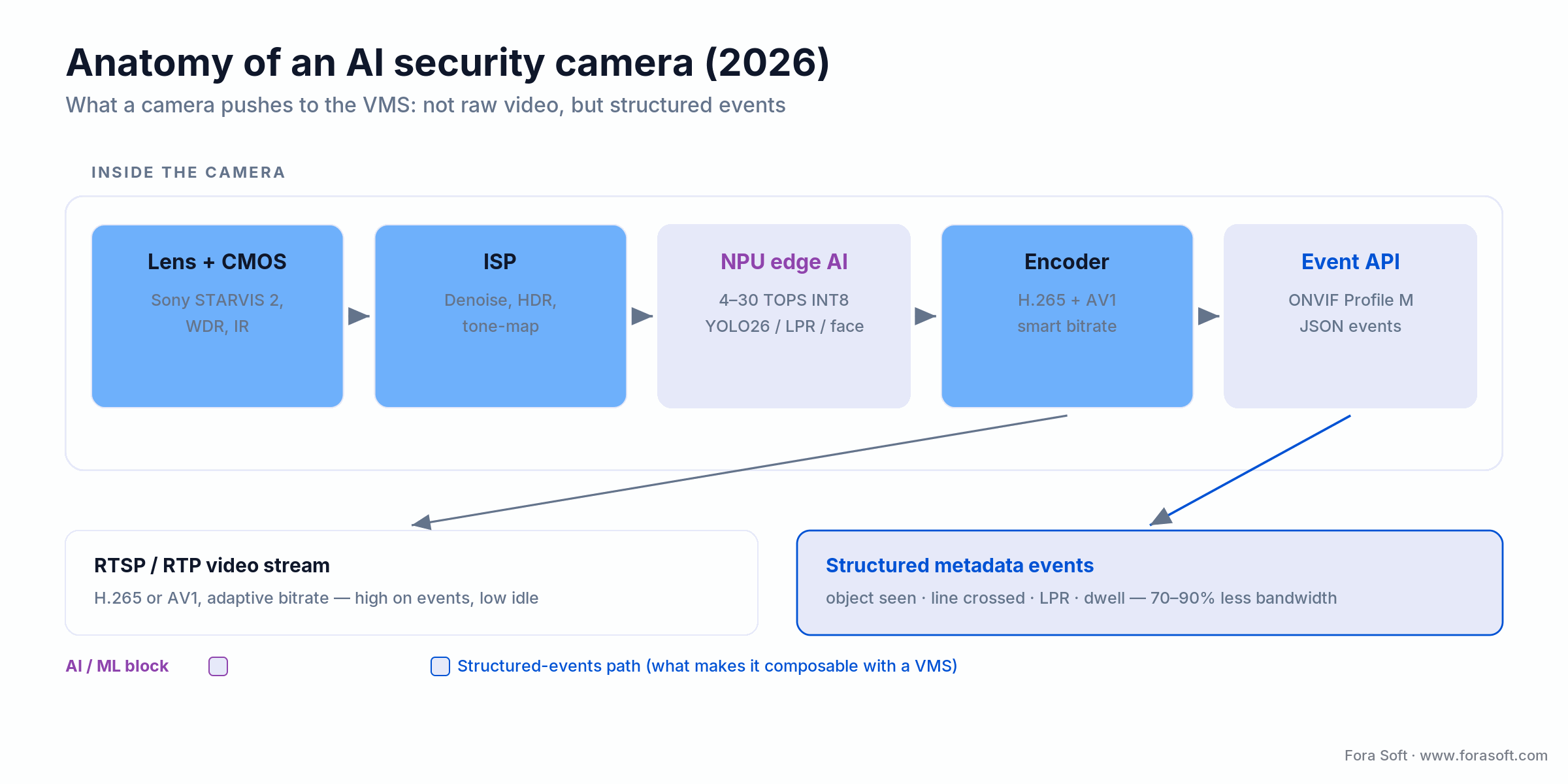
Figure 1. Inside an AI security camera: the NPU and the Profile M event API are what separate a real 2026 camera from a networked webcam.
Reach for on-device AI when: you care about bandwidth, storage cost or operator load. If a camera fails capability 1 or 3 above, the cost of working around it exceeds the price delta versus a proper camera within six months.
AI security camera vs a regular IP camera: what actually changed
The short answer: a regular IP camera sends pixels; an AI security camera sends decisions. A legacy IP camera streams H.264 to a recorder and fires a motion flag when enough pixels change — which is why a tree, rain or a passing truck all read as “motion.” An AI surveillance camera runs detection on the NPU and only raises an event when a named class does something you care about, such as a person crossing a line after hours.
Three things change as a result. Bandwidth: structured events plus smart bitrate replace round-the-clock high-bitrate video, so archival storage falls. Accuracy: class, zone and dwell filters cut false alarms from hundreds per camera per day to tens. Search: because events carry metadata, you can query footage (“every red van at the west gate after 9 pm”) instead of scrubbing timelines. The camera body looks the same. The silicon, firmware and event model are the difference.
Market snapshot: spend, growth and the bandwidth math
The money is following the intelligence. MarketsandMarkets sizes the AI-in-video-surveillance market at about $4.0 billion in 2026, growing to $10.9 billion by 2032 (17.9% CAGR, May 2026 report). Estimates vary by definition, but every serious forecast agrees on direction: AI is the fastest-growing slice.
The operational numbers matter more than the revenue ones. Take a 200-camera 4K fleet recorded continuously at a real 4 Mbps per camera: that is roughly 260 TB of video a month. Switch to event-driven recording plus adaptive bitrate — high quality when something happens, a low baseline when it does not — and you cut that by 70 to 85%, before you even prune to the clips worth keeping long term. At 2026 cold-archive prices, the storage saving alone runs into tens of thousands of dollars a year for a fleet that size.
Spend has also shifted inside the budget. A few years ago hardware was roughly 70% of a surveillance project and software under 20%. In 2026 that has flattened toward a near-even split: cameras commoditize, while the VMS, analytics and integration carry the differentiation and the margin. That single trend is why this guide spends more time on software than on lenses.
What’s new for AI IP cameras in 2026
The short answer: in 2026 AI IP cameras got faster silicon, simpler detection models and a reshuffled rulebook. Five changes matter to buyers this year.
1. New edge silicon. Ambarella announced the CV7 on 5 January 2026: a 4 nm SoC with more than 2.5× the AI performance of the CV5 at about 20% lower power, able to run CNN and transformer models together across four or more 4Kp30 streams. Expect it in multi-sensor enterprise cameras through 2027.
2. Leaner detection models. Ultralytics released YOLO26 on 14 January 2026. It is end-to-end and NMS-free, which removes a post-processing step that was awkward to run on camera NPUs.
3. A later EU AI Act date. Regulation (EU) 2026/1744 moved high-risk obligations for stand-alone systems such as biometric identification from 2 August 2026 to 2 December 2027. The February 2025 ban on real-time remote biometric identification in public spaces for law enforcement still applies.
4. Tighter U.S. supply-chain rules. Since 16 July 2026 the FCC prohibits importing or marketing previously authorized Hikvision and Dahua models for public-safety, government and national-security uses. For U.S. buyers, NDAA-clear brands (Axis, Hanwha Vision, Bosch, Avigilon, i-PRO) are now the default shortlist.
5. Search replaces scrubbing. Natural-language video search (“red van at the west gate after 9 pm”) is now a standard feature of the cloud-first platforms and of recent Milestone releases, so remote monitoring teams can find an incident from a phone instead of a video wall.
The 2026 vendor map: four tiers, twenty-plus names
AI security cameras split into four tiers in 2026. The mistake is shopping by brand; the fix is matching a tier to your site count, budget and VMS. Here is the map, with representative names and honest price bands.
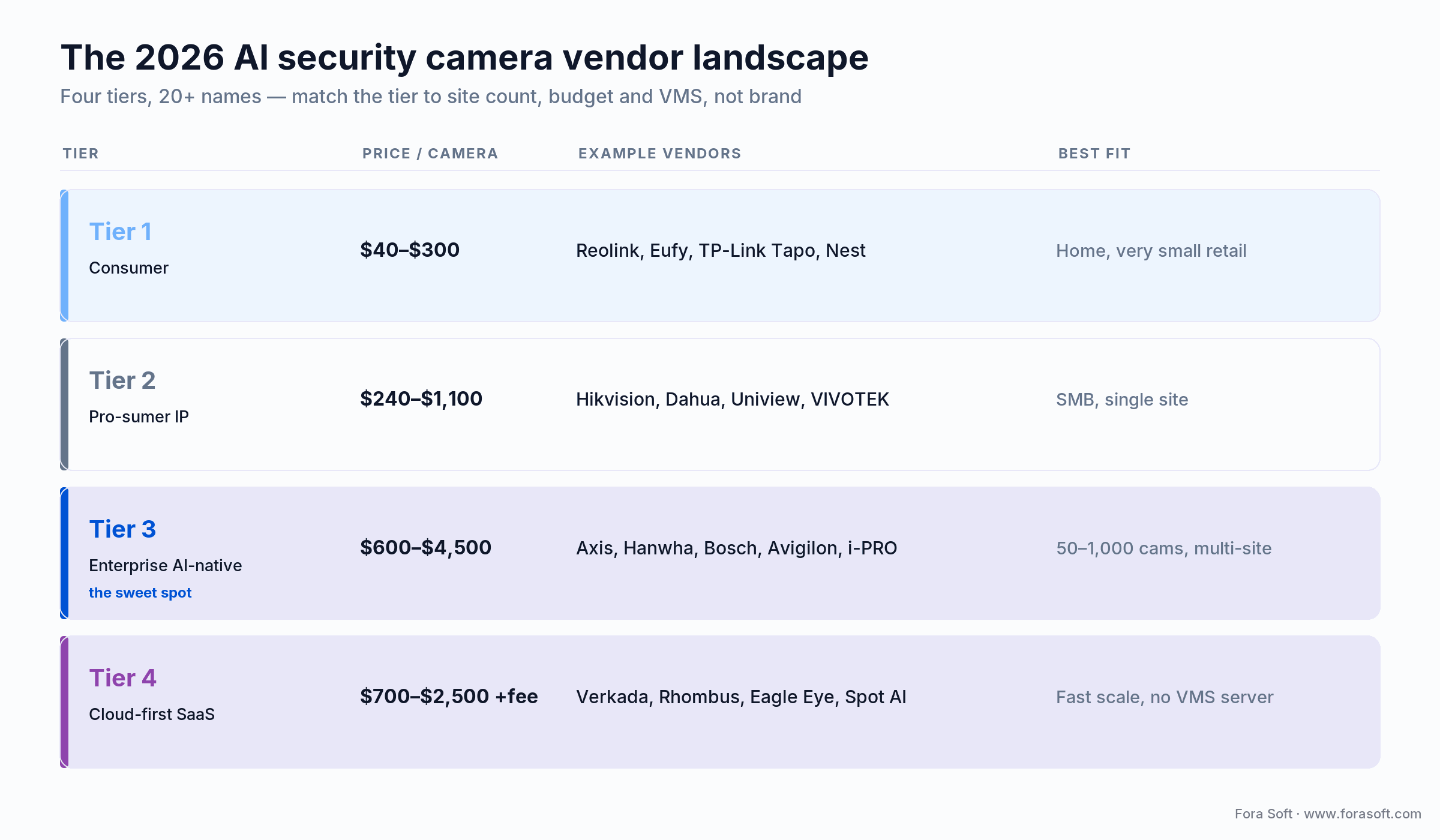
Figure 2. The four tiers, with 2026 price-per-camera bands and best-fit deployment. Tier 3 is the commercial sweet spot.
Tier 1 — Mass-market consumer
Reolink ($60–$220): solid 4K, person and vehicle detection, basic ONVIF. Anker Eufy ($90–$280): strong on-device AI for a consumer brand, Matter-native. TP-Link Tapo ($40–$180): aggressive pricing, ONVIF, simple analytics. Google Nest and Ring ($180–$300): slick UX, subscription model, weak third-party VMS integration. Good for homes and very small sites; no enterprise VMS story.
Reach for Tier 1 when: you have one site, fewer than a dozen cameras, and no plan to run a VMS. Above that, the missing Profile M metadata and short firmware life turn into integration debt fast.
Tier 2 — Pro-sumer and SMB IP
Hikvision DeepinView ($280–$900) and Dahua WizMind ($260–$850): huge installed base, broad analytics, but both carry NDAA Section 889 restrictions in U.S. federal and federally funded work, plus FCC marketing limits for public-safety uses. Uniview Prime ($240–$780): often cheaper, NDAA-compliant variants exist. VIVOTEK ($320–$1,100): Taiwanese, NDAA-clear, solid SMB analytics.
Reach for Tier 2 when: you run a single-site SMB outside federal procurement, want a broad analytics catalog on a budget, and have checked the NDAA context for your buyer.
Tier 3 — Enterprise AI-native
Axis Q- and P-series ($800–$4,200) on the ARTPEC-9 SoC: the reference for enterprise IP video, with the ACAP platform (third-party apps run on the camera), AV1 encoding and seven-to-eight-year firmware life. Hanwha Wisenet P ($700–$3,800): strong road and retail AI, clean NDAA posture. Bosch Flexidome 8000i ($900–$3,600): excellent low-light, built-in IVA. Avigilon H6A ($800–$4,500, Motorola-owned): tightest fit with Avigilon Unity Video (formerly Avigilon Control Center). i-PRO and Milesight round out the tier.
Reach for Tier 3 when: you have 50 to 1,000 cameras, a multi-site footprint, and an IT team that can own a VMS server. This is the best five-year cost for most commercial buyers.
Tier 4 — Cloud-first AI platforms
These vendors sell camera and software as one SaaS bundle: no VMS server, monthly per-camera fees, easy deployment, less control. Verkada ($800–$2,500 plus $200–$600 per camera a year): clean UX, high lock-in, the cloud-first leader. Rhombus: similar, often cheaper, API-friendly. Eagle Eye Networks: accepts third-party ONVIF cameras, so it is not camera-locked. Spot AI and Turing: strong AI search UX.
Reach for Tier 4 when: you run fewer than a dozen sites, want zero servers to manage, and will trade five-year TCO for operational simplicity. Above a dozen sites, the per-camera fees overtake a self-run VMS.
Comparison matrix: four deployment scenarios
The same four tiers map cleanly onto the four situations we see most. Year-one cost is for a 50-camera AI camera system so the scenarios compare like for like.
| Scenario | Recommended tier | Camera / unit | VMS | Year-one (50 cam) |
|---|---|---|---|---|
| SMB retail | Tier 2 pro-sumer | $400–$600 | Milestone XProtect Professional+ / Hanwha Wisenet WAVE | $58,000 |
| Multi-site enterprise | Tier 3 enterprise | $1,200–$2,400 | Milestone XProtect / Genetec | $164,000 |
| Fast-scale startup | Tier 4 cloud-first | $900–$1,800 | Verkada / Rhombus | $122,000 |
| Critical infrastructure | Tier 3 + custom VMS | $2,500–$4,500 | Custom Fora Soft VMS | $340,000 + build |
Best AI security cameras by use case in 2026
If you want named picks rather than tiers, here are the AI security cameras we would shortlist first in 2026, grouped by the job to be done. Prices are per-camera street bands; every pick below is NDAA-clear, which is why Hikvision and Dahua models do not appear here despite being technically capable (and, in the U.S., the FCC’s July 2026 notice now restricts how they can be sold).
| Use case | Camera to shortlist | Standout AI feature | Price / camera | NDAA |
|---|---|---|---|---|
| Enterprise, multi-site | Axis P-series (ARTPEC-9) | ACAP apps, AV1, 7–8-yr firmware | $900–$2,500 | Clear |
| Retail analytics | Hanwha Wisenet P | Queue and demographics retail AI | $700–$2,800 | Clear |
| Low-light, high-security | Bosch Flexidome 8000i | Built-in IVA, strong low-light | $900–$3,600 | Clear |
| Logistics and LPR | Avigilon H6A | Self-learning analytics, ANPR | $800–$3,500 | Clear |
| Cloud, no server | Verkada or Rhombus | SaaS, fast multi-site deploy | $800–$2,500 +fee | Clear |
| Budget, small site | Reolink or Anker Eufy | On-device person and vehicle | $60–$280 | Clear |
| Traffic and road analytics | Hanwha Vision AI traffic/LPR (e.g. PNO-A9311RLP) or Axis with License Plate Verifier | Vehicle type, colour and plate read on the camera | Quote-based | Clear |
These are shortlist starting points, not the whole story: the right AI security camera is the one your VMS supports and your compliance posture allows. Validate every model against your VMS device list before buying.
Reference architecture: five layers from lens to dashboard
Layer 1 — Sensor and ISP. The CMOS sensor, lens and image signal processor. Low-light performance (Sony STARVIS 2, OmniVision Nyxel IR) and WDR decide whether the AI above has usable pixels. No model compensates for clipped shadows.
Layer 2 — Edge AI inference. The NPU runs detection, classification and tracking. The 2026 stack is a quantized INT8 detector — YOLO26 (released by Ultralytics on 14 January 2026; NMS-free, with up to 43% faster CPU inference per the vendor) or YOLO11 on an Ambarella or NVIDIA runtime, sub-100 ms per 4K frame — plus purpose-built models for LPR, face and fall detection. When the stock models miss your scene, our AI video recognition software development team trains and quantizes site-specific detectors for Jetson and camera NPUs.
Layer 3 — Event streaming and video. The camera emits RTSP video, ONVIF Profile M metadata, and often a vendor REST or MQTT event stream. Good cameras raise bitrate on events and drop it when idle.
Layer 4 — VMS ingest and correlation. Milestone XProtect, Genetec Security Center, Avigilon Unity, a custom NVR or a cloud VMS. This is where multi-camera tracking, alarm rules, the video wall and forensic search live.
Layer 5 — Integration and delivery. Mobile and web clients, access-control bridges (Genetec Synergis, Lenel OnGuard), intrusion panels, and LLM-based video search. This is the layer buyers underestimate and the one that decides whether operators actually use the system.
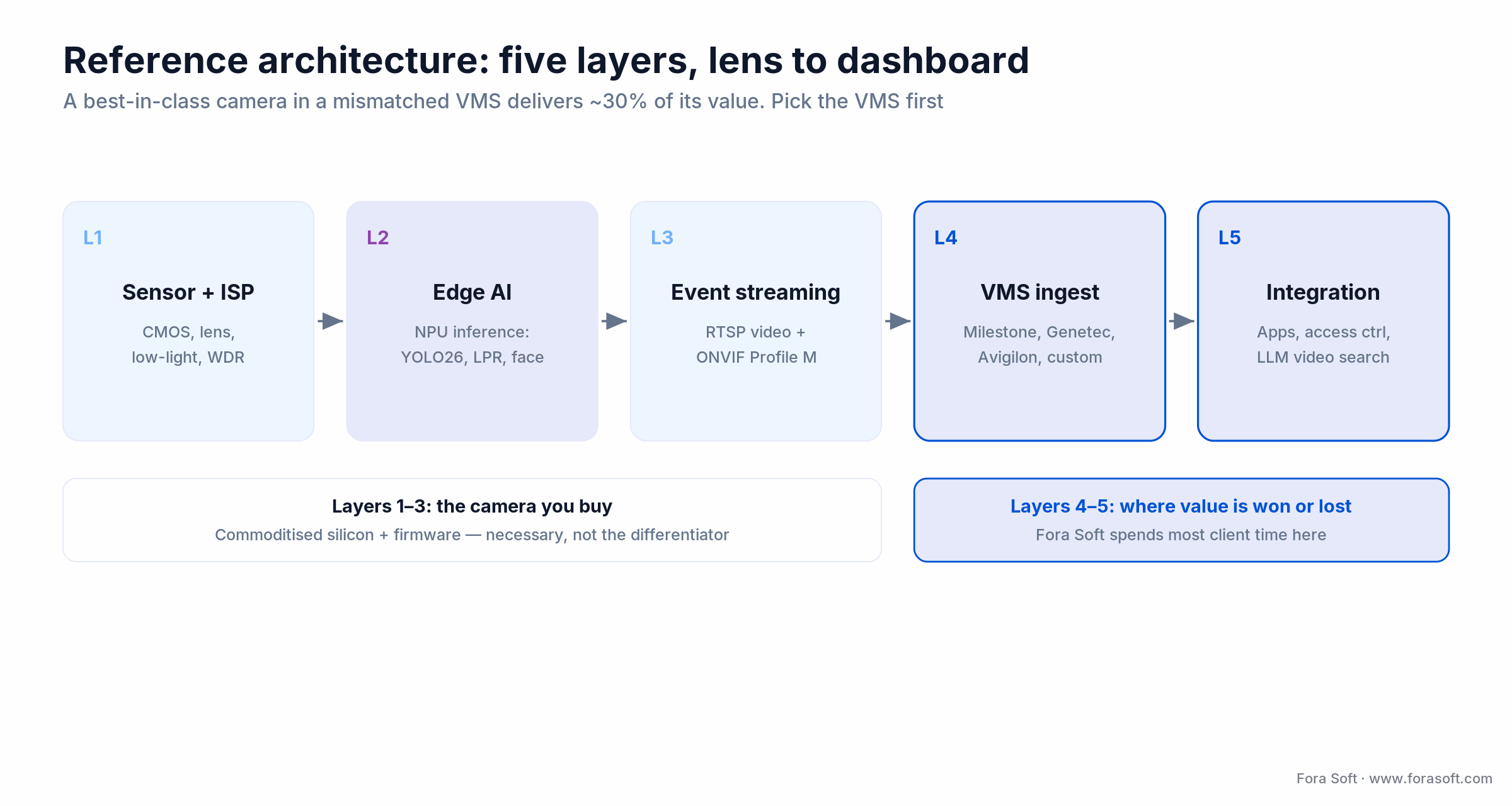
Figure 3. The five layers from lens to dashboard. Layers 4 and 5 — VMS and integration — are where most of the value is won or lost.
Pick the VMS before the camera
If you take one thing from this guide, take this: the VMS is the decision that constrains every other one. Cameras drop into a VMS, not the other way around. A mid-tier camera in a well-integrated VMS delivers about 90% of its possible value; a best-in-class camera in a mismatched one delivers about 30%. Start from our guide on how to choose a video surveillance management system and the 12 must-have VMS software features that separate a modern platform from a glorified recorder.
The interoperability that makes this work is ONVIF, the open standard that keeps your IP camera software vendor-neutral. Profile T carries streaming and PTZ; Profile M carries the analytics metadata that lets a Hanwha camera and an Axis camera raise events into the same Milestone timeline. If you are choosing between platforms, our deep dive on ONVIF Profile M explains exactly what interoperates and what does not. Lock the VMS, validate cameras against its supported-device list, then buy.
Reach for a custom VMS when: an off-the-shelf platform does 80% of what you need and the last 20% is a differentiator — a customer-facing API, an LLM search layer, or an access-control bridge no vendor ships. Below that bar, buy commercial and integrate.
Not sure which VMS your cameras should sit behind?
We run a free discovery that returns a camera shortlist, a VMS recommendation, a rough TCO and an integration plan.
AI NVRs: which brands to compare before you buy
The short answer: an AI NVR is a recorder with its own GPU or NPU, so even cameras without on-board AI get person and vehicle detection and searchable events. For one site, compare the NVR line from your camera brand first (Hanwha Vision Wisenet, Axis S-series recorders, Uniview, VIVOTEK, or Reolink and Eufy for homes), because same-brand pairs expose the full analytics metadata. Above about 30 cameras or two sites, a VMS on standard servers (Milestone XProtect, Genetec Security Center, Avigilon Unity) beats any appliance on flexibility.
To find a quality AI NVR from an established supplier, buy through the manufacturer’s authorized integrator programme and get four things in writing before you sign: the number of analytics channels (not just recording channels), ONVIF Profile T and Profile M ingest, the NDAA and FCC status of the exact model, and the firmware support end date. An NVR that cannot read Profile M metadata from third-party cameras locks you into one camera brand for the life of the recorder.
Where an appliance runs out (cross-site search, an access-control bridge, a custom operator app), the recorder becomes one input to a larger platform. That is the point where teams usually bring in a video management software decision, and where our own work starts.
Cost model: a 200-camera, six-site deployment
A representative 2026 scenario: six sites, 200 cameras (a mix of 4K fixed, PTZ and multi-sensor), 300-day cloud archival, a mobile app, and integration with an existing Genetec access-control system. Here is the year-one arithmetic, shown so you can adjust it.
Hardware. 200 cameras at a blended $1,450 = $290,000. Twelve NVR servers (two per site) at $6,200 = $74,400. Switching, cabling and PoE budget = $48,000. Hardware subtotal: $412,400.
Software. Milestone XProtect Corporate at $320 per device-licence × 200 = $64,000. Care Plus maintenance at 20% = $12,800. Analytics add-ons (LPR, behaviour) = $38,000. Software year-one: $114,800.
Cloud archival. After event-driven recording keeps 39 to 78 TB a month on site, only incident clips and a reduced-resolution compliance copy go to the cloud: about 22 TB a month across all sites × 12 = 264 TB to cold storage, roughly $9,600 a year at 2026 cold-storage prices.
Integration and build (Fora Soft). Access-control bridge, mobile app, analytics dashboard and an API gateway = $185,000. Services and installation: cable, mount, commission, train = $110,000.
Year-one total: $831,800. Year-two steady state drops to about $148,000. On our client data, the software and integration investment pays back in reduced SOC staffing, bandwidth and storage within roughly two years. We build with Agent Engineering, so our integration line is usually below a traditional agency quote for the same scope.
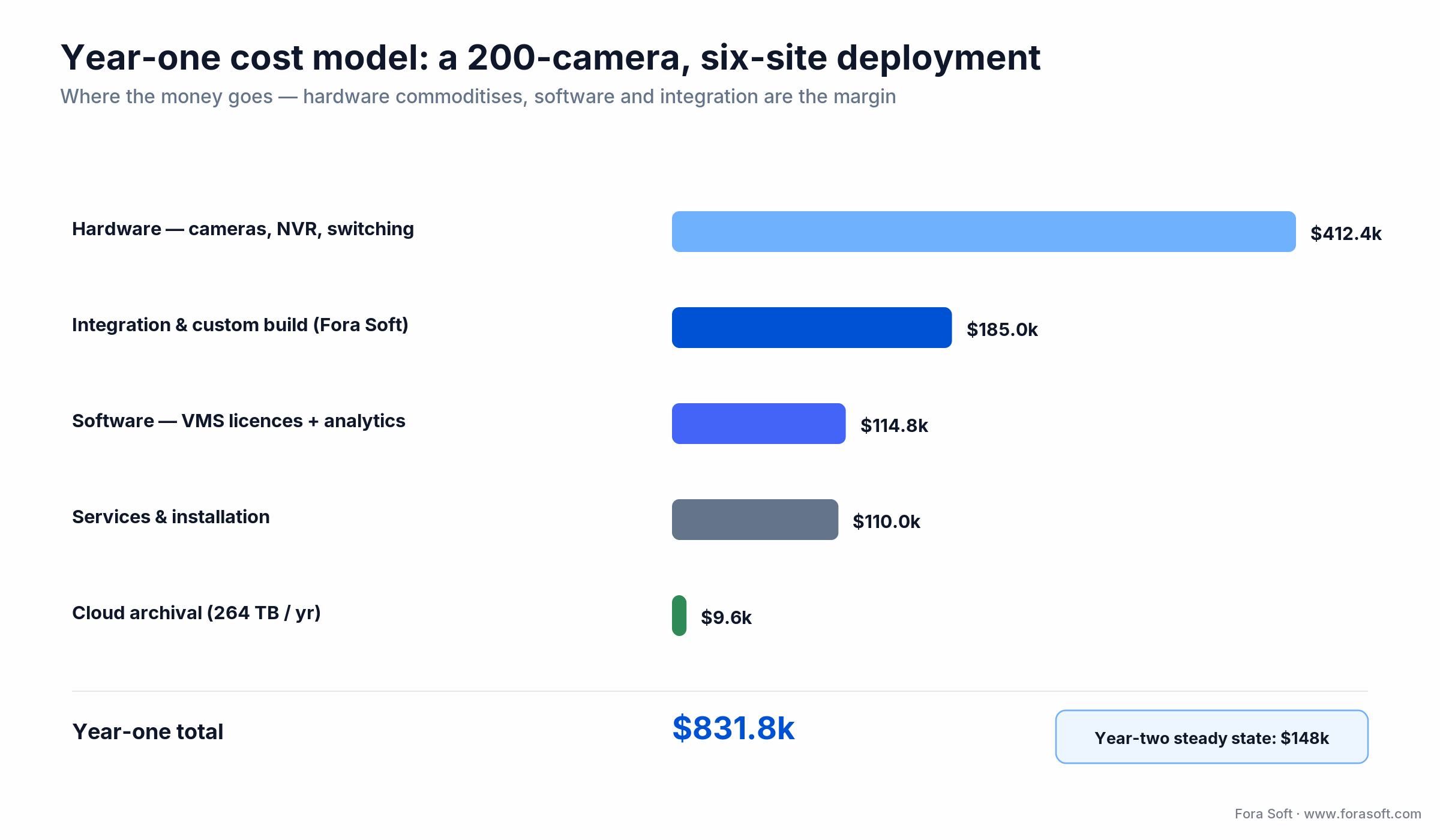
Figure 4. Where year-one money goes on a 200-camera build. Hardware dominates once, then commoditizes; software and integration recur and differentiate.
Mini case: how a logistics client cut false alarms 91%
A Fora Soft client — a European logistics operator with 14 yards across four countries — ran a 340-camera Hikvision DeepinView fleet on Milestone XProtect. Night-shift operators were pushing through 4,200 to 5,800 motion alerts a night at a true-positive rate near 3%. Two SOC staff had quit in six months, both citing alert fatigue.
The fix took eight weeks and replaced zero cameras. We kept the existing Hikvision hardware and upgraded the analytics: tuned camera-side detection zones, turned on class filtering for people and vehicles only, added dwell-time rules, and deployed a behaviour-analytics service on an NVIDIA Jetson AGX Orin at each site to reject tree movement, rain and trucks on the public road beside the yard. On the VMS side we shipped an alarm-prioritization engine that cross-referenced events against RFID gate data and shift schedules.
Alerts per night dropped from a median of 4,800 to 420, a 91% cut. True-positive rate rose from 3% to 34%. The CISO redeployed one of three SOC slots to proactive audits, and turnover stopped. The engagement cost $140,000 and paid back in nine months on headcount alone. Want a similar assessment of your fleet? Book 30 minutes and we will size it.
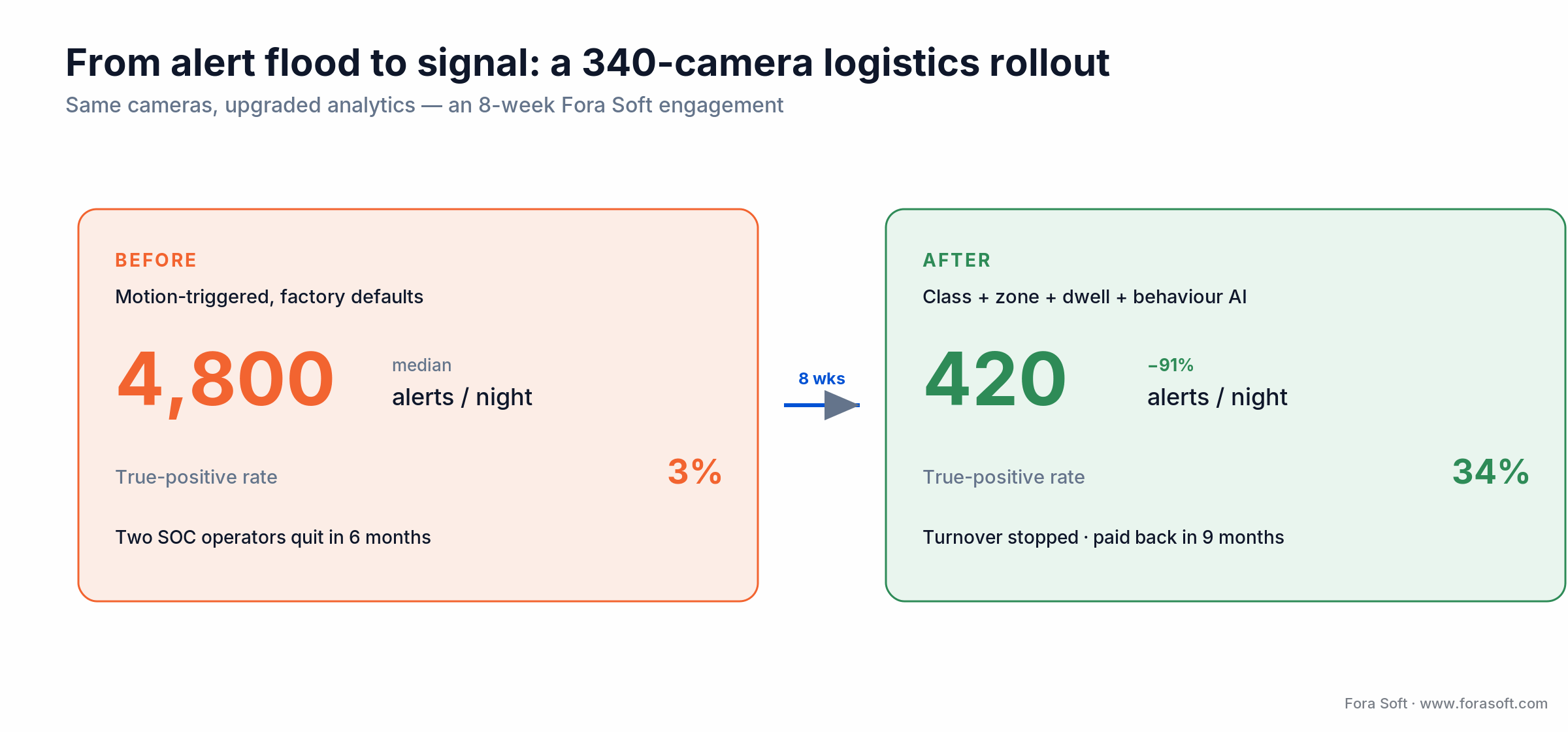
Figure 5. Same cameras, upgraded analytics. The 91% alert cut came from tuning and behaviour AI, not new hardware.
Compliance: GDPR, NDAA, EU AI Act, NIS2, PCI DSS
GDPR and national data-protection law. Any camera that sees identifiable people in the EU, UK, Brazil or California triggers data-subject obligations: a lawful basis (usually legitimate interest), a documented DPIA for face recognition or behaviour profiling, entrance signage, retention limits (typically 30 to 90 days for non-incident footage), and a subject-access process.
EU AI Act. Video analytics are “high-risk” when used for biometric identification or behavioural inference in law-enforcement, employment or essential-services contexts. High-risk obligations — risk management, human oversight, record-keeping, post-market monitoring — were due on 2 August 2026 under the EU regulatory framework, but the Digital Omnibus on AI, Regulation (EU) 2026/1744, in force since 27 July 2026, moved stand-alone (Annex III) high-risk obligations to 2 December 2027 and product-embedded (Annex I) ones to 2 August 2028. Use the extra time to build the DPIA and human-oversight process, not to skip it. Real-time remote biometric identification in publicly accessible spaces for law-enforcement purposes has been prohibited, with narrow exceptions, since 2 February 2025; private-sector biometric identification falls under the Annex III high-risk rules instead.
NDAA Section 889. Section 889 bars federal agencies, their contractors and recipients of federal grants or loans from buying or using covered Hikvision, Dahua and Hytera video equipment. The FCC has granted no new Hikvision or Dahua equipment authorizations since November 2022, and its Public Notice DA 26-635 of 26 June 2026 extended the ban to importing and marketing previously authorized models for public-safety, government-facility and national-security uses from 16 July 2026. Cameras you already own are not banned from use. Most serious enterprises now apply a voluntary NDAA policy for supply-chain hygiene.
NIS2 and PCI DSS. NIS2 makes essential and important entities secure their surveillance stacks as part of broader cybersecurity duties. PCI DSS v4.0.1 (Requirement 9.2.1.1) requires cameras or access control on entry to sensitive cardholder-data areas, with at least three months of retention; keep cameras from capturing card numbers or PIN entry. Both are audit-reportable in 2026, so bring them into scope in week one, not at go-live.
A decision framework: pick your stack in five questions
1. How many cameras, how many sites? Under 30 at one site: Tier 2 plus an entry VMS. 30 to 49 cameras: Tier 2 or Tier 3 on an entry VMS. 50 to 1,000 across sites with an IT team: Tier 3 plus an enterprise VMS. Fewer than a dozen small sites and no IT team: Tier 4 cloud. Above 1,000 cameras, or when surveillance is your product: a custom VMS.
2. What is the regulatory posture? Federal, federally funded or public-safety exposure means NDAA-compliant only. EU behaviour analytics means an AI Act high-risk process. Retail near the point of sale means PCI DSS monitoring and retention duties.
3. Cloud or on-prem archive? Cloud is simpler and cheaper for small fleets. On-prem wins above 100 cameras with long retention, on both cost and data sovereignty.
4. Which integrations matter? Access control, intrusion panel, PSIM, ERP or WMS, mobile app? Integrations are Layer 5 work and usually the long pole in the schedule.
5. What is the operator workflow? Video wall plus event queue, mobile-first, or fully autonomous alerting? Workflow picks the VMS, and the VMS picks the camera tier that integrates cleanly. Answer these five and the stack picks itself — or send us the answers and we will pick it with you.
Five pitfalls that kill AI camera rollouts
1. Buying cameras before the VMS. The most common mistake. Pick the VMS, validate camera compatibility against its supported-device list, then buy. Not the reverse.
2. Ignoring firmware lifecycle. A camera with 18-month firmware support is a two-year asset. Enterprise cameras with seven-year support carry a real TCO advantage over their life. Demand the support calendar in writing.
3. Under-sizing PoE and switching. 4K AI cameras pull 13 to 25 W each. The per-port limit is rarely the problem; the switch’s total PoE budget is. A 48-port switch with a 370 W budget powers only about 15 to 25 such cameras. Size the total budget per switch, and reserve PoE++ (802.3bt) ports for PTZ, heated and multi-sensor units.
4. Deploying face recognition without a DPIA. In the EU this risks an AI Act violation. In the U.S. it invites litigation under Illinois BIPA, Texas CUBI and Washington law. Do the assessment before the camera ships.
5. Skipping analytics tuning. Factory-default zones, dwell times and classes produce the thousands-of-alerts-a-night problem. Budget one week of engineering per site for tuning; it is the single highest-ROI action in the whole rollout.
KPIs: what to measure from day one
Quality. Alerts per camera per day (target under 30 outdoor, under 10 indoor), true-positive rate (above 25% in year one, above 45% in year two), and camera uptime (above 99.4%). If alerts run high and true positives run low, you have tuning debt, not a hardware problem.
Business. Time to evidence (minutes from incident to exportable clip; target under three, under one with good AI search) and incident-to-action time (alarm to ground response; four minutes for a logistics yard, eight for retail). These are the numbers a CFO understands.
Reliability. Operator attention rate (share of alerts acknowledged within 60 seconds; target above 80%) and bandwidth per camera (under 3 Mbps average on 4K with smart bitrate). A fleet averaging 6 to 8 Mbps means adaptive bitrate is off and archival cost is running double.
Industries shipping real value in 2026
Retail loss prevention. Sweethearting, cart-pushout and PPE detection with cameras placed so they never capture card numbers or PIN entry. Hanwha Retail AI, Axis with Irisity, and Spot AI lead here; for footfall and occupancy, see our people counting software guide.
Logistics and yards. ANPR at gates, dwell monitoring, trailer-spot counting. Avigilon, Hanwha and Axis with third-party analytics. This is where our industrial video surveillance work concentrates.
Smart cities and public safety. Crowd density, dispersion, fall and distress detection, plus AI fire and smoke detection cameras as an early-warning layer. Axis, Bosch, and Hikvision in non-NDAA regions.
Healthcare and education. AI fall detection cameras, wandering and PPE compliance in hospitals; perimeter and weapon detection (controversial but deployed) in schools, where Verkada is the cloud-first default.
Build vs buy vs adapt
Buy pure Tier 4 cloud (Verkada, Rhombus) if your site count is under a dozen and you do not want a VMS to run. Fast and clean; expensive at scale.
Buy Tier 3 cameras plus a commercial VMS (Milestone, Genetec, Avigilon Unity) if you have 50 to 1,000 cameras and an IT team that can own a server. Best long-term cost for most buyers.
Adapt with a glue layer if a commercial VMS does 80% of the job and you need a custom client app, an access-control bridge, an LLM search layer or a customer-facing API. That is exactly the surveillance software work we do most; glue projects run $60k to $250k.
Build a custom VMS on NVIDIA Triton, bare ONVIF plus Kafka, or a cloud analytics stack if you are an OEM, a surveillance-as-a-service provider, or a platform where surveillance is the differentiator. We have shipped this pattern many times since 2005.
When not to buy AI security cameras yet
Your network is not ready. No PoE switching, no VLAN segmentation, no symmetric upload for cloud offload? Fix the LAN first. AI cameras on a residential-grade network produce misery, not intelligence.
You have no governance. No policy on retention, access, face-recognition use or incident review means you should deploy the policy before the cameras. The AI Act and GDPR make this non-optional in the EU.
You have no operator workflow. Cameras without a named monitoring and response process are expensive attic decoration. Design the operator process, or an automated alert-routing rule, before the first camera ships.
A 10-week deployment playbook
Weeks 1–3: survey and pick. Walk every site with the VMS team; document coverage, glare, mounting, PoE budget and upload bandwidth. Lock the VMS, lock camera models to its supported-device matrix, procure 10% spares.
Weeks 4–6: network and pilot. Switch upgrades, VLAN design, firewall rules, TLS certificates. Then install one full site, wire it to the VMS, and tune analytics to the target alert rate against real incident scenarios.
Weeks 7–8: roll out. Remaining sites in parallel with trained installers, using VMS configuration templates so every site inherits the tuned baseline.
Weeks 9–10: integrate and cut over. Access control, mobile app, dashboards and APIs (the week we usually own), then operator training, a published runbook, and a week-four post-deploy KPI review on the calendar.
Want this playbook run end to end?
Camera selection, VMS integration, analytics tuning, custom apps and compliance docs — one engagement, usually 10 to 14 weeks.
FAQ
What is an AI security camera?
An AI security camera is an IP camera with an on-device NPU that runs object, face, licence-plate and behaviour detection at the edge and streams structured events to a VMS, rather than only recording raw video. The AI is what cuts false alarms and bandwidth versus a motion-triggered camera.
Which AI security camera brands are best in 2026?
For commercial sites, the NDAA-clear enterprise brands lead: Axis (ARTPEC-9), Hanwha Vision Wisenet P, Bosch Flexidome and Avigilon, with Verkada and Rhombus for cloud-first fleets. For homes that prioritize AI recognition, Reolink, Eufy and Google Nest are the usual shortlist.
What are the best cameras for AI traffic analysis in 2026?
Look for cameras that read vehicle type, colour and plates on the device: Hanwha Vision AI traffic and LPR models such as the PNO-A9311RLP, Axis cameras with AXIS License Plate Verifier and Avigilon H6A with ANPR. Pair them with a VMS that stores the metadata, so you can search traffic by vehicle attributes later.
What should AI video analytics cost per camera in 2026?
On-camera detection is usually bundled into the camera price. Server-side add-ons such as LPR and behaviour analytics came to about $190 per camera in year one in our 200-camera model, and cloud-first platforms bundle analytics into a licence of roughly $200–$600 per camera per year.
Can I mix AI cameras from different vendors in one VMS?
Usually yes for video (RTSP / Profile T). For analytics metadata (Profile M), support is uneven: Milestone XProtect, Genetec and Avigilon Unity handle it well; smaller platforms vary. The cleanest deployments keep analytics-emitting cameras to one or two vendor families and treat the rest as streaming-only.
Do I still need an NVR or VMS if the cameras have AI?
Yes, for anything above a handful of cameras. The VMS aggregates recordings, runs forensic search across cameras, and handles cross-camera tracking and correlation with access control. SD-card-only setups do not scale.
How accurate is edge face recognition in 2026?
Enterprise cameras with dedicated face models reach 98–99% top-1 accuracy on cooperative subjects and 90–95% in free-flowing crowds with reasonable light. Accuracy drops with masks, steep angles and low light. Never deploy face recognition without a legal review and a documented DPIA.
Hikvision and Dahua — yes or no?
It depends on the deployment. For U.S. federal agencies, their contractors and federally funded projects, no: NDAA Section 889 bans them, and since 16 July 2026 the FCC also bars importing or marketing even previously authorized models for public-safety and national-security uses. In much of the EU and APAC they are widely deployed and technically competitive. Most enterprises now apply a precautionary NDAA policy voluntarily.
Verkada or Milestone plus Axis?
Verkada suits small-to-mid single-tenant organizations that do not want to run a server and will pay more in year-five TCO for simplicity. Milestone plus Axis suits 100-plus cameras, multi-site, access-control integrations, or any case where data residency matters.
What does an AI security camera system cost?
Camera hardware runs $40 to $4,500 depending on tier. A 50-camera commercial build lands around $58k–$164k in year one; a 200-camera six-site build with custom integration is roughly $832k in year one and $148k steady state. Software and integration, not cameras, drive the five-year number.
Does LLM-based video search actually work?
Yes, for pedestrian and vehicle queries. Turing, Rhombus, Verkada, Spot AI and the latest Milestone search release take natural-language queries and return ranked clips. Quality varies by domain; custom builds are common for specialized search like PPE compliance on construction sites.
What to read next
VMS
Scalable Video Management Systems
The software side of the stack — how to build a VMS that scales past a few hundred cameras.
Android SDK
Android SDK for Video Surveillance
Building the operator app: the SDK choices for a mobile surveillance client.
ML Algorithms
ML Algorithms for Surveillance Anomalies
The analytics layer — the models that turn raw events into real alerts.
Anomaly Detection
Top Anomaly Detection Models (2026)
A deeper look at the detection models behind behaviour analytics.
Ready to spec your AI security camera stack?
An AI security camera in 2026 is commodity hardware wrapped around differentiated silicon and firmware. The intelligence lives at the edge and in the VMS; the camera is the sensor and the delivery point. Buying well means matching tier to site count, regulatory posture and integration needs — and picking the VMS first, every time.
Twenty-one years of surveillance-software work boils down to one sentence: the camera fleet is only as useful as the software behind it. The buyers who invest in the stack see 90% alert cuts and true-positive rates that keep operators in their seats. The ones who buy cameras first generate the 4,800-alert-a-night problem our logistics client started with.

The book · Volume 6 of 7
AI for Video: A Complete Guide to Intelligence in Video Products: From Models and Inference to Computer Vision, Speech, Search, and Generative Video
Once the VMS is chosen and the cameras are shortlisted, the analytics on top decide whether the rollout pays off. Volume 6 covers computer vision for video products: detection, tracking, segmentation and OCR, deployment topologies from edge to cloud, and the lifecycle of an AI feature. Security teams use it to judge vendor claims about accuracy. Written by Nikolay Sapunov, CEO at Fora Soft.
Read it on Amazon →Kindle & paperback · Fora Soft Video Engineering Handbook
Let’s scope your AI security camera build
Fifteen minutes on camera tiers, fifteen on VMS and integration. You leave with a shortlist and a plan, not a pitch.

